
Cost Performance Index (CPI) is calculated by dividing the budgeted cost of completed work by the actual cost of that work. A CPI of 1 means spending is on plan, while a value below 1 indicates that the work is costing more than budgeted.
Percent complete vs percent of hours used is usually the earliest warning sign. Review it weekly at minimum and daily on labor-heavy phases.
Tools for Tracking Construction Labor Hours and Costs
The right tool depends on how many crews you manage and how quickly you need to see labor costs. Common options include:
- Spreadsheets and paper timesheets: Easy to start with, but manual entry can lead to errors and make it harder to spot overruns before payroll. See our comparison of construction time cards vs. digital timesheets for more details.
- Time tracking apps: Construction time tracking software records hours by job, phase, or cost code. For example, our employee time clock software lets construction companies track employee hours across multiple job sites and organize labor time by job and cost code.
- Accounting and ERP systems: These tools help track labor costs alongside other project expenses, though detailed time data may not be available as quickly as it is recorded in the field.
- Project management platforms: These help teams monitor work progress and compare completed work with planned schedules, providing context for labor-hour variances.
For contractors who need accurate field time records, a time tracking app such as Fareclock can help managers see how labor hours are distributed across jobs and phases before reviewing project costs.
When you compare tools, look for cost codes, GPS or geofencing, offline clock-ins, approval workflows, alerts, and payroll or accounting integrations.
Best Practices for Keeping Construction Labor Hours on Budget
A few consistent habits can help keep labor hours close to the estimate:
- Review hours regularly: Check hours and exceptions daily on labor-heavy jobs, then review phase-level variances each week.
- Use the correct cost codes: Record hours against the right phase, task, or cost code so you can see where labor is running over budget. Review cost-code assignments before approving timecards, especially when employees work across multiple project phases during the same shift.
- Track rework separately: Record rework and change-order hours under separate codes or flags to distinguish them from planned work.
- Keep crews consistent: Frequent crew changes can affect productivity as new workers learn site procedures and team routines.
- Use past project data: Compare current performance with similar completed jobs. Productivity targets should reflect the trade, project type, and working conditions.
- Set budget checkpoints: Review labor usage at 75%, 90%, and 100% of the budgeted hours to identify overruns before they grow. A payroll calculator can help you verify labor totals against expected hours at each checkpoint. Compare these checkpoints with the percentage of work completed, not just the total hours recorded.
- Check whether changes work: After adjusting crew assignments or work plans, review the next shift or reporting period to see whether the variance has narrowed.
How Fareclock Helps Monitor Labor Budgets
Fareclock helps construction companies track employee working hours across multiple job sites and organize labor data by project, phase, and cost code. Accurate time records give managers a clearer picture of where labor hours are being spent. This provides the data needed to compare actual labor usage against project budgets.
- Set and monitor labor budgets: Fareclock allows administrators to set daily and weekly hours budgets for the organization, departments, and other groups. Managers can track these scheduled paid hours against budget limits and identify potential overruns.
- Track labor hours by job and cost code: Fareclock’s job costing tools help assign employee hours to specific projects, phases, and cost codes. Workers can switch between jobs or tasks during the day, making it easier to track labor usage across different construction activities. Read more on how we enhance job classifications, using job phases and cost codes.
- Review and approve schedules: Authorized managers can review schedules by organizational group and approve scheduling periods. This ensures planned hours are reviewed against labor budgets before schedules are finalized.
- Verify employee clock-ins: AI facial recognition with liveness detection helps prevent buddy punching and inaccurate attendance records. GPS tracking and geofencing provide additional location verification for employees working across job sites.
- Monitor overtime and labor costs: Fareclock supports overtime rules, multiple pay rates, and reporting features that help managers review working hours and labor-related expenses.
- Review and approve timecards: Supervisors can review time records, correct discrepancies, and approve employee hours before payroll processing. This helps reduce errors that could affect job costing and labor budget analysis.
- Track hours at remote job sites: Offline time tracking allows workers to record their hours even when internet connectivity is unavailable. Their punches synchronize when the connection returns, helping maintain accurate records across remote construction sites.
- Generate labor and attendance reports: Fareclock provides more than 28 reports covering employee hours, overtime, attendance, labor budget, and other workforce data. Managers can use this information to review labor usage and support project budget comparisons.
- Control schedule changes and analyze labor hours: Fareclock can restrict changes to approved schedules, either preventing all changes or allowing changes that do not add hours. The Labor Budget report compares budgeted, scheduled, and actual hours to help administrators monitor labor costs and identify discrepancies.
- Simplify payroll preparation: Payroll-ready timecards and export options help reduce manual work when preparing employee hours for payroll.
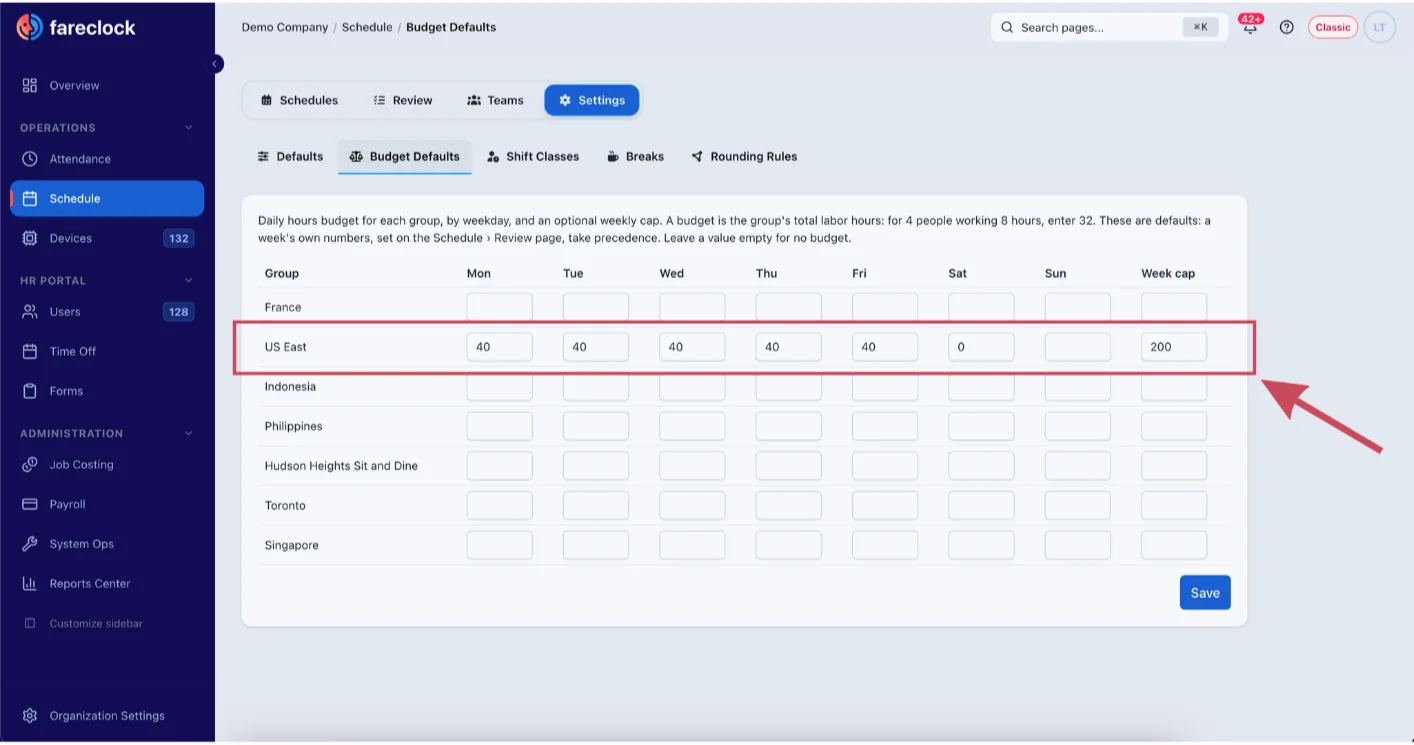
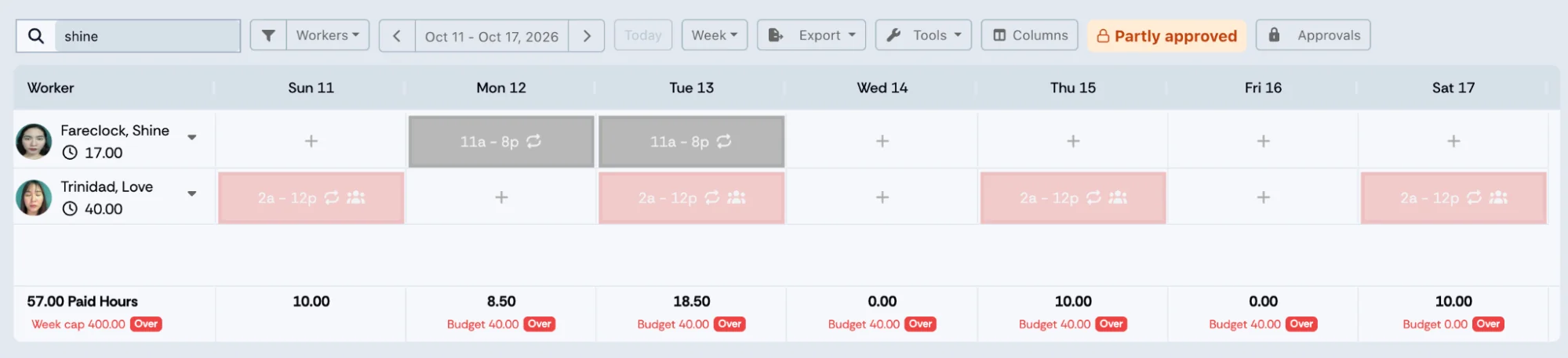
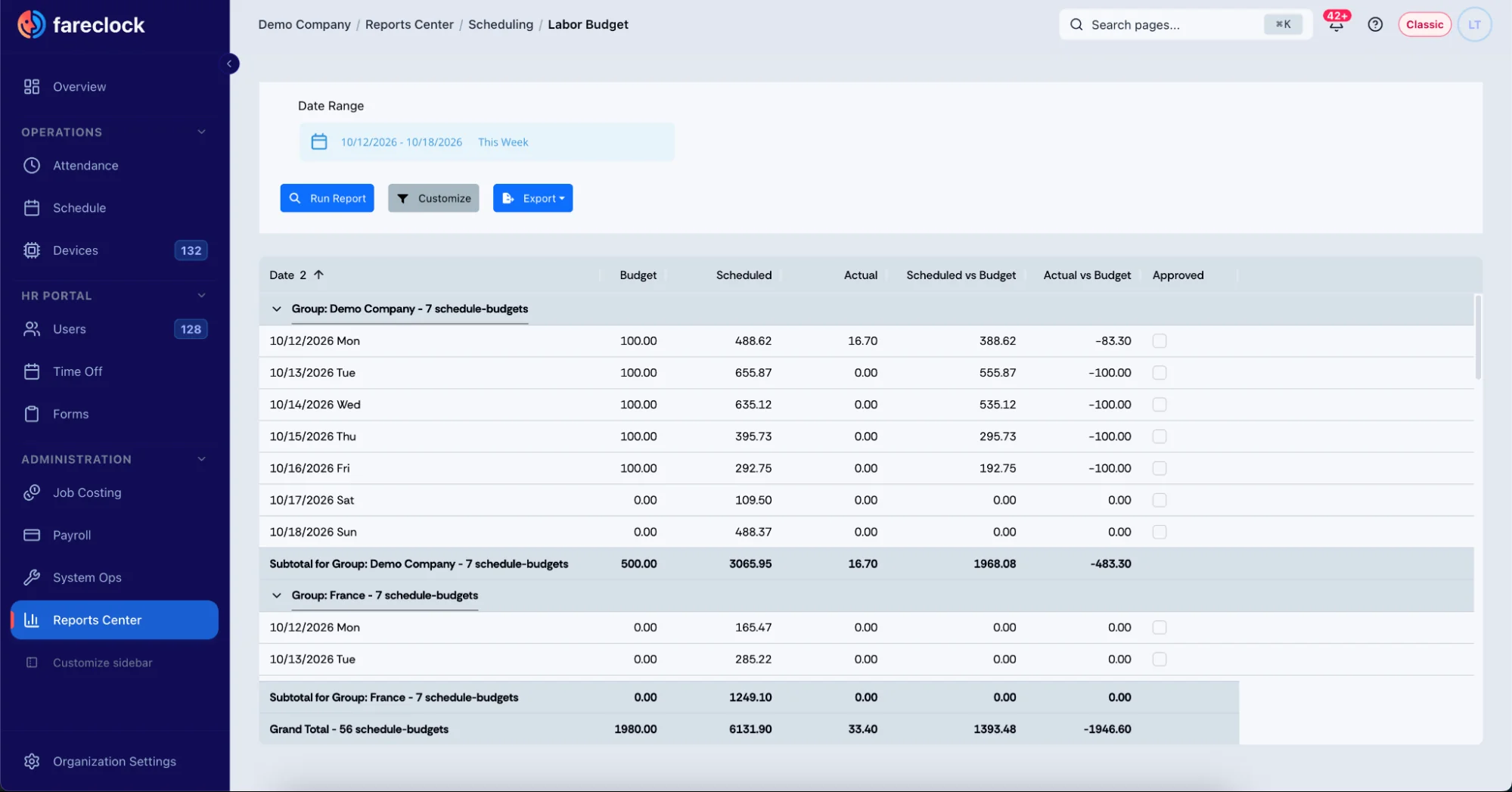
Fareclock provides the time tracking and job costing data needed for labor budget analysis. Project managers can use these records alongside their estimated budgets and project progress information to identify potential overruns and make informed staffing decisions. Read How to Set Up Schedule Budgets and Approve Schedules in Fareclock.
You can try Fareclock free for 30 days to see how it fits your crews. If you’d like to see your crews’ hours by job and cost code before payroll, start your free trial of Fareclock.
FAQ
What causes actual labor hours to exceed estimates?
The usual causes are underestimated scope, waiting on materials or access, rework, avoidable overtime, overmanning, thin supervision, crew turnover, and miscoded hours. The size of an overrun varies by project, so compare current performance with your own estimates and historical job data rather than relying on a single industry average.
How do labor hour variances affect construction project budgets?
Labor is roughly 20% to 40% of project cost, so a small hours overrun moves the whole budget. For example, a 7% overrun on a USD 1,000,000 labor budget adds USD 70,000 in labor cost.
Can construction time tracking software help control labor costs?
Yes, it can help when it ties hours to jobs and cost codes while work is active. That lets you spot problems and act before payroll closes. Results depend on how consistently your team reviews the data.
How do you calculate labor hours for a construction project?
Multiply the quantity of work by the hours per unit for each task, then add up all the tasks. To get the labor cost, multiply the total hours by your burdened hourly rate.
How do you know if a construction project is over its labor budget?
Compare the percent of hours used with the percent of work complete. If hours are burning faster than progress, or your labor hour variance is negative, the job is trending over budget.
How often should construction labor hours be reviewed?
Review hours and exceptions daily on labor-heavy jobs, and check phase variance and forecasts weekly. Smaller or shorter jobs may only need a weekly review.
Can Fareclock track scheduled hours against labor budgets?
Yes, Fareclock allows administrators to set daily and weekly labor budgets for the organization, departments, and other groups. Managers can monitor scheduled paid hours directly in the schedule and identify when hours exceed the allocated budget.
Can Fareclock restrict changes after a schedule is approved?
Yes, Fareclock allows administrators to configure schedule controls to either prevent all changes to approved schedules or allow changes that do not increase scheduled hours. Only managers with the appropriate Approve schedule permission can approve schedules.