
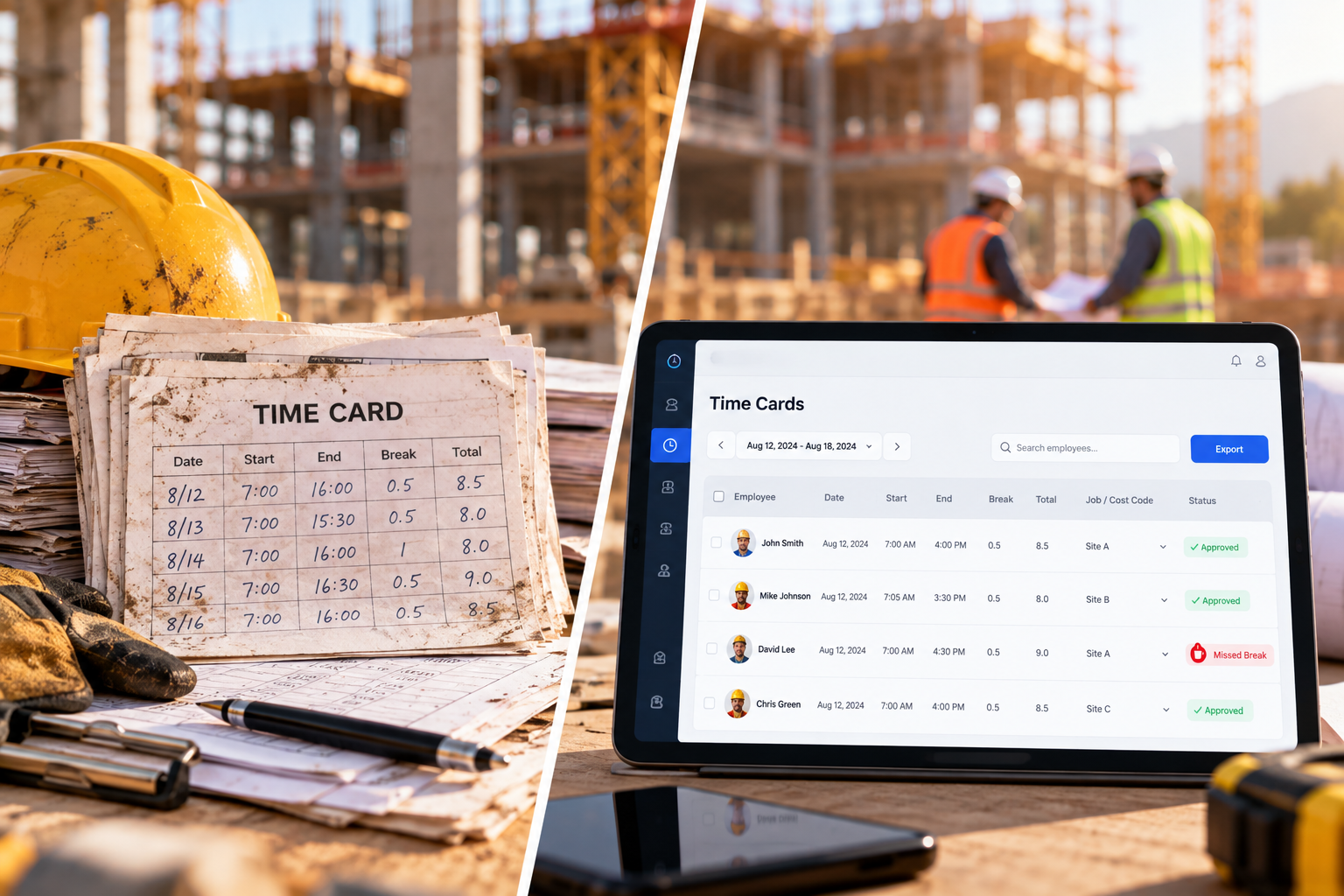
The main differences tend to appear in how companies manage multiple job sites, assign labor to jobs, prepare payroll, and access time records. The next sections look at these areas in more detail.
Which Option Works Better for Multiple Construction Job Sites?
Managing time across several job sites becomes more complicated as crews and projects grow. A contractor with 40 employees across 5 active sites can use time clock software to keep track of where workers clock in, which projects they work on, and how their hours are assigned.
- Tracking workers at different locations: Digital timesheets can use geofencing to create a boundary around each job site and record where employees clock in. Paper time cards record the hours, but they do not automatically show where the worker was when the entry was made.
- Managing time from multiple projects: Crews may work on more than one project during the same day. Digital systems can let workers select the relevant project when recording their time, while paper cards require workers or supervisors to write down each project and the hours worked there.
- Reviewing attendance across job sites: A centralized dashboard can show which workers are currently clocked in at different locations. With paper cards, managers need to collect or check records from individual sites before they can see the full picture.
- Assigning hours to jobs and cost codes: Digital timesheets can connect recorded hours to specific jobs, phases, and cost codes within the timekeeping system. With paper cards, these details are written down and usually entered into the system later for job costing.
How Do Time Cards and Digital Timesheets Affect Payroll?
The choice of timekeeping method affects how payroll staff collect, check, and process employee hours. The more manual steps involved, the more work there is to do before payroll can be finalized.
- Collecting worker hours: Paper time cards must be collected from each job site and brought to the office before payroll staff can process them. Digital timesheets keep clock-in and clock-out records in the system, so managers can review them as they are recorded. If workers are offline, those records become available after the device reconnects.
- Reviewing overtime and breaks: With paper cards, payroll staff or supervisors need to calculate hours and check whether overtime or break rules were applied correctly. Digital systems can calculate hours based on configured rules and may flag overtime or missed breaks for review.
- Correcting missing or incorrect entries: A missing paper entry may require contacting the worker or foreman and updating the card or payroll records manually. With digital timesheets, an authorized manager can correct the time entry in the system before approving it. Some systems also keep an edit history.
- Preparing approved hours for payroll: Paper cards require staff to transfer approved hours into payroll or a spreadsheet. Digital timesheets can export approved records or connect directly with payroll software, depending on the system.
Which Should You Choose for Your Construction Business?
The right option depends on how your crews work, how many sites you manage, and how much information your payroll team needs to process.
Paper time cards may be enough if you have a small crew working from one site, straightforward pay rules, and a simple payroll process.
Digital timesheets may be worth considering if you have:
- Crews working across several job sites
- Multiple jobs, phases, or cost codes to track
- Prevailing wage or certified payroll requirements
- Frequent payroll corrections or timecard reviews
- A need to process and approve hours more quickly
- Managers who need centralized attendance or job-cost information
Moving from paper to digital timekeeping also involves a change in how workers and managers record and review hours. A gradual rollout can help. Start with one crew or job site, work through any issues, and then expand the process to other teams.
What Features Should Construction Companies Look for in Digital Timesheets?
Use this checklist when comparing construction time tracking software:
- Mobile clock-in with GPS and geofencing: Records where workers clock in and can help prevent clock-ins outside the assigned job site.
- Offline time tracking: Lets workers record their hours without internet or cell service and syncs the data when the connection returns.
- Facial recognition with liveness detection: Helps verify that the assigned worker is clocking in and can block attempts using photos or videos.
- Job, phase, and cost code tracking: Connects hours to the right project and cost category for more accurate job costing.
- Real-time attendance visibility: Gives supervisors a current view of who is clocked in and where workers are assigned.
- Timecard review and editing: Makes it easier to find missing punches, correct errors, and approve hours before payroll.
- Overtime and break alerts: Helps supervisors catch missed breaks and overtime issues before payroll is finalized.
- Payroll export or integration: Reduces manual work when moving approved hours into payroll.
- Labor and job-cost reports: Helps managers review hours, attendance, and labor costs across projects.
How Digital Timesheets Solve Common Construction Time Card Problems
Paper time cards can create problems at several points in the timekeeping process. Digital timesheets can reduce the manual work involved in collecting, checking, and processing those records.
- Lost or damaged cards: Paper records can be misplaced, damaged, or left at a job site. Digital records are stored electronically and remain available for review.
- Hard-to-read entries: Handwritten times can be difficult to interpret. Digital entries give payroll staff clear clock-in and clock-out records.
- Missing punches: A missing start or end time can hold up payroll processing. Supervisors can review digital timecards and correct incomplete records before approval.
- Rounded or inaccurate hours: Workers may round their start or finish times when filling out a card later. Digital clock-ins record the actual punch time.
- Unclear job assignments: Paper cards may require workers to write down jobs or cost codes manually. Digital timekeeping can connect hours to the relevant job, phase, or cost code as they are recorded.
- Time cards arriving late: Paper cards have to move from the job site to the office before they can be processed. Digital records are available in the system as workers submit them.
- Manual payroll entry: Payroll staff may need to transfer hours from paper cards into another system. Digital timesheets can export approved hours or connect with payroll software, depending on the system.
- Limited visibility across sites: With paper records, managers may have to collect information from several locations before they can review attendance. Digital records can give supervisors a centralized view of worker hours and attendance.
How Fareclock Replaces Manual Construction Time Cards With Digital Timesheets
Whether a construction company is moving away from paper time cards or replacing an existing timekeeping tool, the goal is the same: keep worker hours, attendance, locations, job assignments, and payroll data connected.
Our employee clocking software brings these functions into one construction-focused system. Workers can record time from supported devices, while managers can monitor attendance across job sites, manage timecards, assign labor to jobs and cost codes, and prepare records for payroll from the same platform.
Record Worker Hours Digitally
Workers can clock in and out from their phones or other supported devices using facial recognition, PIN, NFC tags, or QR codes. Fareclock’s facial recognition uses liveness detection and multiple checks, including eye movement, depth, reflectivity, and background clues, to help prevent clock-ins using photos, videos, or screens.
We also support offline time tracking. Workers can record clock-ins and clock-outs when connectivity is unavailable, with the data syncing automatically once the device reconnects.

Track Workers Across Job Sites
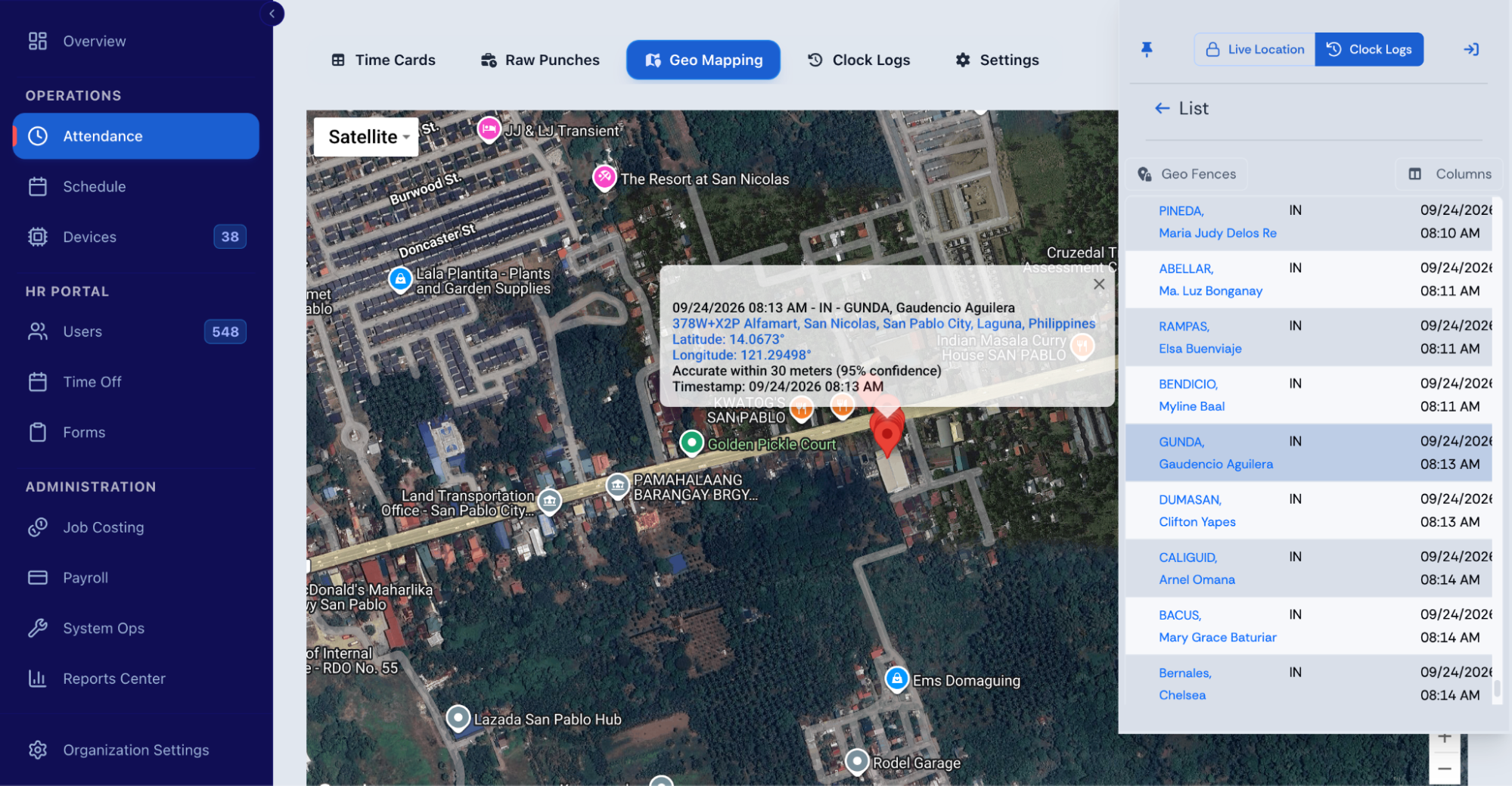
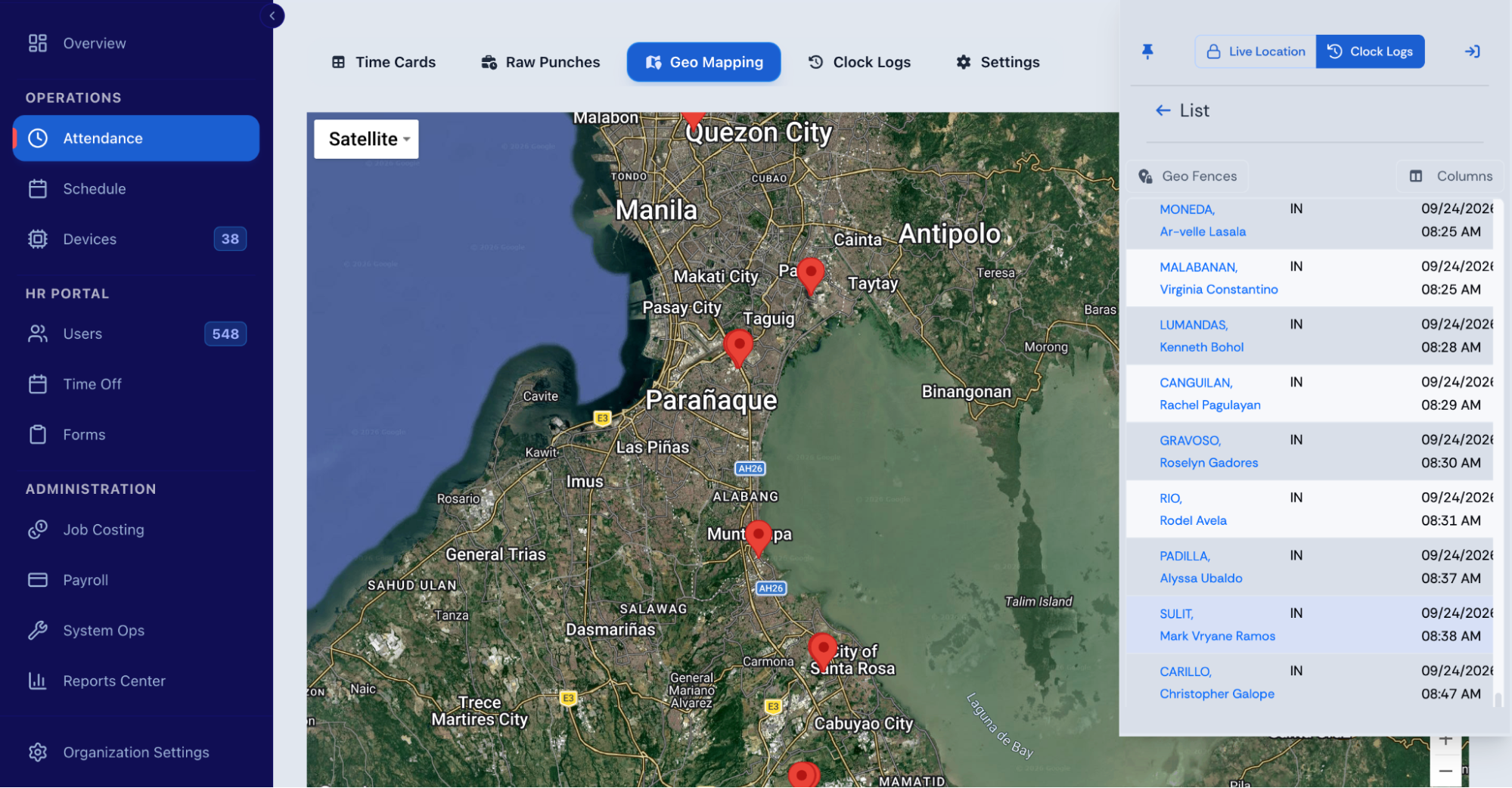
Fareclock lets companies create geofences for individual job sites, using circular or polygon-shaped boundaries, and apply those locations to worker punches.
Managers can use the Roll Call view to see who is working and where workers are assigned. Live location tracking can also provide route and breadcrumb history when enabled.
Review and Approve Time Records
Fareclock’s Admin Console allows managers to view worker time cards within a selected pay period, including daily punches, scheduled shifts, job assignments, and total hours.
Unlike paper time cards, digital records can be updated across multiple shifts or workers simultaneously. Managers can copy and paste punches, modify punch states, update job and cost code details, and use bulk saving or auto-save. They can also manage schedules, employee profiles, notes, time off, custom fields, and shift summaries directly from time cards.
Features such as missed-break indicators, adjustable date picker settings, and a compact view for desktop and mobile make records easier to review. Time cards can also be printed or saved as PDFs for payroll documentation.
For detailed instructions, see Fareclock’s Editing Time Cards: A Comprehensive Guide or watch the Time Cards User Guide.
Assign Hours to Jobs and Cost Codes
Fareclock’s Job Costing module lets companies organize labor by job, job phase, and cost code.
Workers can select the relevant Job, Phase, and Cost Code when clocking in, while managers can assign these details through scheduled shifts. This connects recorded hours to the project information needed for labor costing and reporting.
Prepare Time Data for Payroll
After timecards are reviewed, Fareclock provides tools for overtime reporting, timecard approval, payroll reports, and exports. It also supports integrations with systems such as QuickBooks Online and Xero.
This gives companies a single workflow from the initial punch through timecard review, job costing, and payroll preparation, whether Fareclock is replacing paper records or consolidating capabilities that were previously spread across different tools.
Ready to simplify construction timekeeping? Start your free Fareclock trial and see how it works for your crews.
FAQ
What is the difference between a time card and a digital timesheet?
A time card records a worker’s hours, traditionally on paper. A digital timesheet records the same information electronically and can also include job, location, shift, and approval details.
Are digital timesheets better than paper time cards?
It depends on the company’s workforce and timekeeping needs. Paper can be practical for a small crew on one site, while digital timesheets provide more tools for companies managing multiple locations, job assignments, payroll reviews, and attendance.
Are construction time cards still used?
Yes. Paper time cards are still used by some construction companies, although adoption of digital and mobile timekeeping continues to grow. The AGC and Sage 2025 Construction Hiring and Business Outlook reported that 41% of surveyed firms used cloud-based time tracking and 54% planned to adopt mobile time tracking and approval.
Can digital timesheets track workers across multiple job sites?
Yes. Depending on the software, GPS and geofencing can associate punches with job locations, while centralized attendance views can help managers monitor workers across multiple sites.
Can digital timesheets work without the internet?
Some can. Offline timekeeping allows workers to record punches without an active connection and sync the data when connectivity returns, but this feature is not available in every system.
How do digital timesheets improve payroll accuracy?
They reduce manual data entry by recording clock-in and clock-out times electronically. Supervisors can also review and correct time records before approved hours are sent to payroll.
Can digital timesheets track overtime?
Many construction timekeeping systems can calculate or report overtime based on configured rules. Some can also alert supervisors or require approval when workers need to extend their shifts.
Can digital timesheets assign hours to construction projects?
Yes. Construction-focused systems can let workers or managers associate hours with a job, phase, or cost code, making it easier to track labor by project.
Are digital timesheets more expensive than paper time cards?
Digital timesheets generally involve software or device costs, while paper has a lower direct cost. The overall cost also depends on factors such as administrative time, payroll processing, devices, and the features the company needs.
What should construction companies look for in digital timesheet software?
Look for features that match your workforce and job sites, such as mobile clock-in, GPS and geofencing, offline tracking, identity verification, job and cost-code tracking, timecard approvals, overtime tools, payroll integrations, and labor reporting.