Construction crews often work across several job sites, making it hard for supervisors to verify every clock-in. When one worker punches in for a coworker who’s running late, the mistake or time theft may go unnoticed until payroll is processed. Preventing buddy punching starts with using a timekeeping system that verifies who is clocking in and when.
Buddy punching can lead to inaccurate timesheets, higher labour costs, and payroll disputes. On construction projects, even small discrepancies can add up across large crews and multiple sites.
This article covers seven ways to prevent buddy punching, compares common timekeeping methods, and explains how to create a clear policy and use Fareclock to improve time tracking.
What Is Buddy Punching in Construction?
Buddy punching happens when one worker clocks in or out for a coworker who isn’t on site. It’s a form of time theft because the company may pay for hours an employee didn’t work.
Construction sites face a higher risk because crews are large, subcontractors change frequently, and time tracking often relies on paper timesheets or shared devices.
It can happen in simple ways. A worker signs a timesheet for a colleague stuck in traffic, shares a PIN, or clocks out for someone who has already left the site.
Why Is Buddy Punching a Problem for Construction Companies?
Buddy punching affects more than one paycheck. It changes your labor costs, your job data, and how well you know what’s happening on site.
- Paying for hours workers did not work: You cover wages for time nobody spent on site, plus payroll taxes and possible overtime. As a hypothetical example, if a coworker clocks one worker in 30 minutes early every day at USD 30 an hour, that adds up to 125 hours, or USD 3,750, over 250 workdays.
- Inaccurate job costing and payroll: False hours flow into cost codes, so your bids and budgets rest on wrong labor data. According to CMiC, manual timesheet entries already carry a 10 to 15% error rate before they leave the jobsite.
- Poor visibility into crew attendance: When crews move between jobs, the office often can’t confirm who was where until payroll runs. Tracking construction workers’ hours across multiple job sites requires systems that can attribute each punch to the right location and project. Without reliable attendance records, supervisors may struggle to identify unauthorized clock-ins or verify whether employees were present at their assigned sites.
Each of these problems tends to grow as you add crews and job sites.
How to Prevent Buddy Punching on Construction Sites
The strongest approach layers identity checks, location checks, and clear rules, so each method covers the gaps the others leave.
Use facial recognition for clock-ins
Facial recognition compares a worker’s face with their stored profile before approving a clock-in. If the faces don’t match, the system rejects the punch, making it harder for workers to clock in for each other.
Look for liveness detection too. It checks whether the system is seeing a real person rather than a photo or video replay. In Illinois and New York, employers should also check the applicable biometric privacy laws and consent requirements before using facial recognition.
Verify clock-ins with GPS and geofencing
A geofencing time clock creates a virtual boundary around each job site. Workers can clock in only when they’re within that area, depending on the system’s settings. Geo-mapping tools help you define and visualize those boundaries for each location. Employers can set up a fence for each site and choose whether to block or flag punches made outside it.
GPS shows where a phone is, but not who is using it. Combining location checks with identity verification helps address this gap.
Require individual PINs or employee credentials
Give each worker a unique way to clock in, such as a personal identification number (PIN), badge, QR code, or near-field communication (NFC) tag. Individual credentials link each punch to a specific employee, making it easier to spot unusual activity.
However, credentials can be shared. A PIN confirms that someone knows the code, not that they’re the employee assigned to it or that they’re at the job site. Pair credentials with photo or facial verification and GPS checks to make clock-ins more reliable.
Set up a supervised time clock or shared kiosk
A shared kiosk works best when crews arrive at one gate or site trailer and a supervisor can see the device. Clock-ins happen in one spot, and someone is there to notice a person punching twice.
Without supervision, a kiosk is easy to misuse. Anyone can tap in for a coworker, and multi-site crews can’t all gather at one device. If you use a kiosk, require a face or credential check at every punch.
Review time records and flag suspicious patterns
Review time records before each payroll run. These patterns are worth a closer look:
- Identical punch times: The same worker clocks in at the exact same minute every day.
- Grouped punches: Several workers punch within seconds of each other on one device.
- No site activity: A clock-in appears, but the daily log or crew report doesn’t show that person working.
- Travel gaps and late clock-outs: We suggest checking long gaps between sites and late clock-outs before you approve payroll.
- Payroll creep: Labor costs on a job slowly drift above the estimate with no single cause. This is one of the early warning signs.
Digital clock logs can provide additional context when investigating suspicious activity. For example, Fareclock’s Clock Logs record successful and flagged clock-in attempts, including failed facial recognition checks and cases where an employee authenticates but doesn’t complete the transaction. These records help supervisors investigate unsuccessful punches and identify activity that may require further review.
When suspicious activity appears, review the available punch records and clock logs, confirm the details with the site supervisor, and resolve any discrepancies before finalizing payroll.
Establish clear attendance policies
Written rules tell everyone what’s expected, and they back up your technology. A buddy punching prevention policy also gives supervisors a fair basis for action. We outline one below.
However, a written policy alone cannot prevent buddy punching. Companies should combine clear attendance rules with reliable clock-in verification, regular record reviews, and consistent enforcement to reduce the risk of unauthorized punches.
Train supervisors and workers on accurate timekeeping
Show workers how to clock in, what counts as a violation, and how to report a missed punch. Explain that accurate records protect their own pay, because a verified punch helps document the hours they worked. Training should also cover why employees must never clock in for coworkers, share credentials, or submit inaccurate time records.
Give supervisors their own role. They should spot-check the site during the day and approve every timesheet correction.
Which Buddy Punching Prevention Methods Work Best for Construction?
No single method covers everything. Identity checks confirm who punched, and location checks confirm where they were. The best setups combine both.
This table compares six common methods side by side.
| Method | Identity verification | Location verification | Ease of use | Potential weaknesses |
|---|---|---|---|---|
| Manual timesheets vs digital records | None | None | Familiar but slow | Easy to falsify or sign for another worker; prone to manual entry errors |
| PIN-based clock-ins | Weak | None unless added | Fast | PINs can be shared |
| Shared kiosks | Depends on the setup | Tied to the kiosk's location | Easy for crews at one gate | Needs supervision, poor fit for multi-site crews |
| GPS and geofencing | None on its own | Strong | Easy on a phone | Confirms the device's location, not the person |
| Facial recognition | Strong | Weak unless paired with GPS | Fast on mobile or tablet | Needs consent, privacy compliance, and liveness detection |
| Combined identity and location verification | Strong | Strong | One step after setup | Takes setup, enrollment, and consent work |
These ratings are general guidance based on how each method works. For multi-site crews, combined identity and location verification closes the biggest gaps. Manual timesheets and PIN-only systems leave the most room for construction timesheet fraud.
How to Build a Buddy Punching Prevention Policy
A short written policy makes your rules clear and helps you apply them the same way for everyone. Include these four elements:
- Approved clock-in procedures: Workers clock in and out only for themselves, using the approved method, at their assigned job site.
- Prohibited practices and consequences: Ban punching for someone else, sharing PINs or credentials, and approving false time records. Explain that buddy punching is a form of time theft and a violation of company attendance policies. Clearly define the consequences and apply them consistently, following applicable employment laws and company procedures.
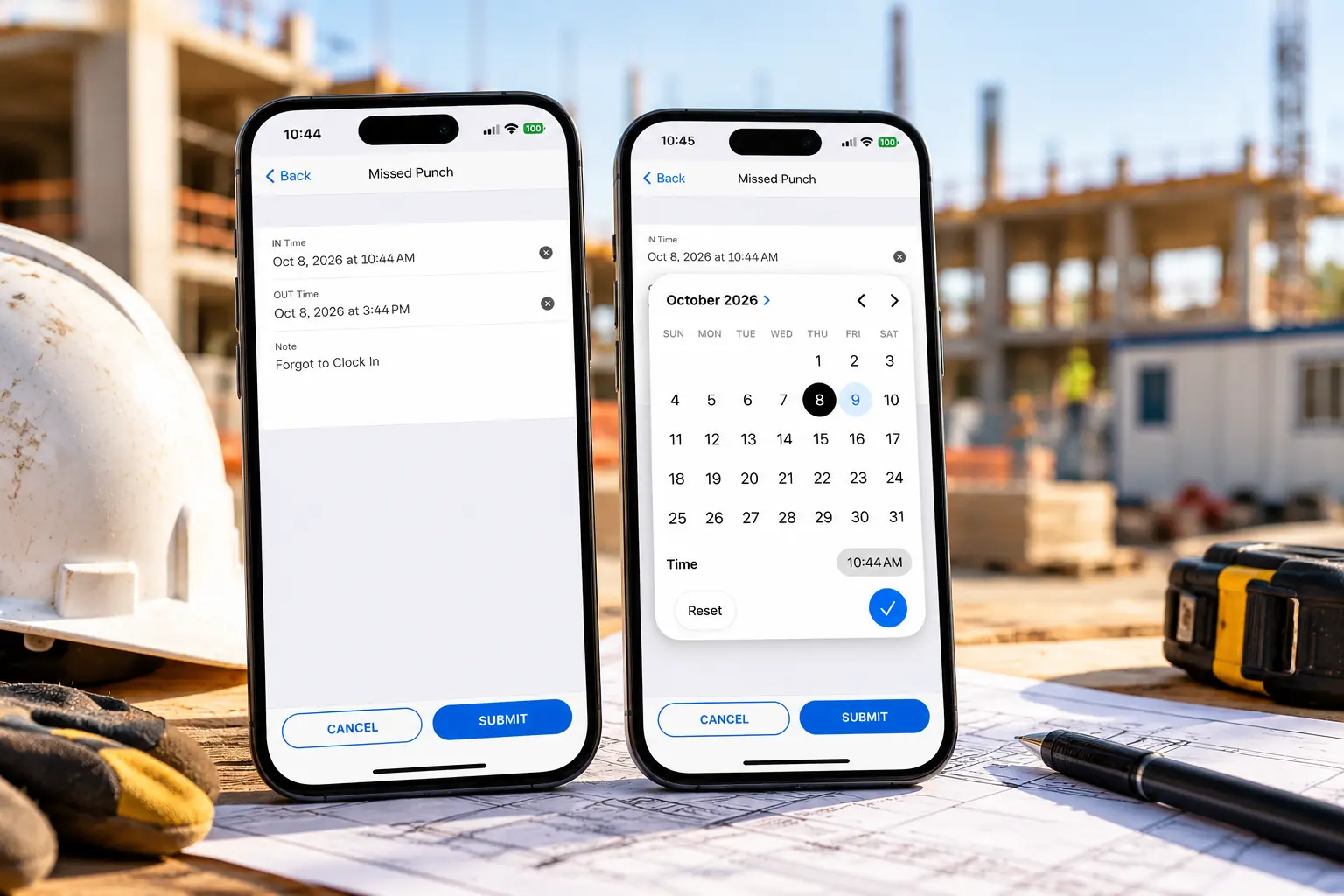
- Missed punches and corrections: Require employees to submit missed punch requests through an approved process rather than asking coworkers to record time on their behalf. With Fareclock, workers can submit missed punch requests through the mobile app, while administrators can review, approve, or reject requests through the Console or mobile app. Both parties receive notifications about the requests.
- Regular record reviews: Set a schedule, such as before every payroll run, and name who’s responsible. A payroll calculator can help you verify labor totals against expected hours before approving pay.
Keep your records complete. Under the Fair Labor Standards Act (FLSA), the Department of Labor expects accurate records of hours worked each day and each workweek.
If you use facial recognition, get written consent where required. Also offer a non-biometric option such as a PIN. Check your state’s rules before rollout, because biometric laws change often. For the technical side, the steps for how to set up time tracking software cover configuration and enrollment for construction companies.
How Fareclock Prevents Buddy Punching in Construction
Fareclock helps construction companies reduce buddy punching by combining employee identity verification, job site location controls, and digital attendance records. Our employee time clock software helps supervisors verify clock-ins, investigate suspicious activity, and maintain more accurate time records across multiple construction sites.
- Verify who clocks in with facial recognition. Fareclock uses facial recognition to match the worker’s face to their profile. Liveness detection helps prevent someone from clocking in with a photo, recorded video, or an image displayed on a screen. This makes it harder for a coworker to clock in on someone else’s behalf.
- Restrict punches to the right job site: Fareclock’s geofencing lets you draw circular or polygon boundaries around construction sites. You can configure the system to block punches made outside a site’s boundary or flag them for review. This helps catch clock-ins recorded from the wrong location.
- Check location data when reviewing hours: GPS records the device location associated with a punch. With Fareclock’s live GPS tracking, available in the Premium plan, managers can also review employee locations and breadcrumb history. Location data alone can’t prove who used the device, but it adds another check alongside identity verification.
- Choose the right clock-in method for each crew: Fareclock supports facial recognition, PINs, QR codes, NFC tags, mobile devices, and kiosks. A PIN or badge can be shared, so facial recognition is a stronger option when preventing buddy punching is the priority. If crews use a shared tablet or kiosk, choose a setup that requires each worker to authenticate individually.
- Review questionable punches before payroll: Fareclock’s digital timecards, Raw Punches feature, and Clock Logs help managers review recorded hours, job assignments, punch locations, and unsuccessful clock-in attempts. Supervisors can investigate unusual entries, review missed punches, and make corrections before approving payroll.
- Keep time records when connectivity drops. Construction sites don’t always have reliable internet access. Fareclock supports offline punches that sync when the connection returns, helping crews record their time without relying on a live connection at every clock-in.
- Monitor crew attendance in real time. Fareclock’s Roll Call Summary shows which workers are currently clocked in or out, along with details such as device and address information. Administrators can also filter workers by job, department, or attendance status through the mobile app, making it easier to review attendance across multiple construction sites.
Together, these features help construction companies make buddy punching harder, identify questionable time entries, and maintain more accurate payroll records across multiple job sites.
Explore Fareclock’s construction time tracking features, or start a free trial to see how they can work for your crews.
FAQ
What is the most effective way to prevent buddy punching?
Combine identity verification, such as facial recognition, with location verification through GPS and geofencing. Back both up with a clear written policy and a record review before each payroll run. Layering works because each method covers gaps the others leave open.
Can GPS tracking stop buddy punching?
Partly. GPS and geofencing confirm that a device is at the job site, but they can’t tell who’s holding it. To confirm identity, pair location checks with facial recognition or individual credentials. That way, each punch shows both who and where.
Does facial recognition prevent buddy punching?
It makes buddy punching much harder, because the system matches each punch to the worker’s stored profile. Liveness detection helps block photos and video replays. Get written consent where your state requires it, and offer a non-biometric option for workers who prefer one.
Can workers buddy punch with a PIN-based time clock?
Yes. A PIN proves someone knows the code, not that they’re on site. A coworker who knows it can easily punch for someone else. Add a photo, face, or location check to close that gap and tie each punch to the right person.
How does buddy punching affect construction payroll and job costing?
It inflates payroll with hours nobody worked and puts wrong labor hours into your cost codes. That skews job costs, project budgets, and future bids. Manual timesheets make the problem worse, because they add their own entry errors on top of any false punches.
Is buddy punching considered time theft?
Yes. Buddy punching is generally considered a form of time theft because it involves recording hours that an employee did not actually work. Construction companies should clearly prohibit this practice in their attendance policies and establish consistent procedures for addressing violations.