
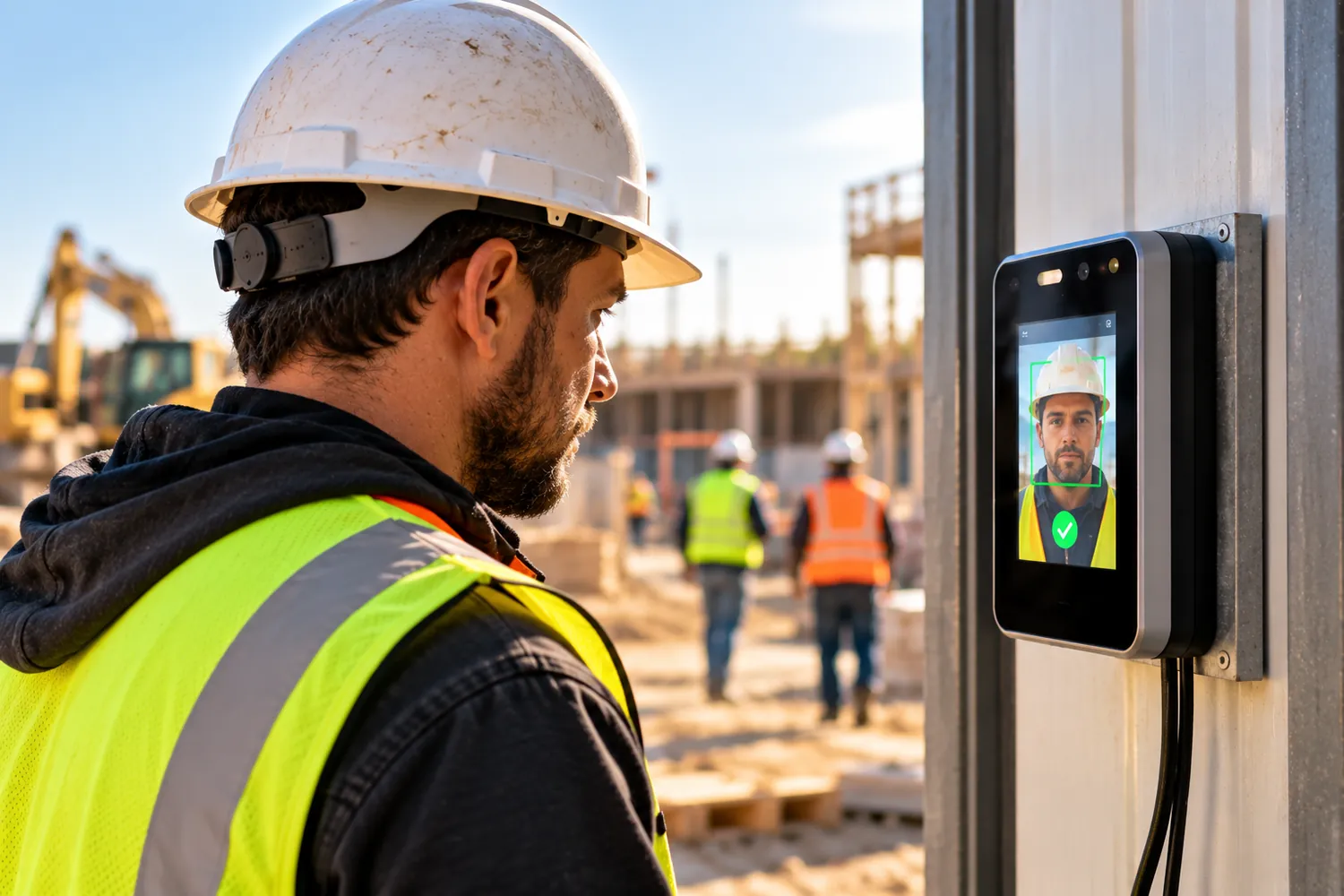
Biometrics do the most work on their own, but they bring privacy duties. PINs and photos are easier to set up, but they lean more on your supervisors.
How Each Clock-In Method Handles Construction Time Theft
Each clock-in method addresses different risks. The best choice depends on whether you need to prevent buddy punching, verify jobsite attendance, or review questionable time records.
Can biometric clock-ins prevent buddy punching?
Biometrics make it harder for one worker to clock in for another because the system checks the worker’s identity at the punch.
Fareclock uses AI-powered facial recognition with liveness detection to help verify that the person clocking in is the assigned worker. This helps reduce buddy punching and attempts to use photographs or videos instead of a live face. Learn more about whether workers can clock in using a photograph.
However, identity checks don’t prove that someone works the full shift. Contractors still need to review breaks, early departures, and other unusual time records.
Why PIN clock-ins are vulnerable to code sharing
PINs are easy to share, so one worker can record attendance for a colleague who hasn’t arrived. On busy construction sites, this can go unnoticed when supervisors oversee multiple crews or rely on shared devices.
Real-time attendance visibility helps supervisors see who has clocked in and follow up on missing arrivals, but it doesn’t verify identity on its own.
Our employee clocking software supports PIN-based clock-ins, giving contractors a simple option for crews that don’t need facial recognition. Administrators can also configure PIN requirements based on their account settings.
How photo clock-ins help verify worker attendance
Photos give supervisors a visual record to check when a punch looks suspicious. Unlike automated facial recognition, basic photo clock-in systems don’t necessarily compare the captured image with an enrolled worker’s identity.
Someone must review the images, which can become time-consuming across multiple crews and jobsites. Photo clock-ins are more useful when combined with time and location checks, but they don’t automatically confirm a worker’s identity.
Which Clock-In Method Works Best on Construction Sites?
The right clock-in method depends on crew size, jobsite conditions, and how much identity verification your timekeeping process needs.
- Best for large crews and multiple jobsites: Facial recognition combined with geofencing offers a stronger way to verify both who is clocking in and where the punch occurs. This can be useful when supervisors manage several crews and can’t check every arrival in person. Tracking construction workers’ hours across multiple job sites adds complexity that a single-location approach doesn’t account for. Fareclock combines facial recognition with geofenced clock-ins to help contractors verify attendance across job sites.
- Best for small contractors with straightforward timekeeping needs: PINs may be sufficient for small crews where supervisors can check attendance easily and the risk of buddy punching is low. Photo clock-ins provide an additional record for later review. Whatever method you choose, the U.S. Department of Labor’s recordkeeping guidance requires employers to keep accurate records of hours worked by covered employees.
- Best for sites with limited equipment or changing work locations: Phone-based clock-ins let workers record time without a dedicated time clock at every location. Check whether the system supports offline punches if crews work in areas with weak mobile coverage, so entries can sync when connectivity returns.
- Best for reducing payroll errors and labor disputes: Digital time records vs time cards make it easier to review hours, identify missing punches, and document corrections. The method matters less than having a consistent process for checking and approving timecards before payroll. As a construction time tracking software, Fareclock lets administrators review time records and prepare payroll reports and exports.
What to Consider Before Choosing a Construction Clock-In System
Before choosing a system, check how it handles jobsite conditions, attendance verification, payroll, and employee privacy.
- GPS and geofencing: Geofences limit clock-ins to a designated jobsite area, helping supervisors check where punches occur. Geo-mapping tools can help you define and manage those site boundaries. GPS confirms a device’s location at the time of a punch, not who is holding it, so consider whether you also need identity verification.
- Offline clock-ins: Basements, remote sites, and areas with weak mobile coverage can interrupt timekeeping. Look for a system that records punches offline and syncs them when connectivity returns. Test this during a trial.
- Payroll and job costing: Accurate punches are only useful if hours reach the right job and cost code. Check whether the system supports job-level labor tracking and exports approved hours to your payroll or accounting software. A payroll calculator can help you verify labor costs once hours are approved.
- Setup and ease of use: Facial recognition requires a compatible camera, while PIN and photo clock-ins may work with simpler equipment. Choose a method crews can use quickly and consistently without creating delays at the start of a shift. The process of how to set up time tracking software for construction covers configuration steps specific to jobsite workflows.
- Privacy and employee data protection: Before using biometrics, check the laws that apply to your worksites and explain how employee data will be collected, used, and stored. Some states impose specific notice, consent, and retention requirements. For example, Illinois’s Biometric Information Privacy Act (BIPA) regulates the collection and handling of biometric identifiers. Other states have different requirements, so consult employment counsel before introducing biometric clock-ins.
How to Choose the Right Clock-In Method for Your Construction Business
Choose the method that addresses your biggest attendance risks while fitting the way your crews work.
- Biometric verification: Choose facial recognition or fingerprint checks when preventing buddy punching is a priority. Check applicable privacy and consent requirements before rollout.
- PIN clock-ins: Choose PINs when simplicity and low equipment costs matter most, and supervisors have other ways to verify attendance. Remember that workers can share their codes.
- Photo clock-ins: Choose photo capture when supervisors need a visual record to review questionable punches. Make sure someone has time to check the images regularly.
- Identity verification with geofencing: For contractors managing several jobsites, combining identity checks with location controls helps verify both who clocked in and where the punch occurred. Fareclock combines facial recognition and geofenced clock-ins to help construction teams manage attendance across sites.
Start with the risks your current process leaves unchecked, then choose the controls that address them without making clock-ins difficult for your crews.
How Fareclock Supports Different Clock-In Methods for Construction Sites
Fareclock gives construction companies several ways to record worker attendance, depending on how much identity verification they need and what works best for their crews.
- Biometric clock-ins: Fareclock uses facial recognition with liveness detection to help verify worker identity and reduce buddy punching. Administrators can configure recognition options according to their requirements.
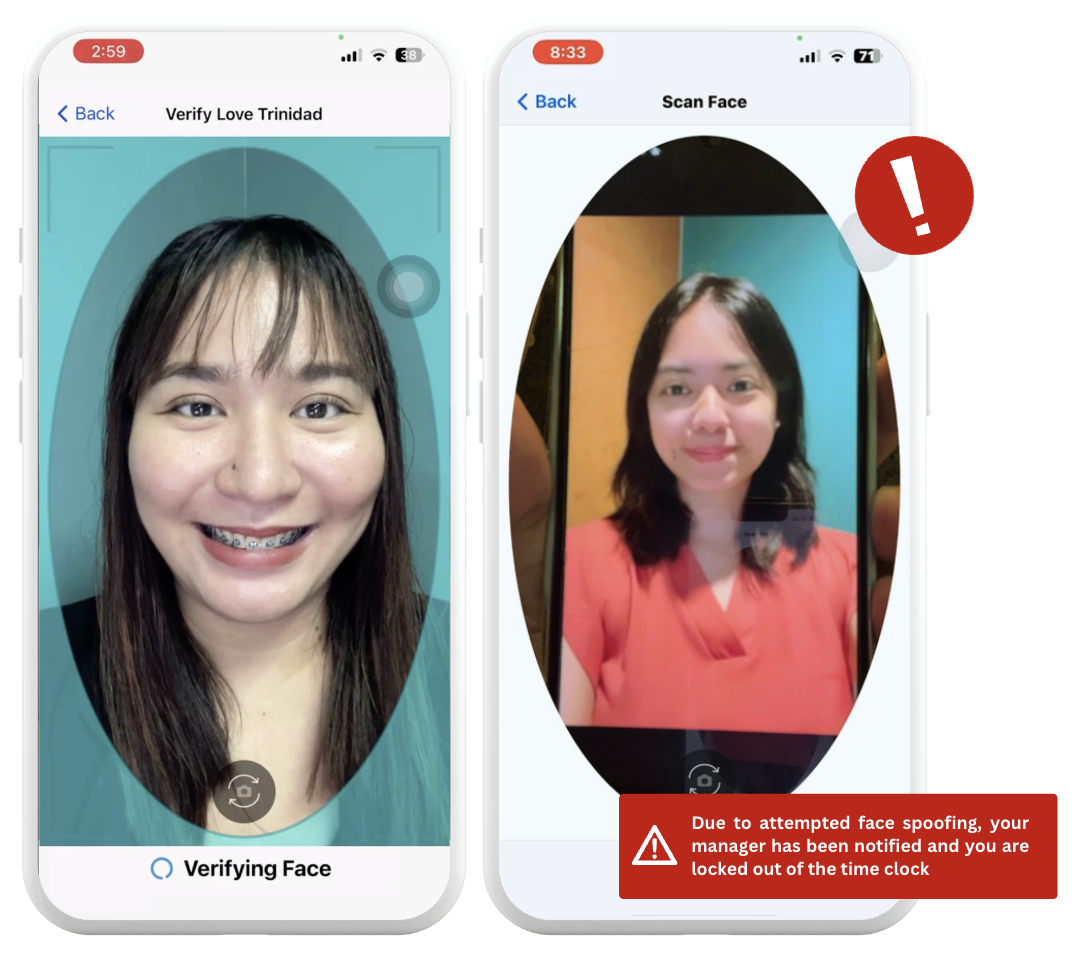
- PIN clock-ins: Workers can use personal PINs to record their hours. Fareclock supports PIN-only operation when facial recognition is disabled, and administrators can configure minimum and maximum PIN lengths from 1 to 12 characters. PINs provide a simple option for crews that don’t require biometric verification. See How to Use PIN-Only Clock In/Out.
- GPS and geofencing: Fareclock helps contractors verify where clock-ins occur and can restrict punches to approved jobsite areas. Combining location verification with facial recognition provides stronger attendance controls than either method alone.
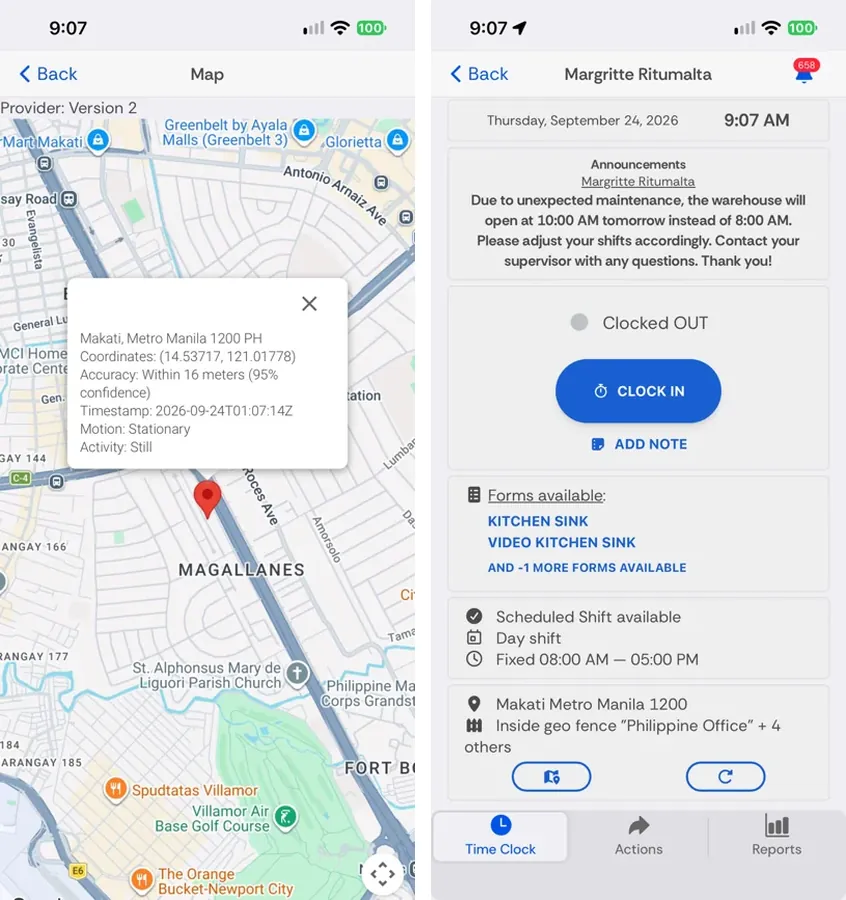
- Photo verification: Photo-based records can give supervisors a visual reference when reviewing attendance. Check the available setup to confirm whether it captures photos for later review or uses facial recognition to verify identity, as these serve different purposes.
- Real-time attendance monitoring: Fareclock’s Roll Call Summary Console shows which workers are currently clocked IN or OUT, along with details such as department, device, address, labels, and payroll ID. Administrators can also use the mobile Worker List to filter employees by attendance status, department, organizational unit, or job.
Explore Fareclock’s construction time tracking features or start a free trial to find the right setup for your crews.
FAQ
Which clock-in method is best for construction workers?
It depends on your crew size, jobsite conditions, and attendance risks. Facial recognition can help prevent buddy punching, while PINs offer a simpler option for smaller crews. Combining identity checks with geofencing adds another layer of verification.
Is facial recognition better than PIN-based time tracking?
For verifying identity, facial recognition has an advantage because workers can share PINs. PINs are usually simpler to use and may require less equipment, while facial recognition involves additional privacy and consent considerations.
Can a PIN clock-in system prevent buddy punching?
Not on its own. Workers can share PINs, allowing one person to clock in for another. Supervisor checks and location controls can help reduce this risk.
Are photo clock-ins enough to verify employee identity?
Not usually. A time-stamped photo gives supervisors a record to review, but it doesn’t automatically confirm who the worker is. Facial recognition goes further by comparing a face against an enrolled identity.
Can GPS and biometric clock-ins be used together?
Yes. Biometrics help verify who is clocking in, while GPS and geofencing help verify where the punch occurs. Fareclock supports both.
Are biometric clock-in systems legal for construction employees?
They can be used legally, but requirements vary by state. Laws such as Illinois’s Biometric Information Privacy Act (BIPA) and Texas’s biometric identifier law impose specific requirements for collecting and handling biometric data. Check the rules that apply to your worksites and consult employment counsel before rollout.