

Your crews may start the week on one job site and finish it on another. By Friday, someone is filling out paper timesheets from memory, while payroll has to rely on whatever makes it onto those sheets. With 92% of construction firms reporting difficulty filling open positions, every hour you pay for needs to be tied to the right employee and job.
Choosing construction time and attendance software can help you get there. This guide walks through the key features, costs, and other factors to consider, along with how to compare vendors and choose a system that fits the way your crews work.
Why Do Construction Companies Need Time and Attendance Software?
Construction labor is expensive, difficult to find, and spread across multiple job sites. When crews still rely on paper time cards, it becomes harder to spot errors, resolve disputes, and make sure hours are assigned to the right project.
The AGC’s 2025 Workforce Survey Analysis puts the average construction wage at $39.69 per hour, 8.9% above the private-sector average. At that rate, even small timekeeping errors can add up quickly.
- The cost of manual timekeeping: According to research cited by Projul from the American Payroll Association, manual timesheet errors can account for 1% to 8% of total payroll. For a company with $2 million in annual labor costs, that would equal $20,000 to $160,000 per year. Paper timesheets can also lead to missing sheets, forgotten clock-in or clock-out times, and delays in seeing actual labor hours.
- Compliance matters, too: Federal rules require employers to keep records of hours worked by non-exempt employees, although they do not require a specific recordkeeping format. The system you choose should make those records easy to create, review, and retrieve.
- The job site is different from the office: Construction crews may work in areas with weak cellular service, wear gloves while using devices, or share a tablet during an early morning shift. Time and attendance software needs to work in these conditions, not just in an office.
What Factors Should Construction Companies Consider Before Choosing Time and Attendance Software?
Start with your own operation before comparing software. These five questions can help define what you actually need.
- How many workers and job sites do you manage?
Consider your current headcount, number of active sites, seasonal changes, and expected growth. Pricing can also change as your workforce grows, so compare how each vendor charges. - How does your workforce operate?
Think about how often crews move between sites, how supervisors manage them, and whether workers typically use company or personal devices. Your software should fit the way your crews already work. - How complex are your payroll and labor rules?
Consider overtime, union agreements, prevailing wage requirements, worker classifications, and any state-specific rules that affect how hours are calculated. - How much visibility do managers need?
Decide whether supervisors only need weekly timesheets or need to monitor attendance, review exceptions, and manage labor across several sites throughout the day. - What systems does the software need to work with?
List your existing payroll, accounting, HR, and project management systems. Check how time data needs to move between them and whether your current workflows can be maintained.
These requirements give you a baseline for comparing software. From there, look at the specific capabilities each system offers.
What Features Should Construction Time and Attendance Software Have?
Once you know what your operation requires, compare the actual capabilities of each system. For construction companies managing multiple sites, these features are particularly useful:
- Multi-site time tracking: View who is working across different job sites from one dashboard.
- Flexible clock-in options: Support mobile, kiosk, shared-device, or other clock-in methods that fit different crews and sites.
- GPS and geofencing: Record punch locations and restrict or flag clock-ins outside approved job sites.
- Job and cost code tracking: Connect each period of work to the correct job, phase, or cost code for accurate labor reporting.
- Worker transfers: Move employees between jobs during the day without losing or duplicating hours.
- Offline tracking: Record punches when there is no connection and sync them when service returns.
- Overtime and break rules: Apply the appropriate rules to hours worked and flag potential overtime or attendance issues.
- Timesheet review and approvals: Let workers and supervisors review, correct, and approve hours before payroll.
- Payroll and accounting integration: Export or sync approved hours and labor data with the systems your company already uses.
- Centralized attendance management: Keep punches, edits, approvals, and attendance history together for reporting and recordkeeping.
How Should You Evaluate Construction Time Tracking Software?
Shortlist two or three tools based on your requirements, then test them with a real crew before you commit.
- Compare the essentials: Check each tool against the factors and features that matter to your business.
- Run a real pilot: Test the software on one project with real crews and collect their feedback.
- Train foremen first: Get supervisors comfortable with the system before rolling it out to the wider crew.
- Run both systems: Use paper and digital timekeeping side by side for about two weeks to catch problems before switching fully.
- Test real conditions: Try clock-ins with work gloves, weak signal, multiple workers arriving at once, and a real payroll export.
- Review the results: Check corrected timesheets, approval times, payroll fixes, and crew feedback before making your decision.
What Questions Should You Ask Before Choosing Construction Time Tracking Software?
Bring these questions to every demo and get the answers in writing.
- How quickly can we get the system up and running?
- What does the supervisor or foreman workflow look like?
- What happens when a worker forgets to clock in or out?
- Can we control which time records workers can edit?
- Can we test the system on an actual job site before committing?
- What reports will managers and payroll teams receive?
- How does the system handle workers who move between job sites?
- What support is available during and after implementation?
- Can we export our data if we decide to leave the platform?
Where possible, get important details, particularly pricing, integrations, implementation requirements, and support terms, in writing. This makes it easier to compare vendors and avoid unexpected limitations or costs later.
What Are the Common Mistakes When Choosing Construction Time Tracking Software?
The biggest mistake is choosing software that works well in the office but poorly in the field.
- Choosing based on the office demo: A system may look good to administrators but be frustrating for crews in the field. Test the actual clock-in and timesheet workflow with workers and foremen.
- Overbuying: Paying for advanced features your company does not need can add cost and make the system harder to use.
- Ignoring crew adoption: If workers and foremen do not understand or use the system consistently, your time records will still have gaps.
- Focusing only on the monthly price: Look beyond the advertised per-user rate and compare the full cost, including setup, support, integrations, hardware, and add-ons.
- Replacing human review with automation: Automated time tracking can catch and flag issues, but supervisors still need to review exceptions and unusual entries before payroll.
How Much Does Construction Time and Attendance Software Cost?
Construction time and attendance software can range from free plans to around $20 per user per month. Many paid plans also have a monthly base or admin fee. Your total cost depends on the number of workers, features, integrations, and hardware you need.
One 2026 market comparison of construction time-clock apps places several products at roughly $6 to $19 per user per month, although pricing models and included features vary by provider.
Other costs to check include:
- Base or admin fees: Some providers charge a fixed monthly fee in addition to per-user pricing.
- Setup and onboarding: Implementation, training, or support may cost extra.
- Integrations: Payroll, accounting, and other integrations may be included or charged separately.
- Hardware: Physical clocks, tablets, and other devices can increase the initial cost.
- Add-on features: GPS, advanced reporting, or other features may not be included in the base plan.
Fareclock pricing uses a base fee plus a per-user charge. The Pro plan is priced at a $11.00 monthly base fee plus $1.65 per user with monthly billing. With annual billing, the base fee is $9.17 per month plus $1.38 per user. Fareclock also offers a 30-day free trial.
Ask each vendor for a written year-one and year-three estimate that includes recurring and one-time charges. That gives you a better comparison than looking at the advertised per-user price alone.
Pricing changes frequently, so verify the current rate and included features before making a decision.
How Fareclock Helps Construction Companies Manage Time and Attendance
If you’re comparing construction time tracking software, Fareclock combines AI-powered facial recognition, GPS and geofencing, job costing, offline time tracking, site assignments, attendance monitoring, and detailed timecard reporting to help contractors manage crews across multiple job sites.
Advanced AI-Powered Facial Recognition
Fareclock is an AI-powered facial recognition time clock software with liveness detection that provides a touchless way for workers to clock in while helping verify that the person using the time clock is the enrolled employee.
Its multi-layered detection approach analyzes factors such as depth, eye movement, reflectivity, and background clues to help detect photo, video, and screen-based spoofing attempts. Even face-model videos that include eye blinking can be detected when presented to the camera.
Fareclock also includes automatic low-light detection, which can brighten the screen and illuminate the worker’s face to improve recognition in darker conditions. Its adaptive face models can account for gradual changes in appearance, such as aging or hairstyle changes, helping maintain recognition accuracy over time.
For workers who cannot or do not want to use facial recognition, Fareclock also supports PIN, NFC tags, and QR-code clock-ins.

GPS and Geofencing for Job-Site Attendance
Fareclock uses GPS-based attendance to associate punches with the location captured by the worker’s device. Administrators can configure location tracking to run continuously or only around IN and OUT punches.
Administrators can also create circular or polygon-shaped geofences around job sites and configure them to restrict or flag punches outside the designated area. When enabled, live location tracking and breadcrumb history provide additional information such as route start and end times, location points, distance traveled, and elapsed time.
Job Costing and Multi-Site Crew Management
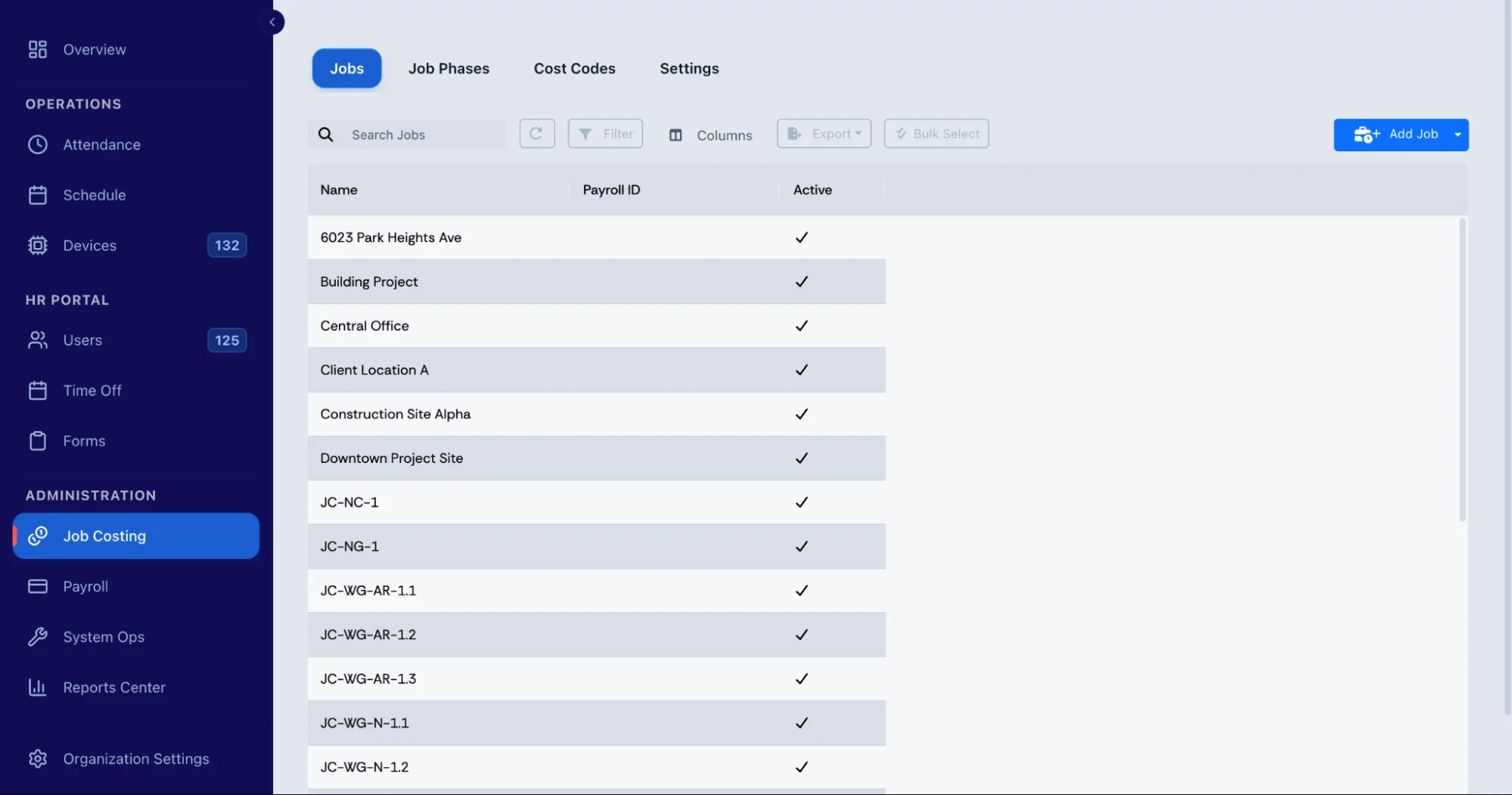
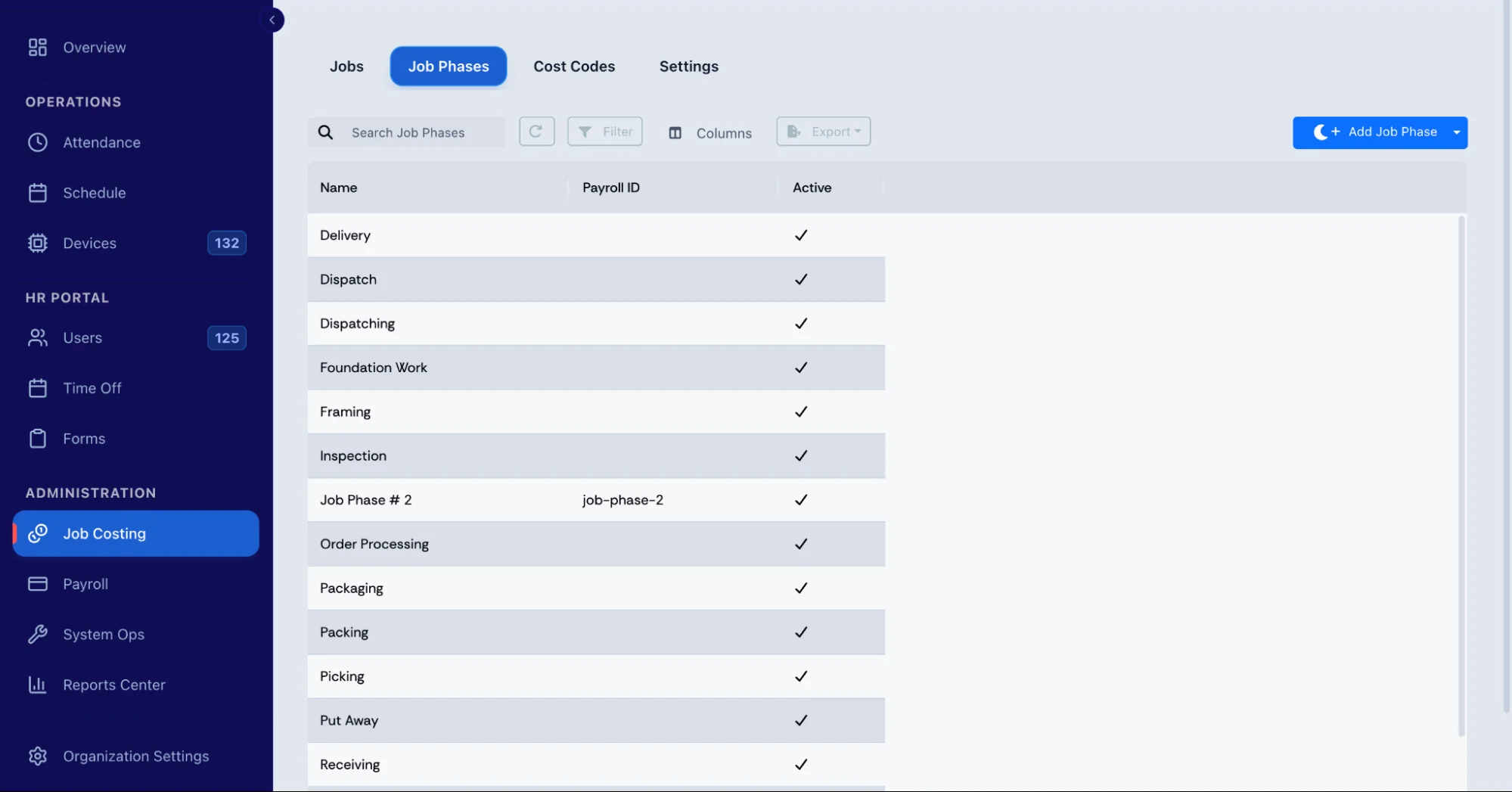
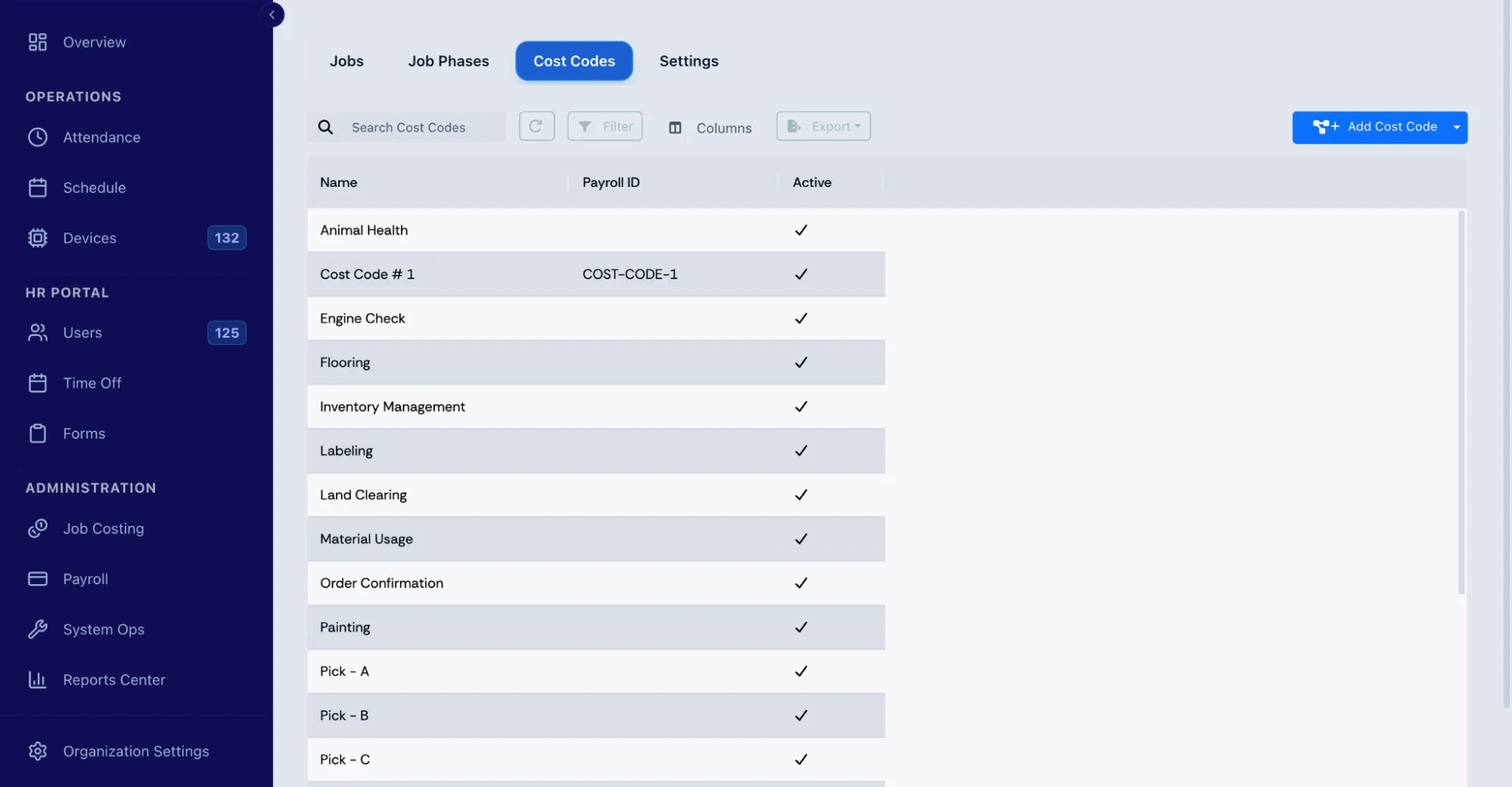
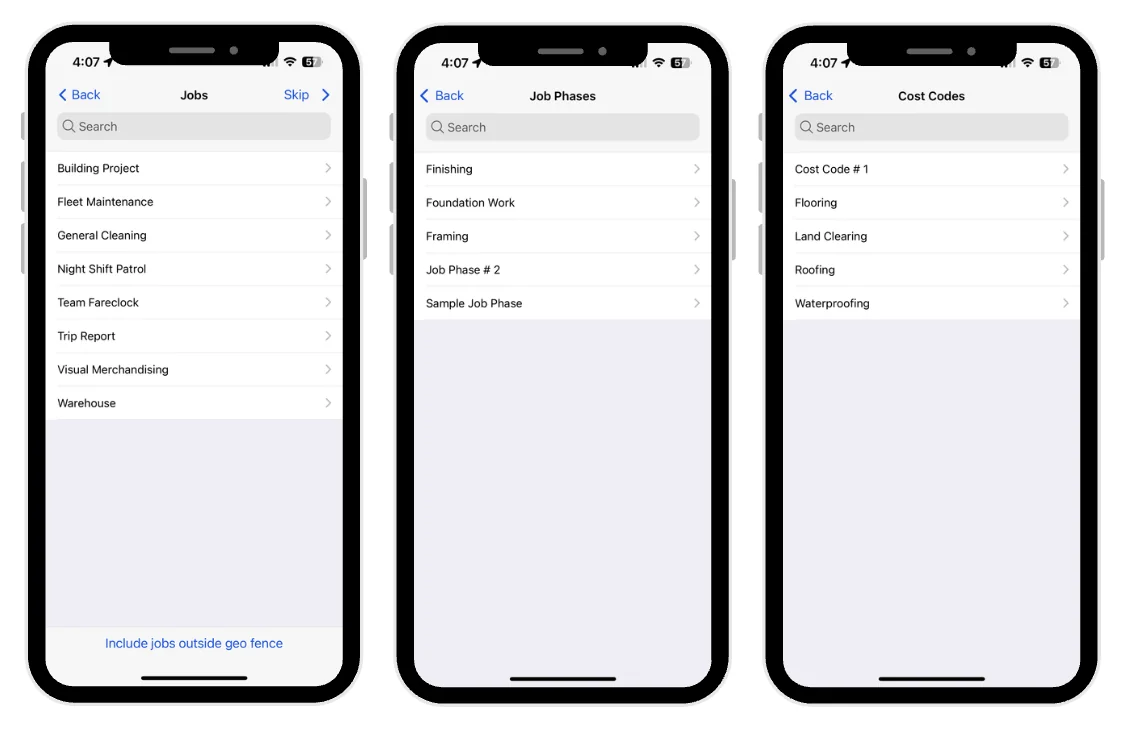
Fareclock’s Costing module organizes labor time by Jobs, Job Phases, and Cost Codes. Workers can select the appropriate assignment when clocking in through the mobile app, or administrators can assign these details when creating shifts.
Supervisors can also assign workers to specific job sites or work areas and use real-time attendance views to see who is currently working at different locations.
Offline Mobile Time Tracking
Construction sites can have unreliable internet or cellular service. Fareclock supports offline clock-ins and clock-outs, with recorded punches synchronizing when connectivity returns.
Workers can use mobile devices to record time, while PIN, NFC, QR codes, and supported kiosk or shared-device setups provide additional clock-in options for different crews and site conditions.
Timecards, Punch Reporting, and Overtime
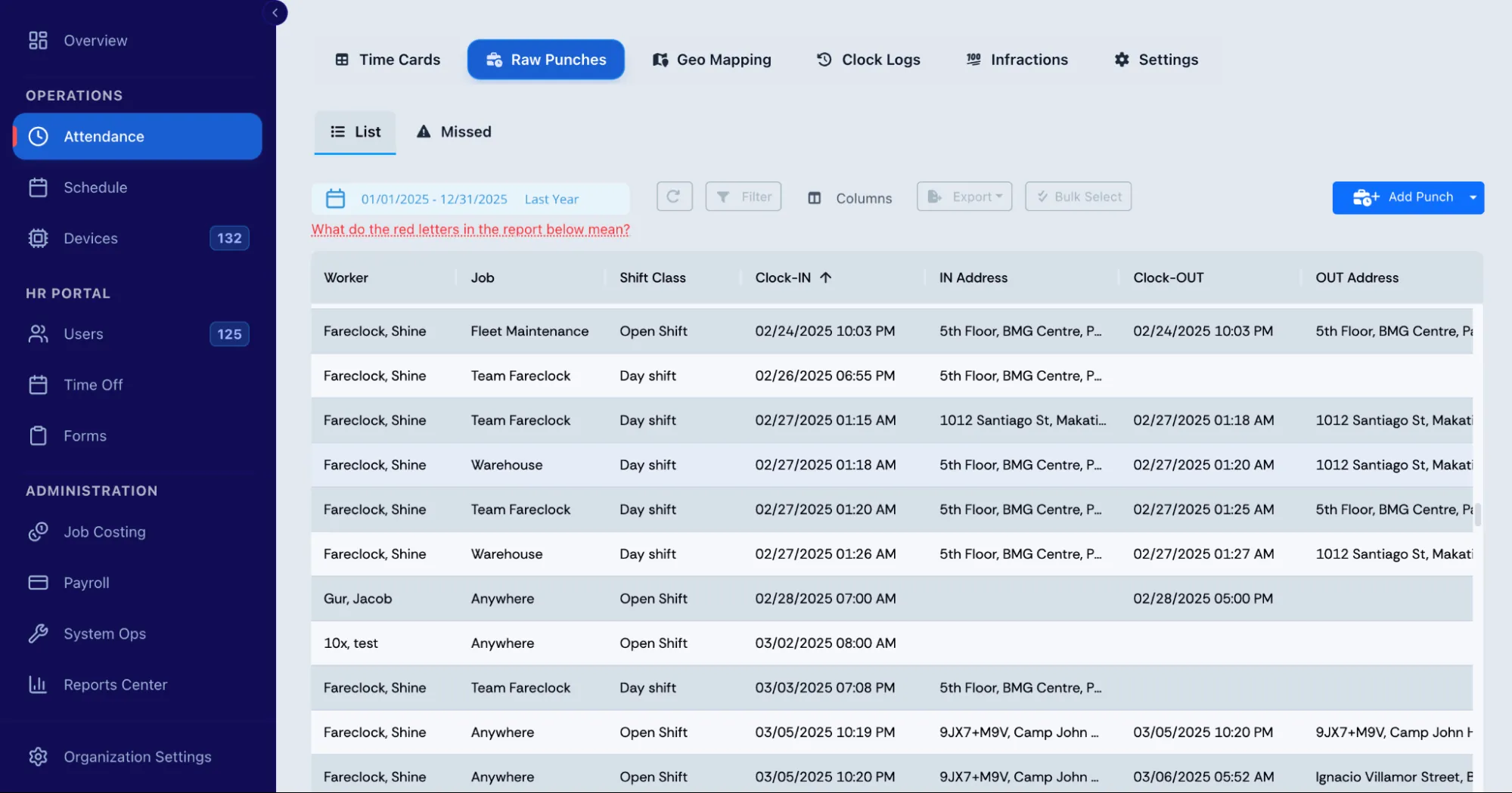
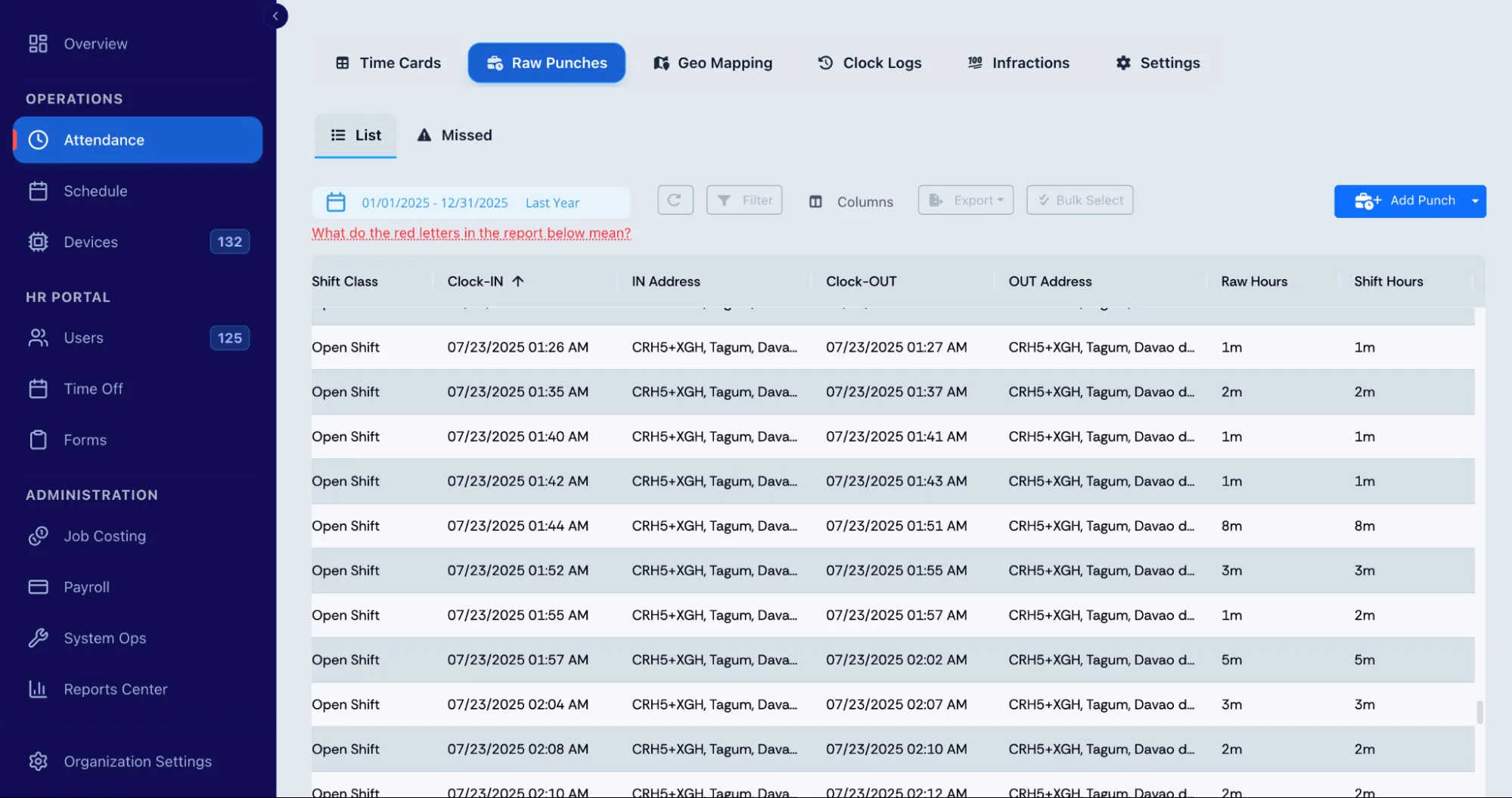
Fareclock provides detailed timecard and timesheet reporting, including clock-in and clock-out times, missed or incomplete punches, total hours, scheduled shifts, assigned geofences, and jobs.
The Raw Punches feature provides additional details such as worker name, job, assigned shift, IN and OUT addresses, raw hours, and shift hours. Administrators can review and edit timecard information when corrections are required.
Fareclock also supports overtime rules and shift extensions. Workers can request additional time through the mobile app when enabled, while administrators can approve or deny requests and configure extension limits. Geolocation notifications can also alert administrators to location-related issues.
Together, these features give construction companies tools to manage worker identity, job-site attendance, crew locations, labor allocation, offline timekeeping, and timecard review from one system.
Start a 30-day free trial or schedule a demo.
FAQ
How do you choose construction time tracking software?
Start with your crew size, number of sites, payroll requirements, and existing systems. Then test shortlisted options with real crews before making a decision.
What features should construction time tracking software have?
Look for multi-site tracking, flexible clock-ins, job and cost code tracking, GPS or geofencing, overtime rules, approvals, payroll integration, and offline support.
Do construction companies need GPS time tracking?
Not always. GPS is useful when you need to verify where workers clocked in or manage crews across multiple sites, but smaller operations may not need it.
Can construction time tracking software track multiple job sites?
Yes. Most construction-focused systems can keep attendance and labor records organized by site, so managers can see activity across projects.
How does construction time tracking software work with payroll?
Approved time is either exported to payroll or synced directly with the payroll system, depending on the software and integration.
Can construction workers clock in and out from their phones?
Yes. Many systems support mobile clock-ins, while kiosks and shared devices provide alternatives for crews without smartphones.
How much does construction time tracking software cost?
Plans commonly cost around $6 to $19 per user per month, although base fees, setup, integrations, hardware, and add-ons can increase the total.
What is the difference between time tracking and time and attendance software?
Time tracking focuses on hours worked, while time and attendance also covers clock-ins, breaks, overtime, absences, and attendance records. Many construction companies need both.