Fareclock and Connecteam are well-known names in time tracking and workforce management solutions for any business around the world across a wide range of industries.
Fareclock is a highly specialized, secure time and attendance tracking, job costing, and payroll readiness tool which includes several advanced timekeeping, security, and tracking functionalities. Connecteam, on the other hand, focuses heavily on HR workflows and team communication.
Since both platforms are built impressively and designed with different priorities, strengths, and use cases in mind, this article will compare their key features, pricing, and feature capabilities to help you determine which solution is the right fit for your business.
Note: Product comparisons and verdicts presented in this article are only based on our personal research and hands-on testing of their console and app. Our stated assessments reflect only our own informed perspectives and opinions, and are intended to provide an objective evaluation of each product’s features, usability, and overall performance.
Fareclock vs. Connecteam: At-a-Glance Comparison
| Feature / Functionality |

|

|
| Offline Time Clock Tracking | ✅ | ❌ |
| Biometric Tools | ✅ | ❌ |
| Job and Cost Coding | ✅ | ✅ |
| Shift Rounding and Grace Rules | ✅ | ❌ |
| Mobile App Capabilities | ✅ | ✅ |
How Do Fareclock and Connecteam Compare on Key Features?
When comparing their features, Fareclock and Connecteam have several time tracking functionalities that overlap with each other.
Offline Time Clock Tracking & Processing – Winner: Fareclock
Fareclock is built with a native offline time clock mode. If your worker completely loses internet or cellular connectivity out on the job site, they can still clock in and out on their personal devices. The system will temporarily store the data, and when connection is restored then background synchronization will happen automatically.
Connecteam does not support offline operational mode as it requires a live internet connection to log shift punches. This results in field workers facing errors or system lags when attempting to clock in low-connectivity or dead zones.
Biometric Tools – Winner: Fareclock
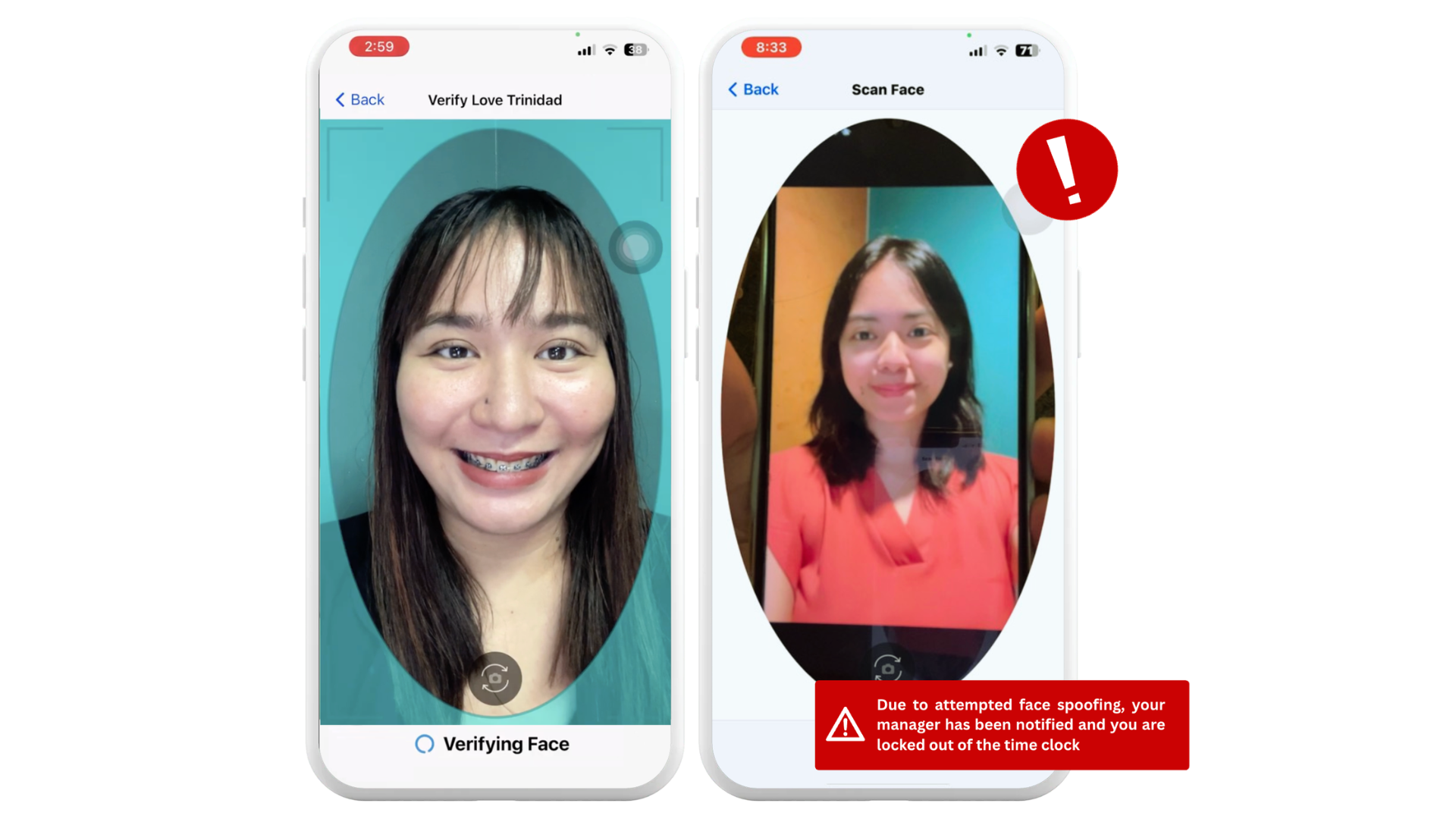
Fareclock has a high-level, AI-powered facial recognition with liveness detection tool as one of its clock-in options. The system analyzes micro-movements, depth, and eye patterns to prevent buddy punching and spoofing attempts like when a worker tries to clock for a co-worker by holding up a photo or video of their face. It also supports clock in via PIN, QR code, and NFC tag.
Connecteam does not offer any kind of high-security identity verification tool or anti-spoofing liveness detection. It only provides multiple clock-in options like clocking in/out on the start or stop timer on their phones, PIN input at kiosk setups, or NFC setups.
Job and Cost Coding – Winner: Fareclock
Fareclock has a dedicated Costing module with distinct jobs, job phases, and cost codes that is built specifically to standardize and capture tracked hours and labor costs that are distributed across jobs.
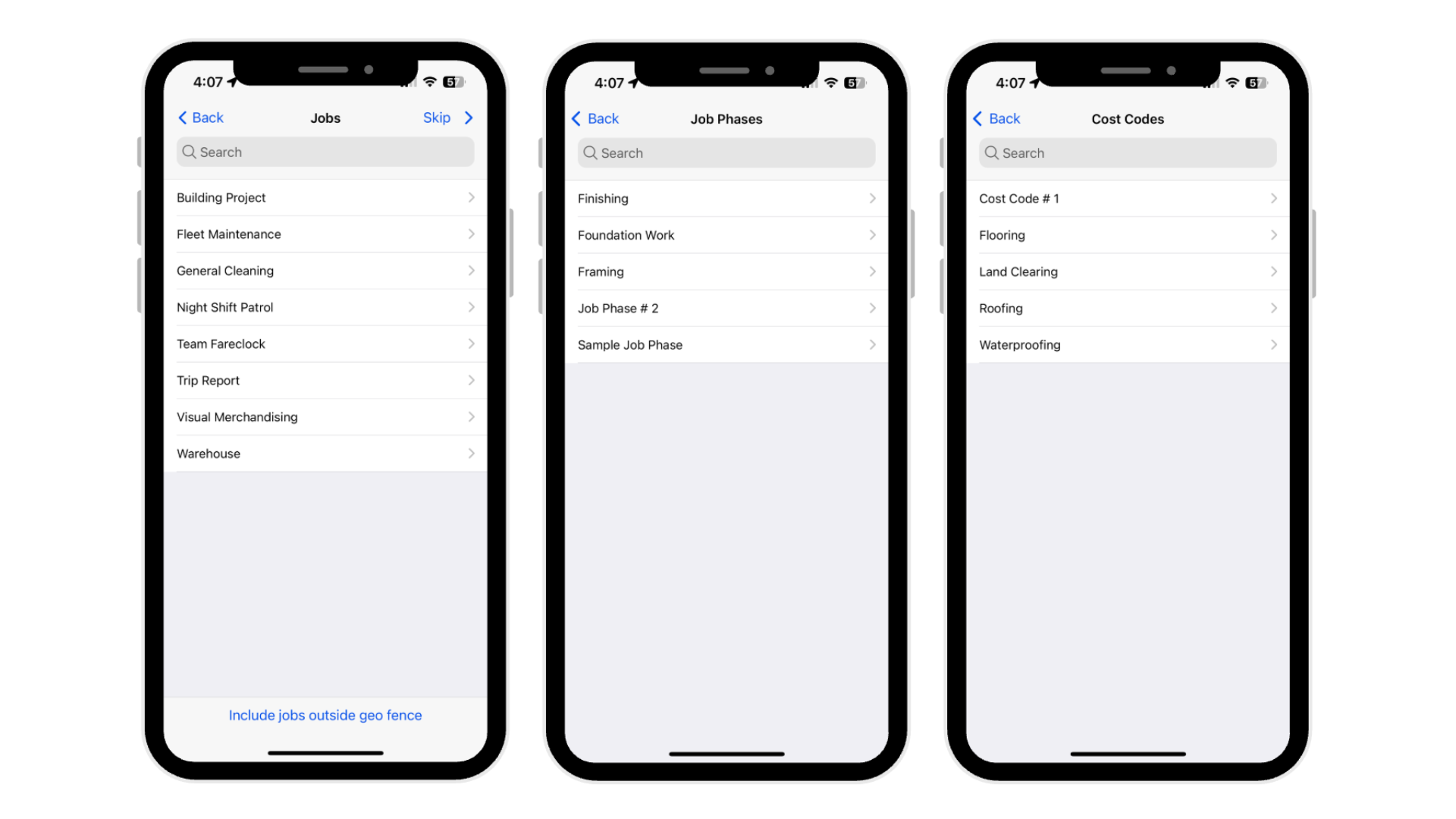
Connecteam tracks general time, projects, and labor costs by location or job task assignment, but it lacks the multi-layered cost coding that Fareclock has.
Shift Rounding and Grace Rules – Winner: Fareclock
Fareclock is supported by highly customizable rounding rules. Admins can set specific thresholds to automatically round clock-ins to the nearest 5 or 15 minutes, implement grace periods for minor lateness occurrences, and configure specific range tolerances for early arrivals.
Connecteam lacks this time-tolerance customization and auto-rounding configurations that help accommodate for early arrivals and late occurrences, making the system a very tight and restricted log of exact punch times only.
Mobile App Capabilities – Winner: It’s a tie
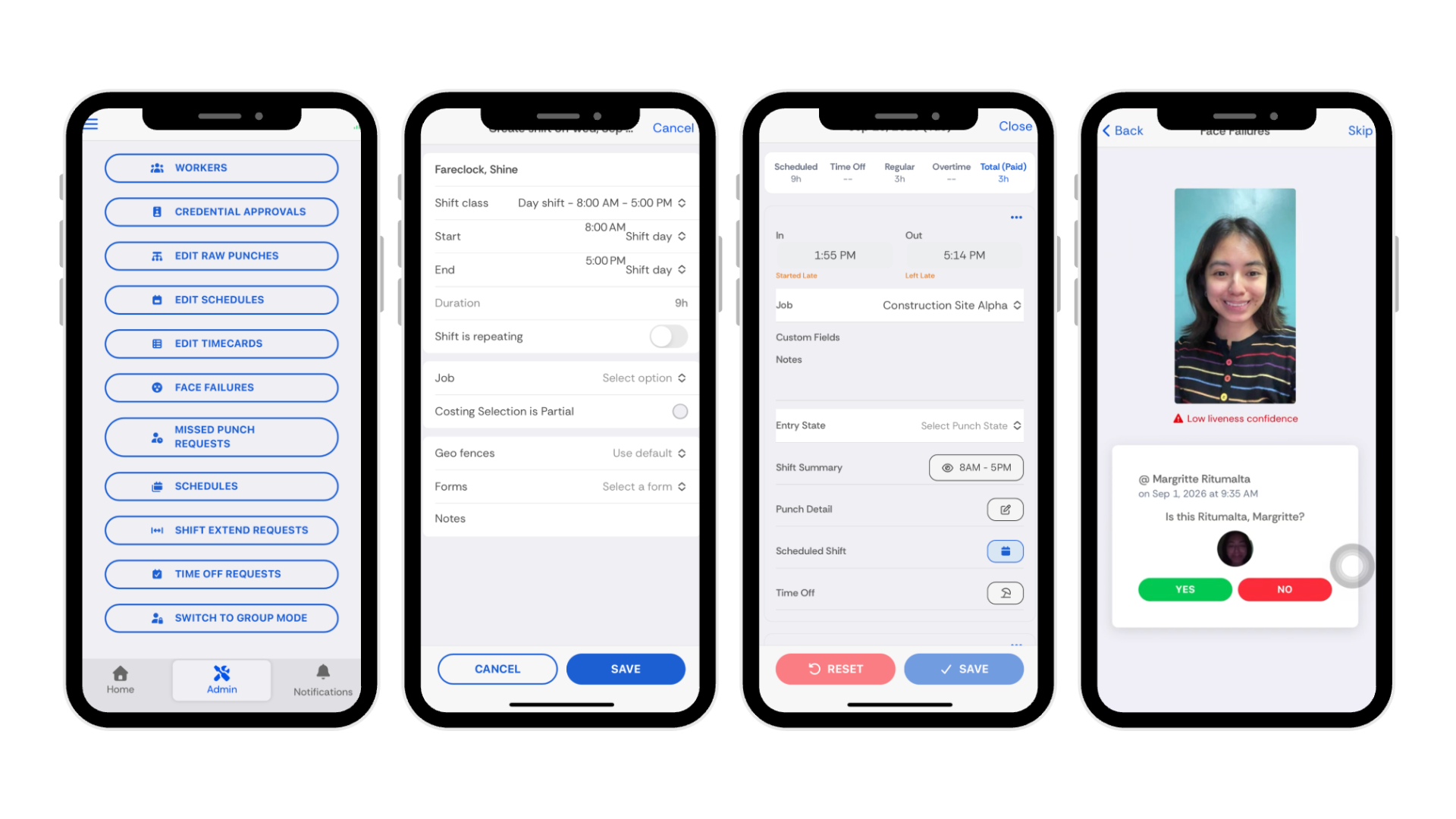
Fareclock’s mobile app offers tools to support time and attendance tracking and worker management. The app allows you to clock in and out with advanced AI-powered Facial Recognition, access company briefings, update personal credentials or documents, submit a request for extended shifts, file missed punches, request time off, fill out required forms, view pay slips, punch history, upcoming shifts and total hours worked. Admins can also access individual profiles to enroll their face models, view schedules, and perform necessary approvals for missed punches, shift extend, time off, credentials, and more.
Connecteam’s mobile app allows employees to clock in and out with GPS and geofencing, view real-time timesheets, access assigned shifts and job locations, accept or swap shifts, submit availability and time-off requests, and complete digital checklists and forms. Employees can also communicate with coworkers and managers through direct and group chats, view company announcements and updates, and complete mobile-friendly training courses, onboarding, and quizzes.
Key Differences Between Fareclock and Connecteam
These are the unique features that differentiate Fareclock and Connecteam from one another.
Fareclock
Advanced AI-Powered Facial Recognition
Fareclock uses its built-in AI facial verification tool to provide a secure, touchless clock-in experience that actively detects spoofing and eliminates buddy-punching on shared or standalone devices. Multiple detection strategies are used to analyze depth, eye movement, reflectivity, and background clues to identify and block fake images, video replays, and screen-based attempts. Automatic low-light detection brightens the display and illuminates the user’s face to improve recognition accuracy in poor lighting conditions, while adaptive face model updates help maintain reliable verification as users’ appearances gradually change due to aging, hairstyles, and other natural variations.
Attendance Policy and Infraction Rules
Define specific infraction rules, point thresholds, and reminder durations for patterns such as repeated absences, late arrivals, early departures, short or long breaks, missed breaks, missed clock-outs, and other attendance-related events.
Payroll Calculator
Convert attendance data into accurate payout with Fareclock’s gross and net pay calculations, multiple pay rates, flexible payroll cycles, configurable pay codes, allowances, bonuses, deductions, payroll adjustments, and cost center references. Multi-country payroll, leave monetization, automated leave conversion, leave payout calculations, and leave balance adjustments are also supported.
Connecteam
Quick Tasks
Plan, assign, manage, and track team tasks from the platform. Create one-time tasks with due dates or set up recurring tasks to automate routine assignments. Detailed task descriptions and subtasks provide clear instructions, while attachments such as to-do lists, images, files, forms, and checklists can be used to give more information on the task.
Chat Communication
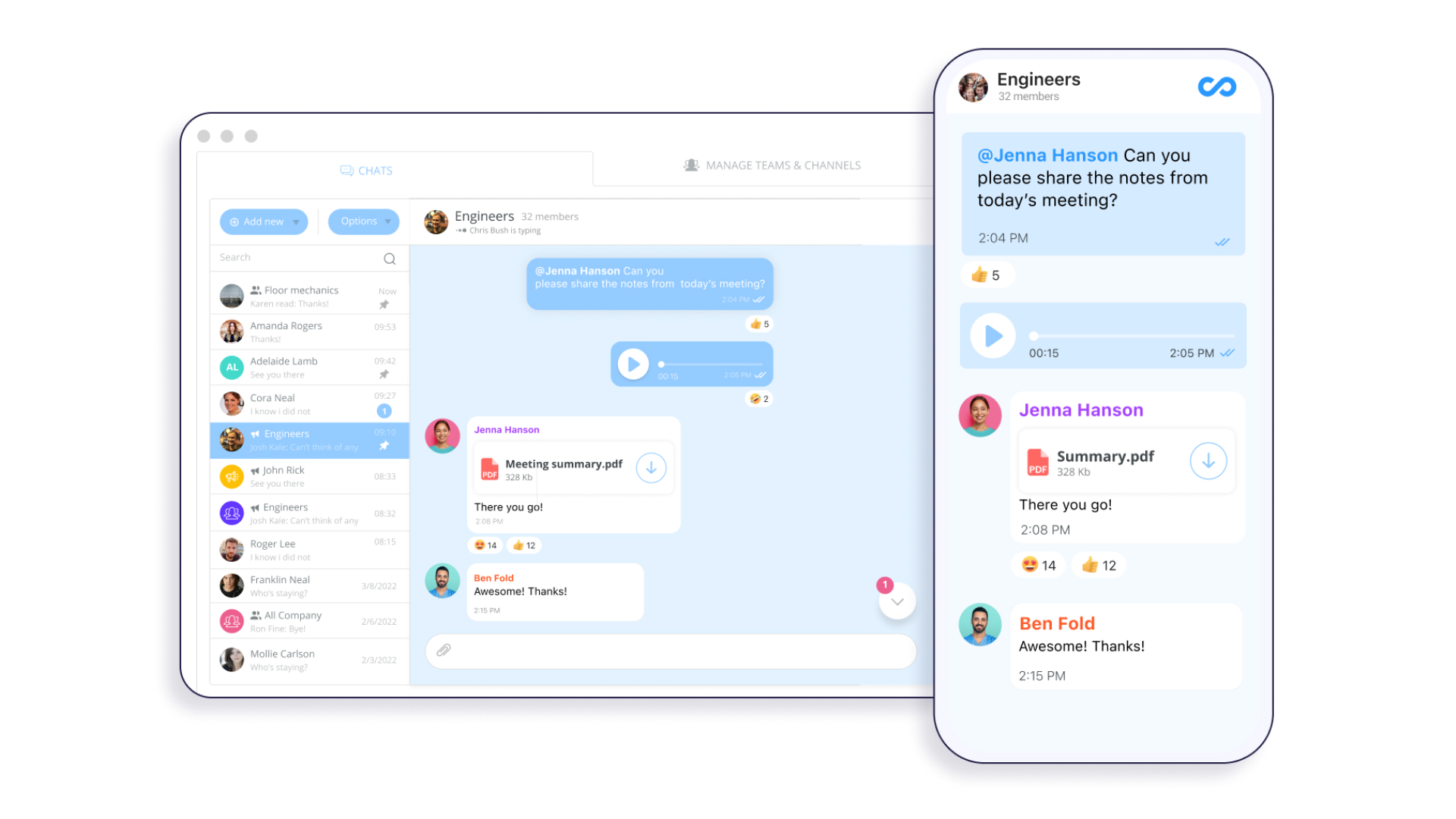
Deliver important operational updates, instant answers, and keep everyone connected in one place. Employees can send and receive one-to-one messages, create team chats, view read receipts, and use built-in translation to communicate effectively across multilingual teams.
HR Course Module
Build reusable training courses from scratch, use customizable templates, or leverage the AI Course Creator to turn any topic into a structured, multi-section course. Choose from a variety of ready-made courses covering specific training needs and send courses directly to employees through the mobile app.

What Are the Pros and Cons of Fareclock and Connecteam?
Fareclock
Pros
- Modern UX design
- AI-powered facial recognition
- Strong fraud prevention
- GPS tracking and Geofencing
- Live location breadcrumbs
- Flexible scheduling options
- Detailed job costing
- Multiple clock-in methods
- Mobile admin approvals & editors
- 28+ reporting options
- Shift and overtime management
- Payroll-ready timecards
- Digital forms
- Raw punch logs
- Attendance audit trails
Cons
- Limited data analytics
Connecteam
Pros
- Good communication tools
- Smart groups
- Automations
- HR and Skills Modules
- Mobile accessibility
- Free option for small teams (10)
Cons
- Manual time tracking reliance
- No secure worker verification methods
- Complex configurations required
- Scheduling limitations
- Limited reporting depth
- Complex interface
- Learning curve
- Less structured scheduling
What Do Customers Say About Fareclock and Connecteam?
To provide a broader view of user experiences, we reviewed feedback for Fareclock and Connecteam across Capterra, G2, the Apple App Store, and Google Play. The reviews below highlight commonly mentioned strengths and areas for improvement based on user feedback.
Fareclock Customer Reviews
Fareclock receives positive feedback for its ease of use, time and attendance tracking, location features, and customer support. On G2, reviewers mention its intuitive interface, reliable timekeeping, and convenience for managing employee attendance. One reviewer described Fareclock as a “convenient tool” for tracking attendance and work hours, while another highlighted its ease of use and accurate time and location tracking.
On the Apple App Store and Google Play, users also mention straightforward clock-in and clock-out, facial recognition, and accurate geolocation. Fareclock currently lists ratings of 4.7/5 on the Apple App Store and Google Play, while its G2 rating is 4.8/5.
“Fareclock has been a convenient tool for tracking attendance and work hours. The system is straightforward, and the reporting feature helps us monitor schedules accurately.”
— G2 reviewer
“Fareclock is super easy & affordable for companies to use, and features like GPS tracking and facial recognition help us maintain accountability without micromanaging. The mobile interface is good, making clocking in and out really quick for employees. You can set different codes like absent, rest day, on leave & resign which is really useful for complex schedules or compliance needs.”
— Capterra reviewer
“Amazing, technical support is top notch. There has never been an issue or concern that has not been fixed or resolved. They will make your experience feel one of a kind.”
— G2 reviewer
[Read more Fareclock reviews on Capterra →]
[Read more Fareclock reviews on G2 →]
Connecteam Customer Reviews
Connecteam reviews frequently highlight its broad range of workforce management tools, particularly scheduling, time tracking, communication, and employee management. Capterra reviewers describe its ability to bring several functions together in one platform, while G2 reviews also mention its ease of setup and use for tracking employee hours.
Some users also mention a learning curve when working with the platform’s larger feature set. Current ratings include 4.6/5 on Capterra, 4.6/5 on G2, and 4.9/5 on the Apple App Store.
“There was a learning curve because of the number of available features, but once everything was set up, it helped streamline several routine processes.”
— Capterra reviewer
“I also like that scheduling, time tracking, and communication are available inside the same system. It helps me manage staff timing, check availability, and keep updates in one place instead of calling or messaging everyone separately.”
— G2 reviewer
“One thing I dislike about Connecteam is that some customization options can feel limited depending on the workflow you are trying to build. There can also be a learning curve when setting up more advanced features or automations for larger teams.”
— G2 reviewer
[Read more Connecteam reviews on Capterra →]
[Read more Connecteam reviews on G2 →]
What Are the Pricing Plans for Fareclock and Connecteam?
Note: Pricing and plan features may vary depending on the number of users, billing frequency, and selected features. Check each provider’s pricing page for the most current details.
BETTER VALUE
Free Trial: Yes (30 days)
Pricing starts at:
$1.65
per user per month
Free Trial: Yes (14 days)
Pricing starts at:
$29.00
per user per month
Which Platform Fits Your Business Needs?
Choosing between Fareclock and Connecteam largely depends on if you’re looking for a precise workforce time and attendance management or a broader employee management platform.
Go with Fareclock if your main priority is knowing when, where, and how your employees are working. Its advanced AI-powered facial recognition with liveness detection, GPS and geofencing, multiple clock-in options, scheduling, job costing, digital forms, employee credentials, payroll-ready timecards, and extensive reporting give businesses detailed oversight of attendance and labor. It is particularly suitable for organizations managing hourly employees, multiple locations, or mobile and job-site-based teams where accurate time records and accountability are important.
Go with Connecteam if you want to support employee management activities with time tracking and scheduling. It offers communication, employee availability, and tasks, making it useful for businesses looking to centralize operations. Customer feedback highlights its value for small businesses with less than 10 users, although some users report a learning curve with advanced features, notification overload, and occasional usability or performance concerns.
In short: Fareclock is better aligned with businesses looking for specialized and secure time, attendance, location, and labor-control capabilities, while Connecteam is geared toward businesses wanting a broader employee management and communication platform.
Ready to see Fareclock in action?
Start your 30-day free trial to achieve first-hand experience in its secure time tracking, advanced scheduling, real-time workforce visibility, and powerful reporting!
FAQ
What are the differences between Fareclock and Connecteam for time tracking?
Fareclock focuses on time and attendance, with features such as facial recognition, offline clocking, GPS/geofencing, job costing, and payroll-ready timecards. Connecteam combines time tracking with broader workforce management features, including communication, tasks, training, and scheduling.
What is the difference between Fareclock and Connecteam for offline time tracking?
Fareclock supports offline clock-ins and outs, storing punches on the device until connectivity returns. Connecteam does not provide the same offline clock-in functionality. This makes Fareclock useful for job sites and locations with unreliable connectivity.
How do facial recognition clock-ins differ between Fareclock and Connecteam?
Fareclock provides facial recognition with liveness detection to help prevent buddy punching and spoofing. Connecteam does not offer facial recognition with liveness detection and instead supports methods such as mobile, PIN-based kiosk, and NFC clock-ins.
How much does Fareclock cost compared with Connecteam?
Fareclock starts at $1.65 per user/month with a 30-day free trial. Connecteam’s paid plans start at $29/month with a 14-day free trial. Pricing varies by plan, users, and billing frequency.
Is Fareclock a good alternative to Connecteam?
Fareclock can be an alternative for businesses focused on time and attendance, job costing, location tracking, and worker verification. Connecteam is broader, with additional communication, training, task, and workforce management tools.