
Fareclock and Hubstaff are known to be leading time tracking and workforce management solutions for businesses across a wide range of industries.
Fareclock is a complete workforce management solution that offers automated tools for time tracking, attendance management, HR functions, payroll computations, reporting, and data collection. On the other hand, Hubstaff is a time tracking platform designed to monitor productivity, time usage, and job performance across remote and field teams.
While both platforms offer robust time-tracking capabilities, they’re designed with different priorities, strengths, and use cases in mind. In this article, we’ll take a closer look at Fareclock and Hubstaff, comparing their key features, pricing, and app capabilities to highlight the differences and help you determine which solution is the right fit for your business.
Note: Product comparisons and verdicts presented in this article are only based on our personal research and hands-on testing of their console and app. Our stated assessments reflect only our own informed perspectives and opinions, and are intended to provide an objective evaluation of each product’s features, usability, and overall performance.
Quick Feature Comparison Table
| Feature / Functionality |

|

|
|---|---|---|
| Advanced Facial Recognition | ✅ | ❌ |
| Start and Stop Live Timer | ❌ | ✅ |
| Briefings | ✅ | ❌ |
| Credentials | ✅ | ❌ |
| Job Costing | ✅ | ❌ |
| Screenshot Tracking | ❌ | ✅ |
| App and URL Monitoring | ❌ | ✅ |
| Project and Task Tracking | ❌ | ✅ |
| Mobile App Access | ✅ | ✅ |
Feature Comparison
Here are some of the key features that Fareclock and Hubstaff have in common. While they serve similar purposes, each platform approaches these features differently, offering a distinct experience and functionality.
Clock-in Methods - Winner: It’s a tie
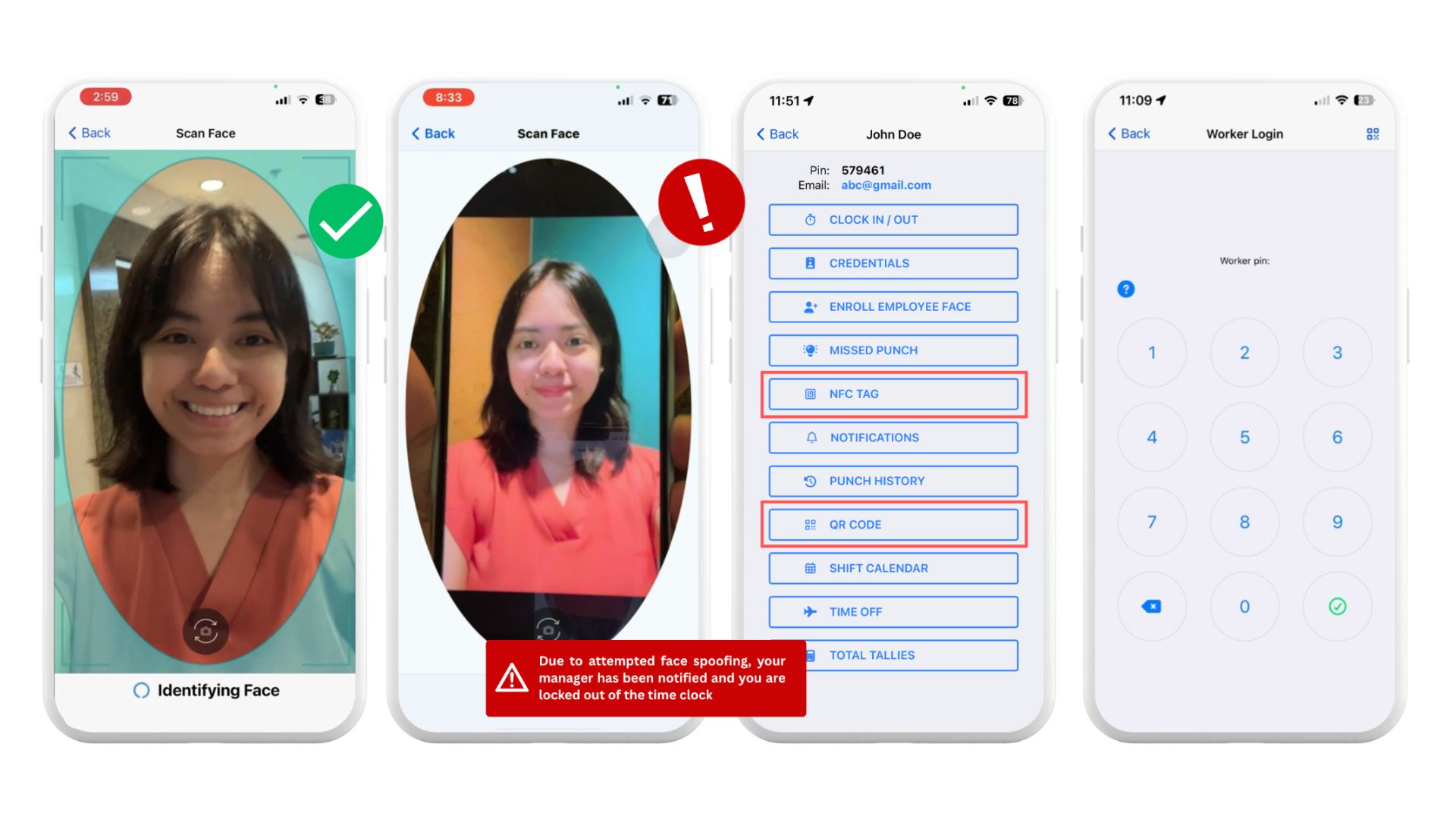
Fareclock supports multiple clock-in methods, including AI-powered facial recognition with liveness detection, PIN, QR codes, NFC, GPS verification, and shared kiosks, allowing businesses to choose the most secure, accurate, and suitable method for their workforce.
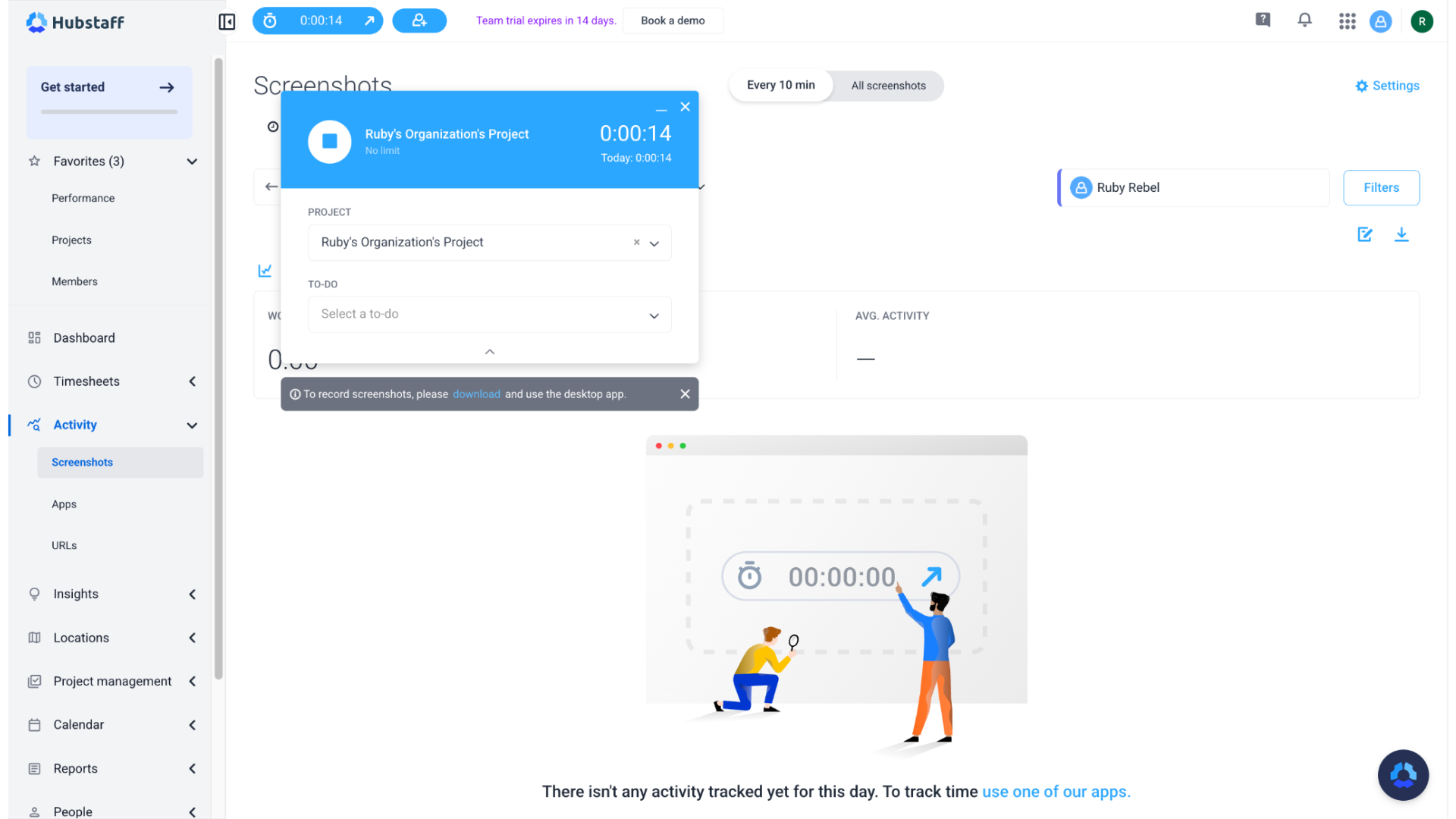
While Hubstaff provides desktop and mobile apps, start/stop timers, geofenced job sites, and a shared time kiosk. Their Silent App can automate tracking based on computer activity or work schedules, allowing businesses to capture accurate work hours across different work environments and employee needs.
Timesheet Management - Winner:

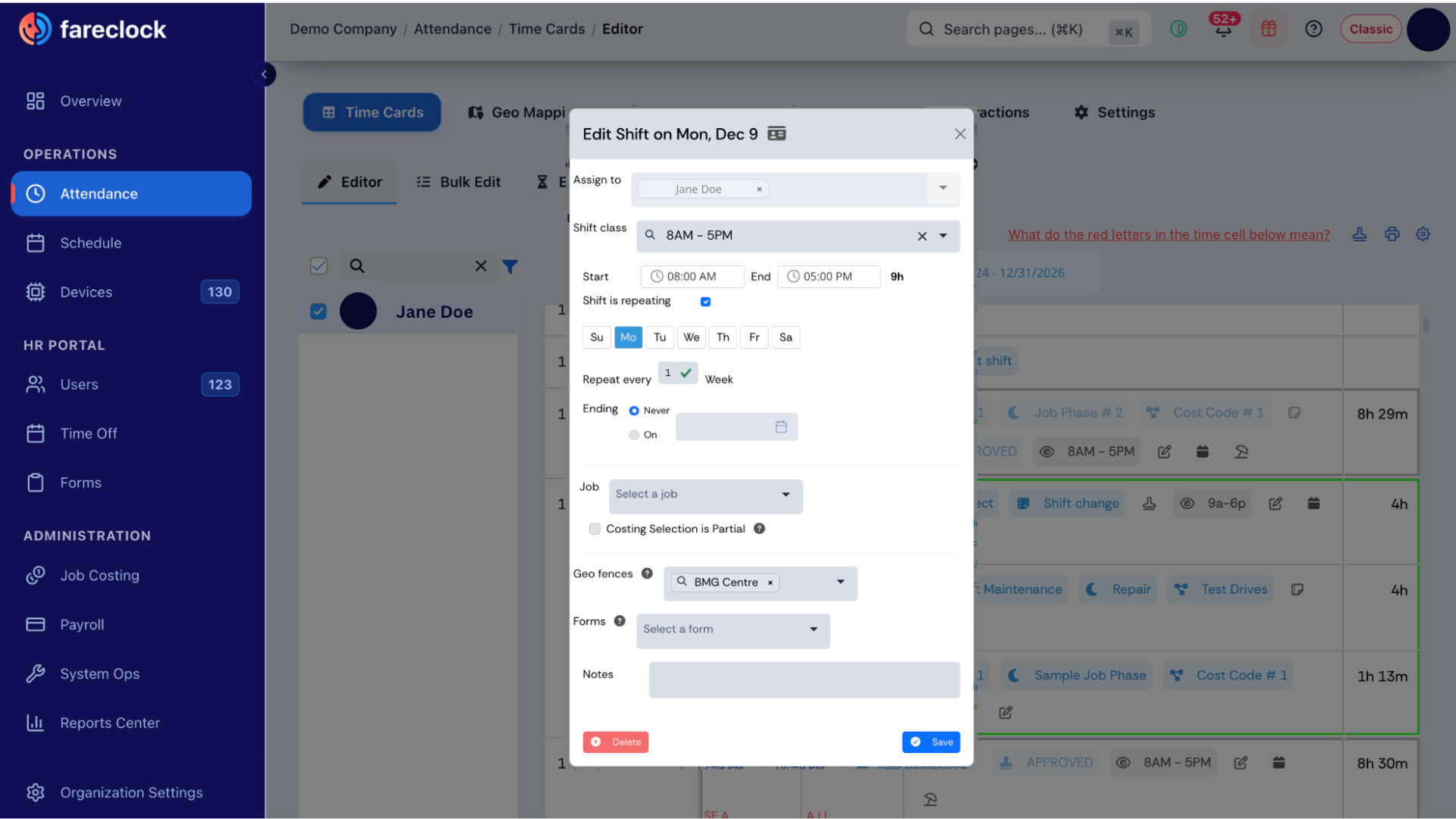
Fareclock’s Time Cards streamline time-data editing and management. Administrators can view all worker shifts within a pay period, edit multiple rows or time cards simultaneously, bulk-save changes, and copy/paste punches or shift details across shifts or workers. Shift schedules can be created or edited directly from the time card, while User Profile details can also be updated. Missed breaks are flagged with a red bouncing coffee mug.
Other key features include Shift Subtotals showing daily start/end punches for payroll calculations; editable shift information such as Jobs, Job Phases, Cost Codes, Custom Fields, Scheduled Shifts, Notes, Punch States/Details, Time Off, and Shift Summaries. Customizable settings include left/center date-picker placement, pay-period navigation arrows, auto-save, and bulk punch-state updates. The compact, responsive layout works on desktop and mobile, with an option to hide the sidebar and print or save displayed time cards as PDF.
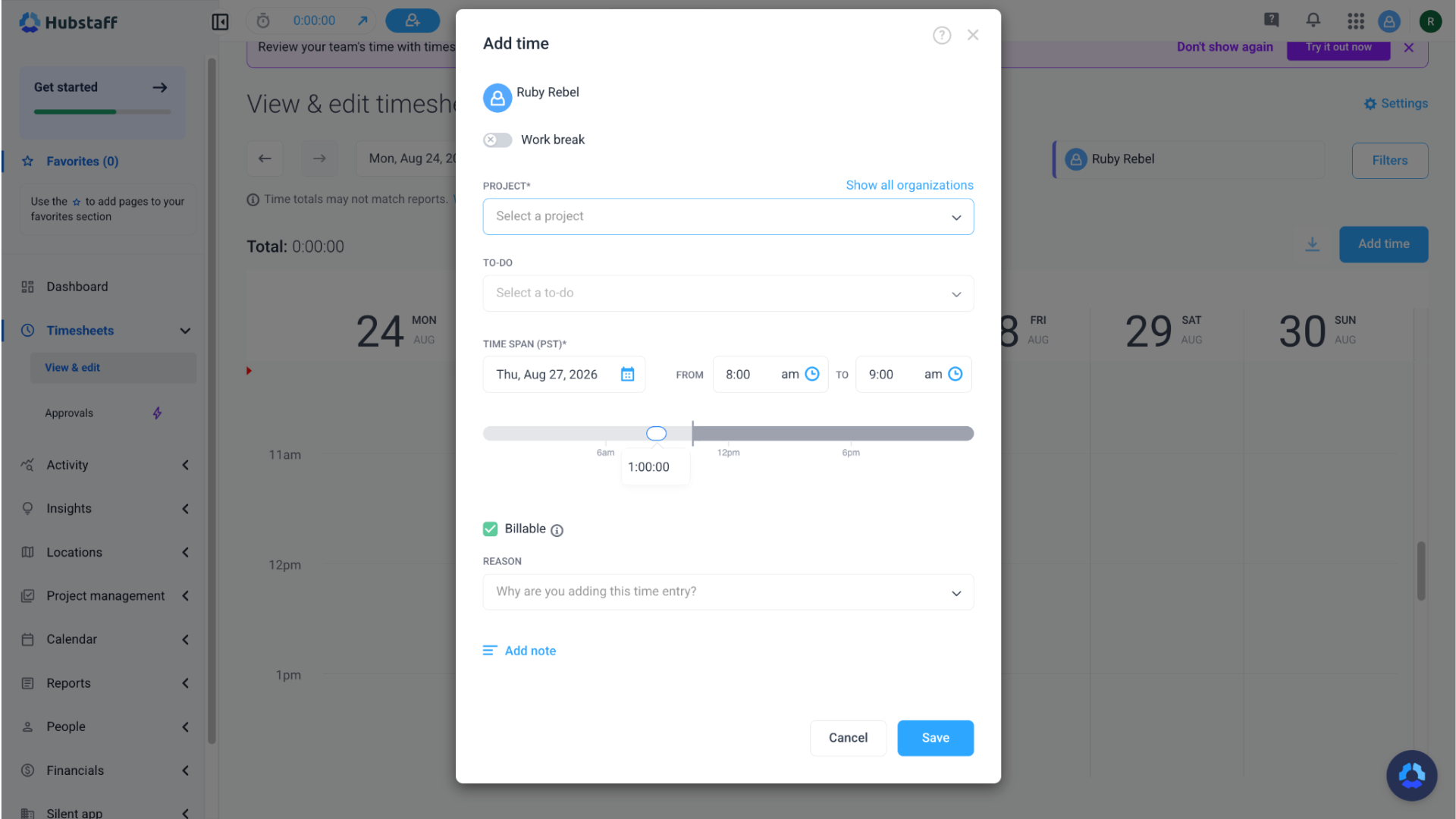
Hubstaff’s timesheet primarily shows the time record and does not include the record of screenshots, activity levels, apps/websites, and GPS/location. Administrators can view employees’ timesheets; add, edit, split, or delete employees’ tracked time; review manual time changes and the reasons for them; approve or deny manual time additions/edits; and approve/deny entire timesheets before payroll.
Reporting - Winner:
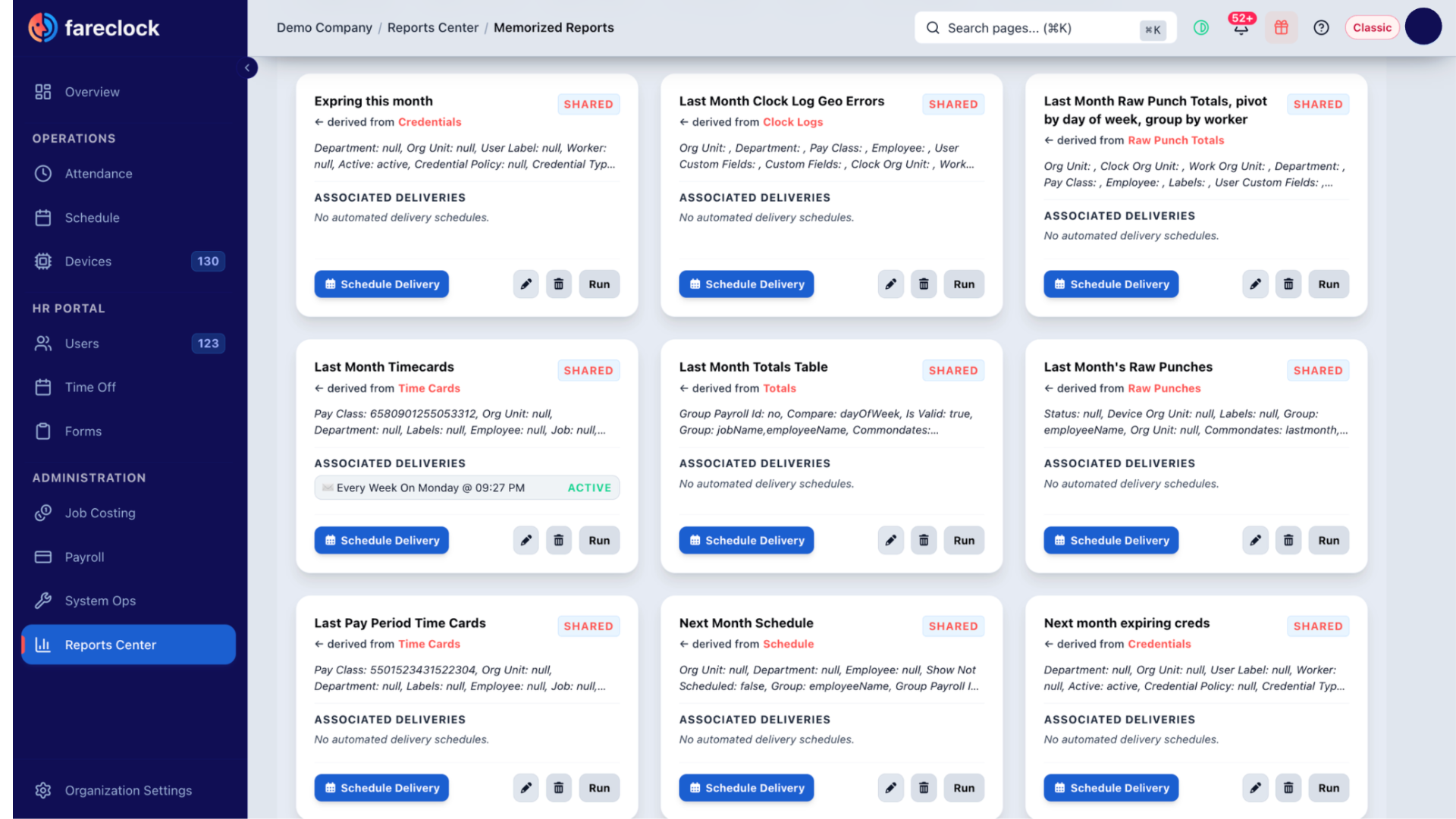
Fareclock has over 25+ report templates available across Attendance, Scheduling, HR & Staff, Payroll, Job Costing, and Audit & Safety. On My Saved Views, you can save a report with its selected filters, formatting, and settings so the same report can be quickly generated again in the future. You can automate reports to be delivered at predefined dates and times, and these are all customizable as you can fix, rearrange, organize the data columns according to your needs.
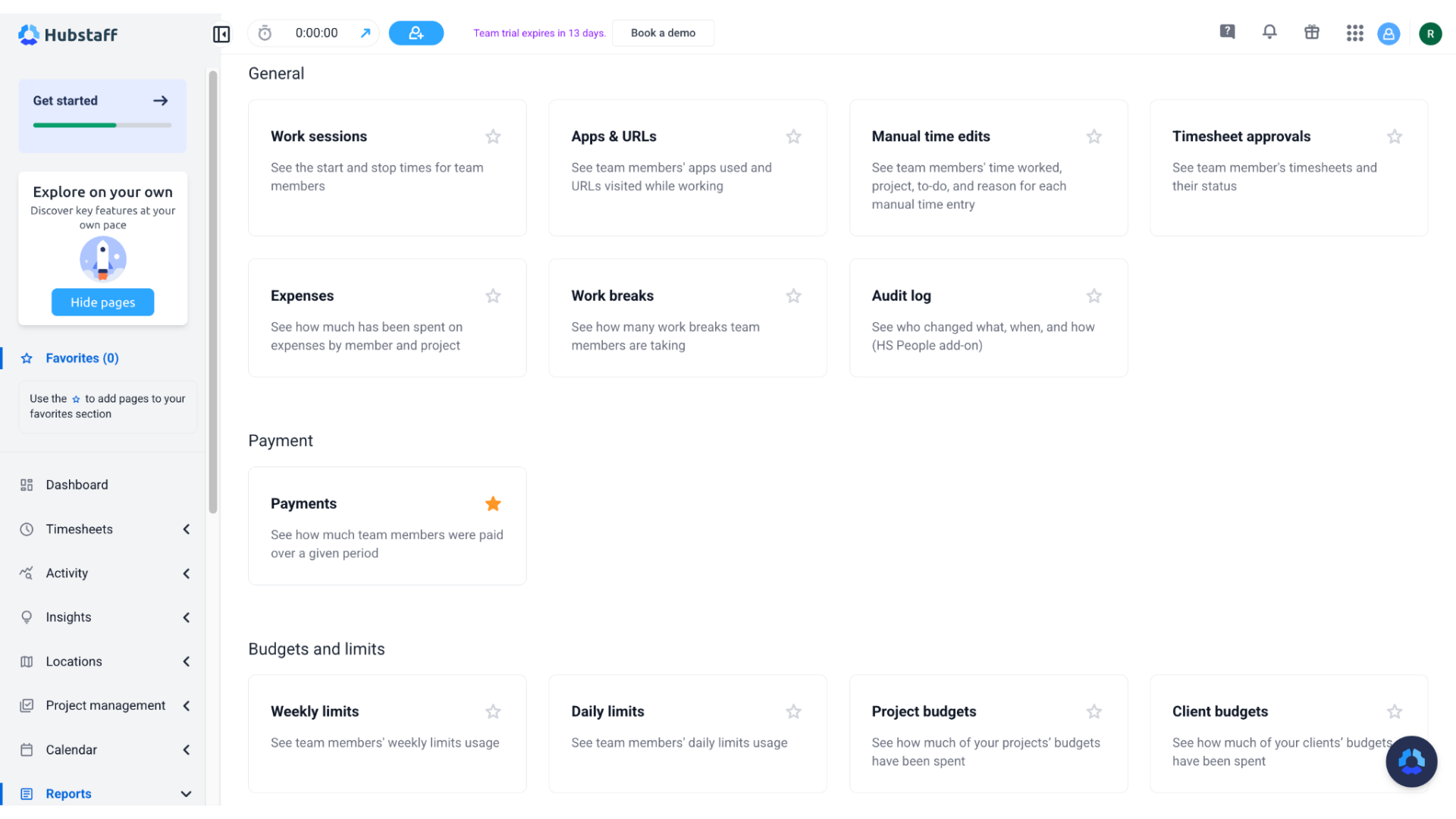
Hubstaff provides 20 reporting templates for daily/weekly hours, work sessions, productivity monitoring, payments, time off, invoice, schedule, and job sites. These reporting formats are useful for estimating labor costs per project, and reviewing time, projects, and performance.
Mobile App - Winner:
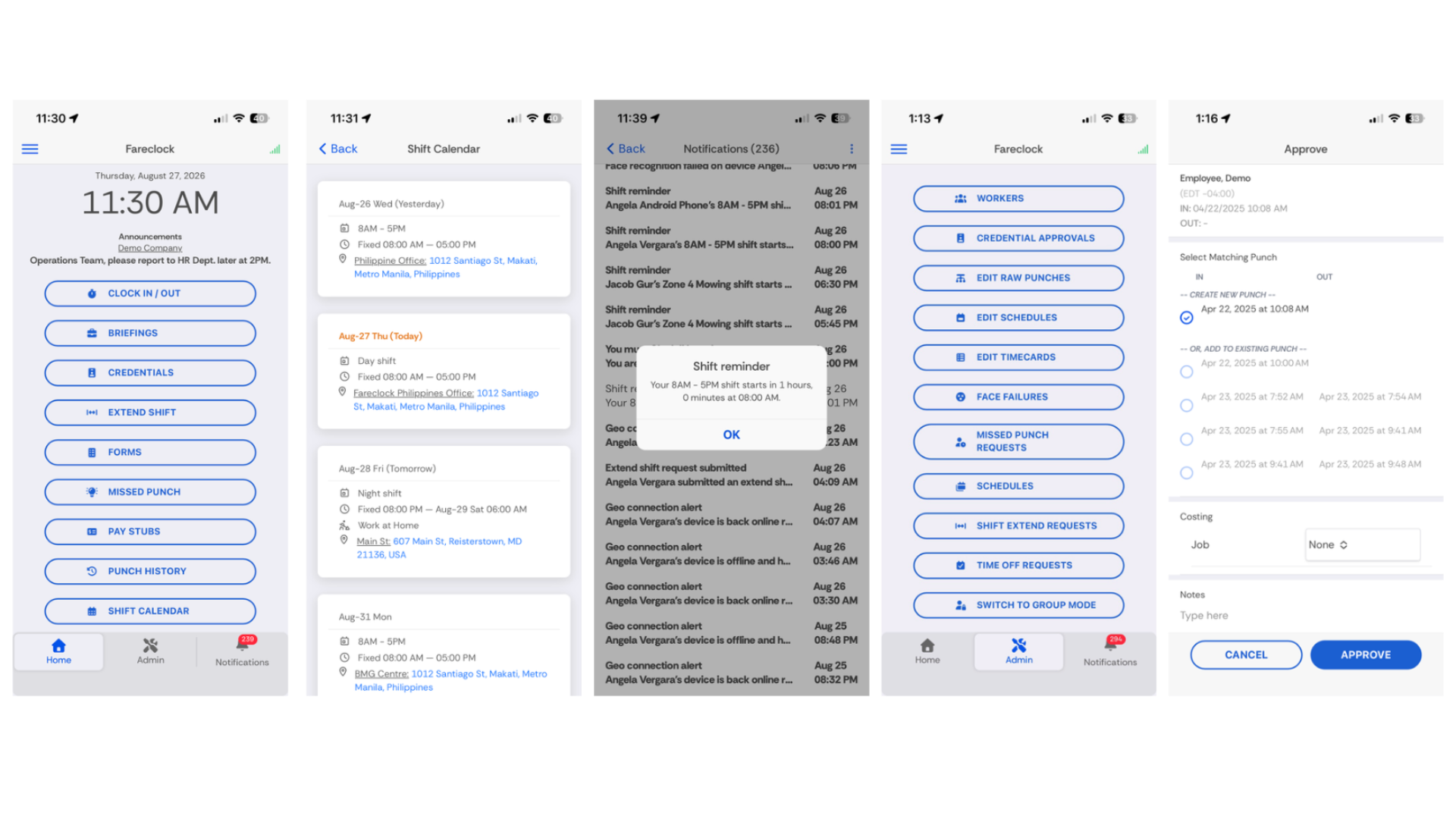
Fareclock’s mobile app offers a wide range of tools to support time and attendance tracking and worker management. The app allows you to clock in and out with advanced AI-powered Facial Recognition, access company briefings, update personal credentials or documents, submit a request for extended shifts, file missed punches, request time off, fill out required forms, view pay slips, punch history, upcoming shifts and total hours worked. Admins can also access individual profiles to enroll their face models, view schedules, and perform necessary approvals for missed punches, shift extend, time off, credentials, and more.
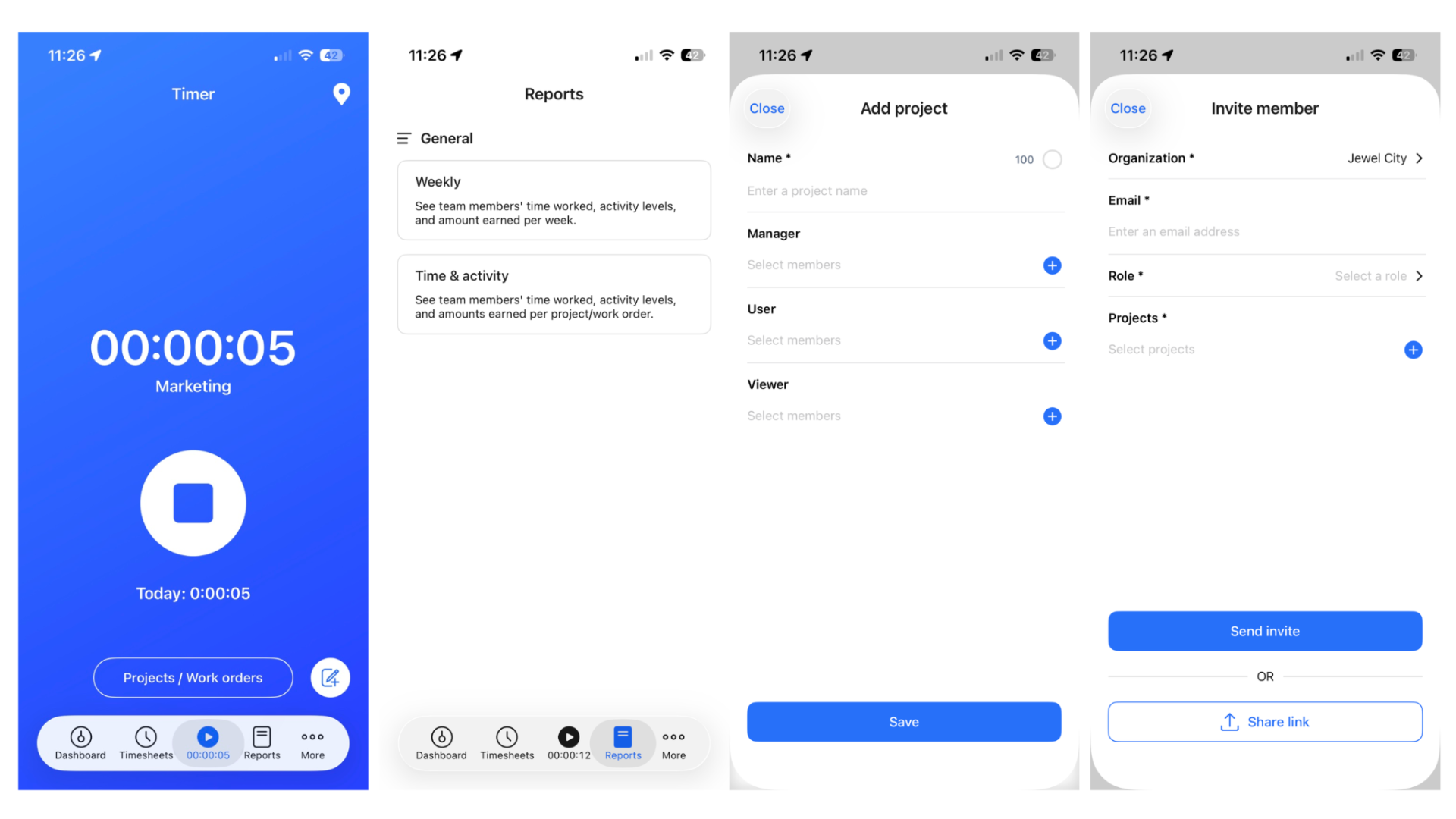
On the other hand, the Hubstaff mobile app is mainly built for tracking work time and, if enabled, location. Mobile users can use a start/stop a work timer to choose a project or work order, track time against specific tasks, create projects, and see tracked time and, depending on permissions, reports such as weekly or time/activity reports. The mobile app does not record screenshots, keyboard/mouse activity, apps used, or websites/URLs. Those are primarily a part of Hubstaff’s desktop-app tracking capabilities.
Notable Key Differences
Fareclock and Hubstaff each have unique features that differentiate them from one another.
Fareclock
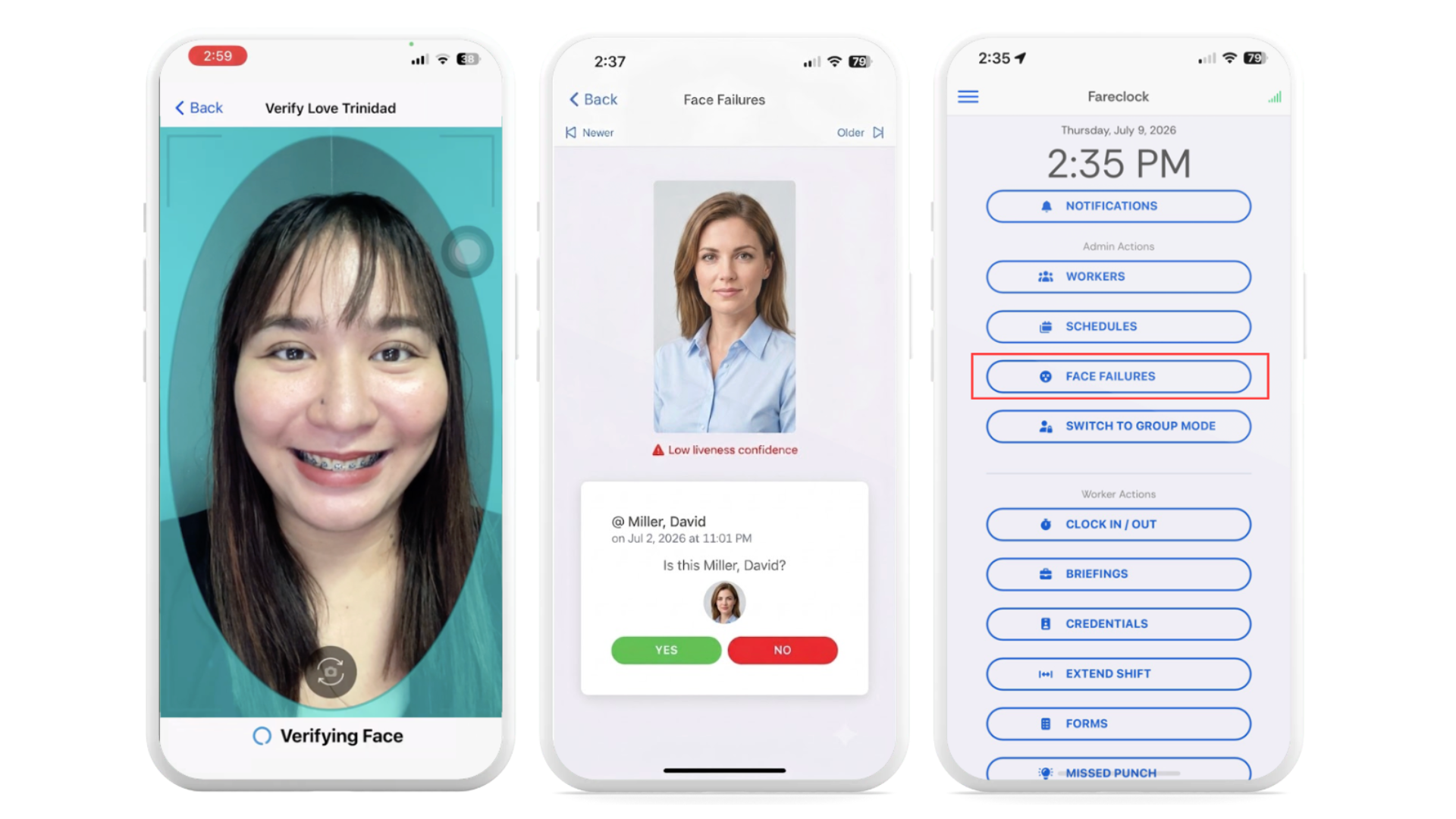
Advanced Facial Recognition
Features such as quick face model enrollment, automatic low-light detection, and adaptive face model updates help maintain accurate and reliable facial recognition during everyday use. Facial recognition mismatch alerts and face failure approval workflows are also available on the dashboard and app to help managers quickly identify and resolve verification issues, preventing buddy punching and spoofing attempts.
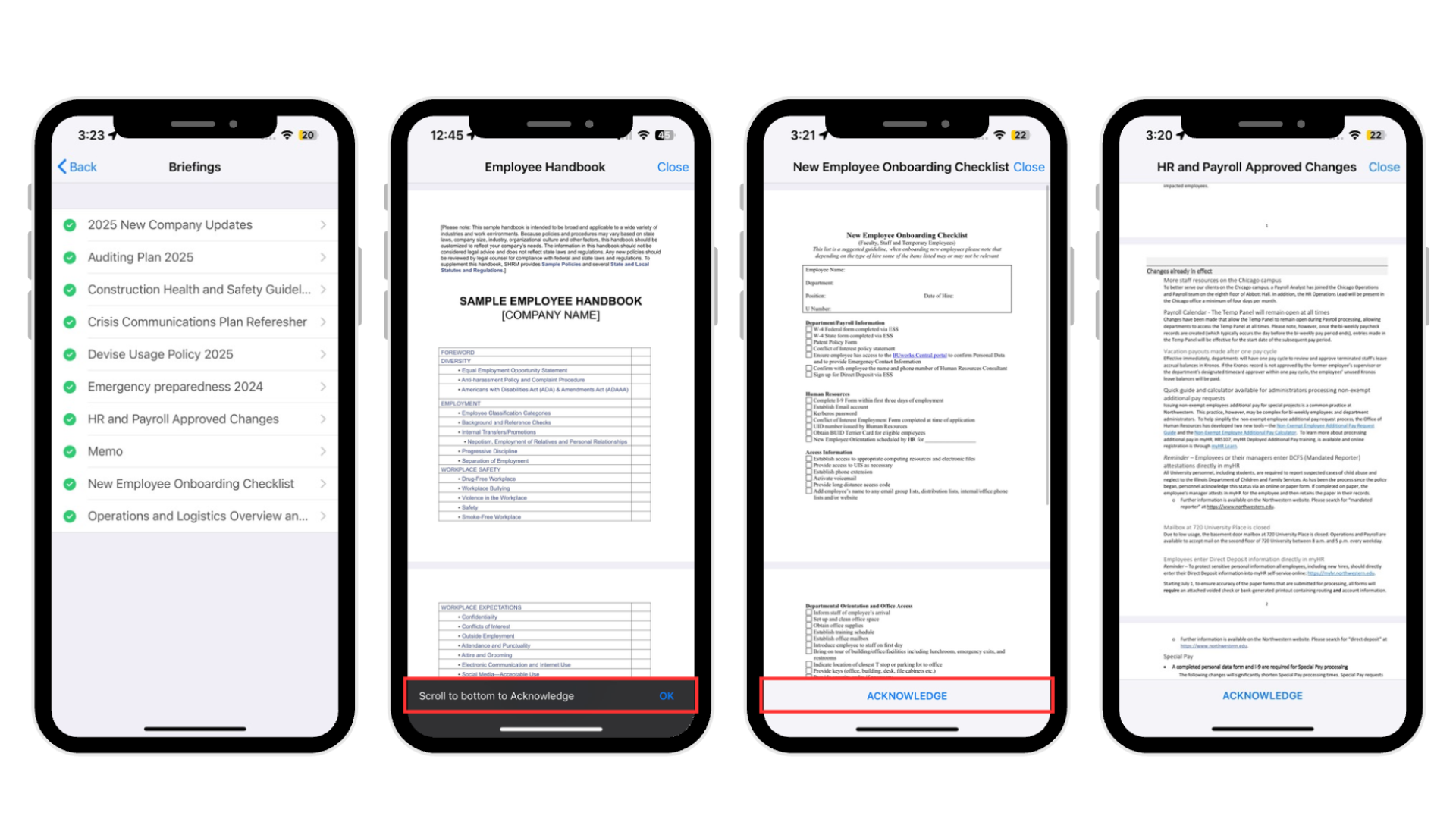
Briefings
Features such as customizable PDF briefings, flexible rebriefing schedules, and assignment by policy, user profile, or job help ensure workers receive and acknowledge important documents for compliance. Briefings can be presented during induction or clock-in, while workers can access available briefings in the app and review their acknowledgment history.
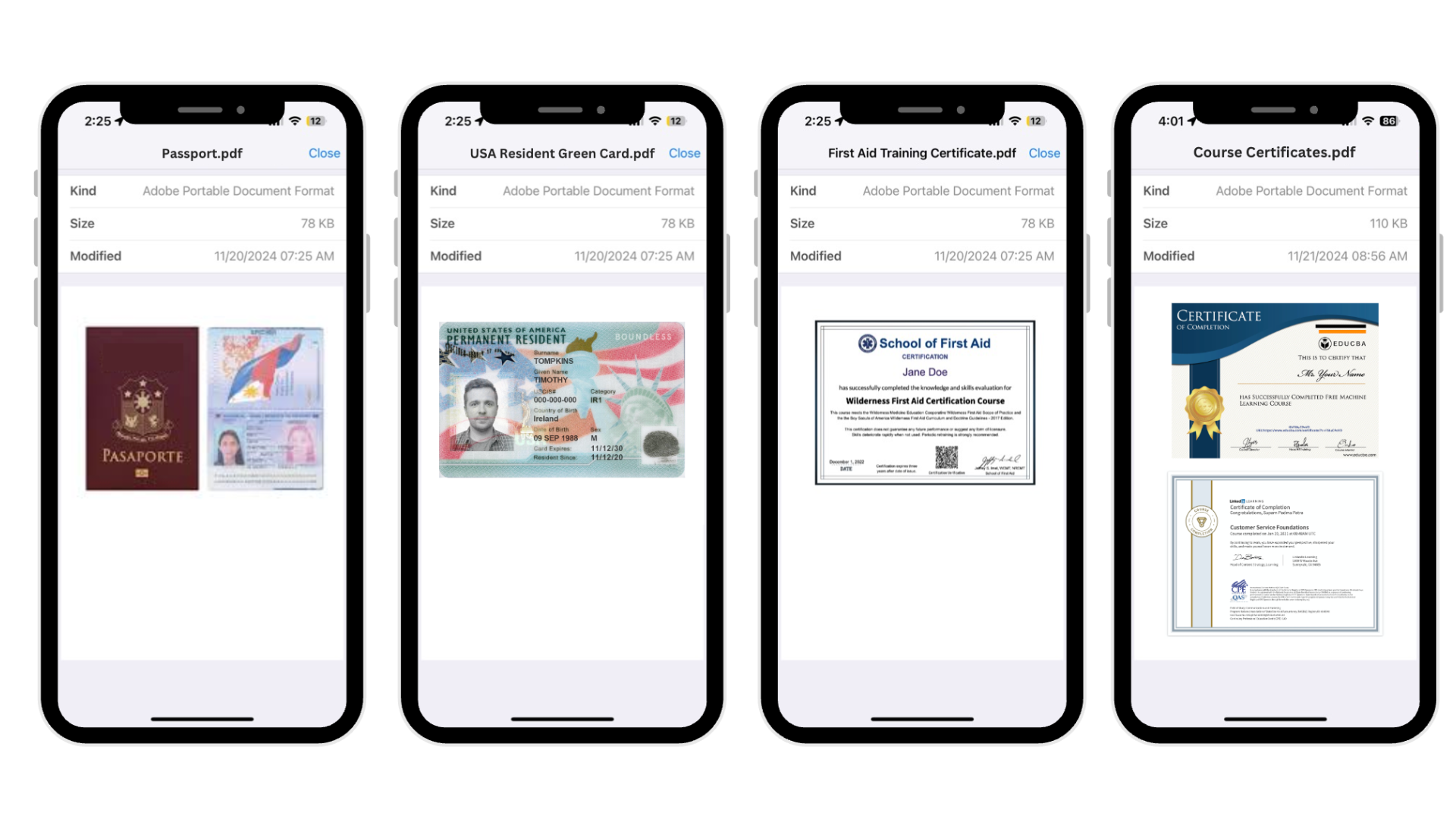
Credentials
Keep worker qualifications and compliance documents organized by allowing admins to define required credentials, upload supporting documents, and track expiration dates. Requirements can be assigned based on worker roles or specific jobs, while workers can submit and update their own credentials through the mobile app for administrator approval. Automated status tracking, alerts, and reporting make it easier to identify missing or expired credentials and ensure workers remain compliant before clocking in.
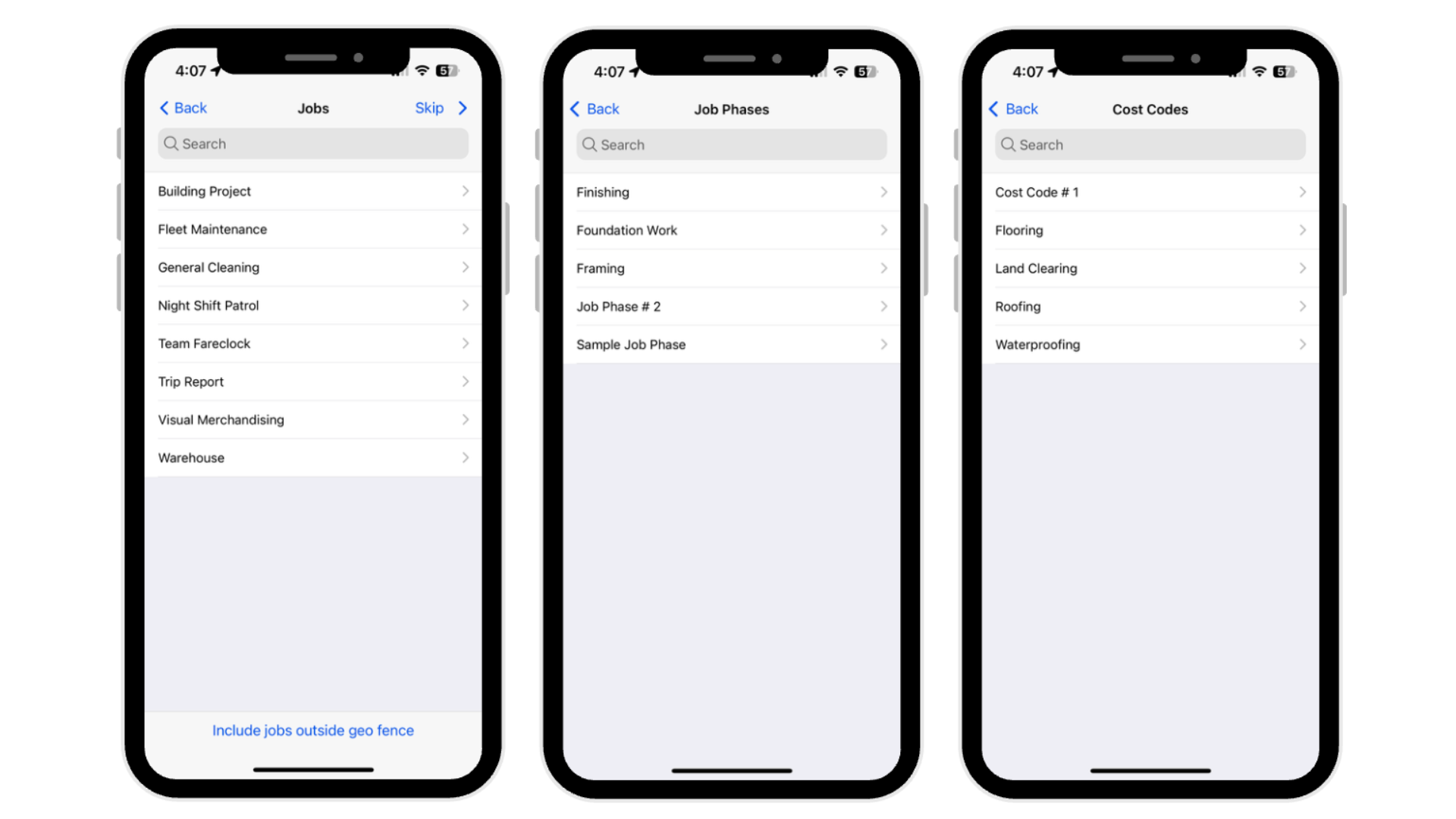
Job Costing
Track worker time by assigning clock-ins to specific jobs, with options to use simple job lists or enhanced classifications such as job phases and cost codes. Workers can select jobs when clocking in, transfer between jobs, or have jobs automatically assigned based on permissions or geofencing. This provides more detailed visibility into where your team is working, improving labor tracking, job reporting, and cost allocation.
Forms
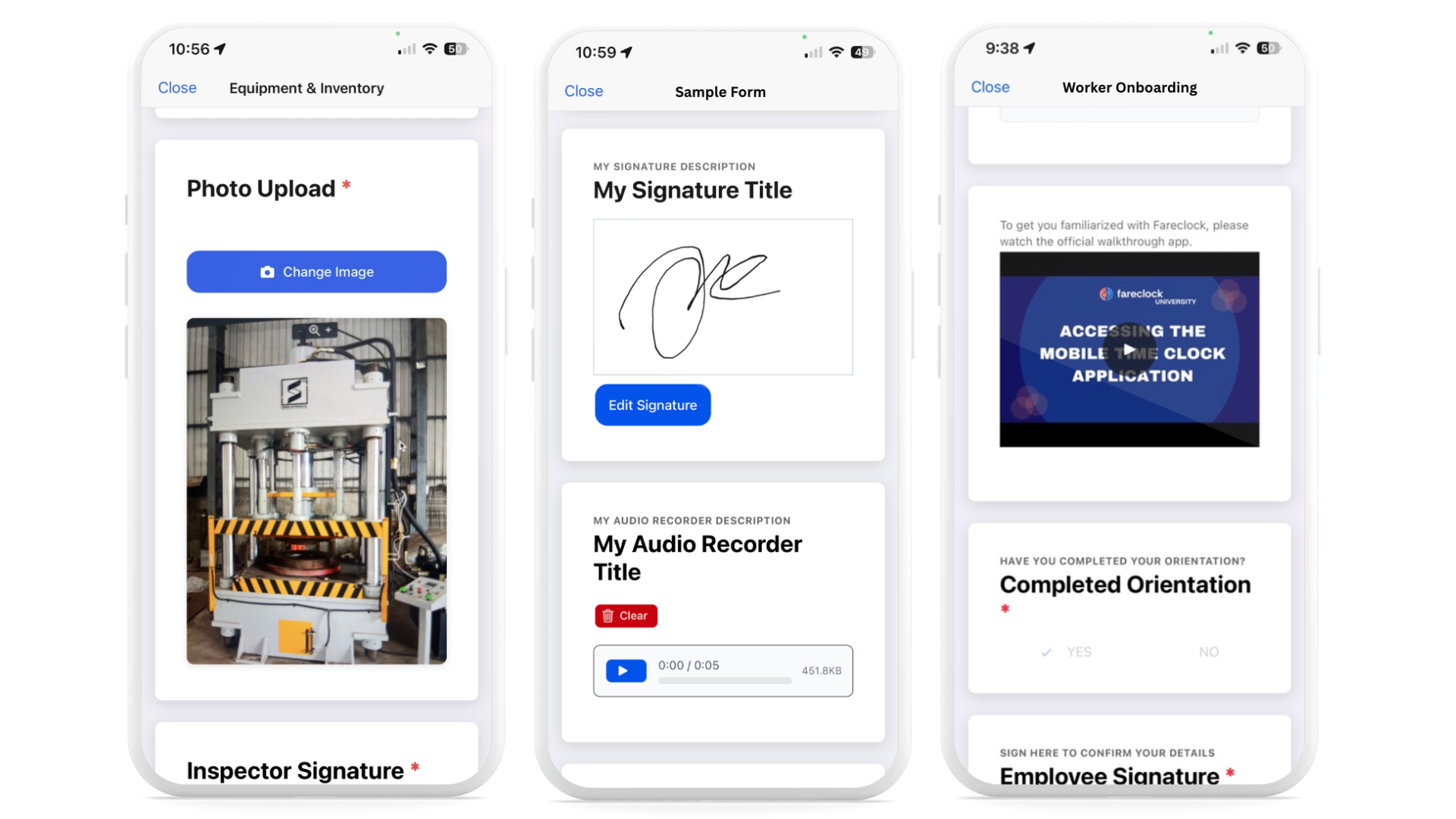
Fareclock Forms streamlines accurate, connected data collection with real-time visibility. Easily create, save, and deploy multiple form templates to the right employees, collect detailed data using comprehensive field options, and view responses in the Fareclock console for faster, informed decisions. All submissions are automatically timestamped and linked to the employee, date, time, and location.
Buddy Punch offers an intuitive, easy-to-learn solution that covers the core essentials of employee time tracking, scheduling, and PTO management without the complexity of a full workforce management system.
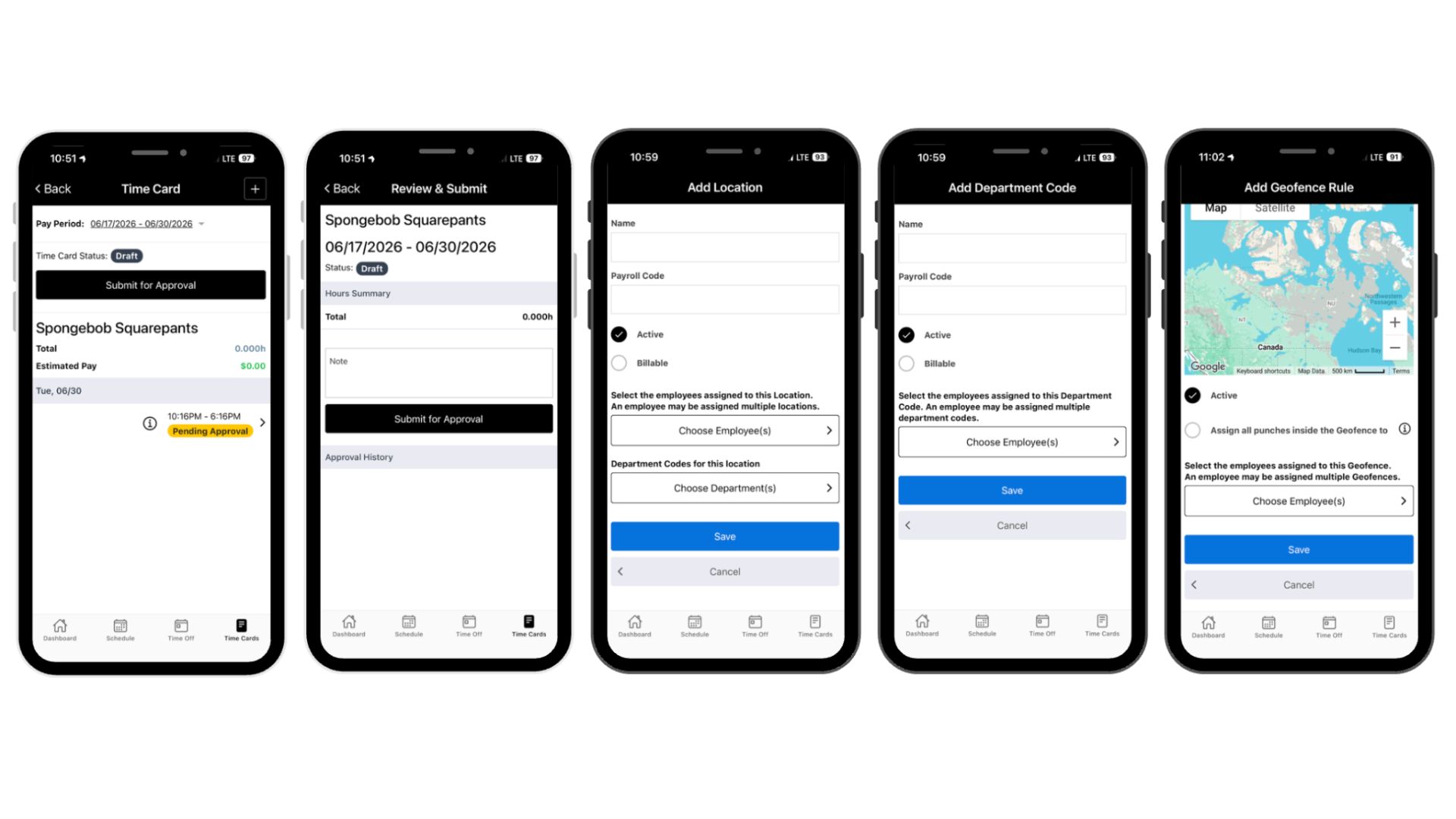
→ Workers can submit their time card for admin approval.
→ Worker calendar is available to sync together approved shifts and time off entries into one singular view.
Hubstaff
Productivity Monitoring
Hubstaff combines time tracking with tools like AI-based unusual activity detection, app and URL tracking, idle time monitoring, optional screenshots, and achievement badges. These give managers another approach to monitoring workforce productivity tied to time tracking logs.
AI-Powered Workforce Analytics
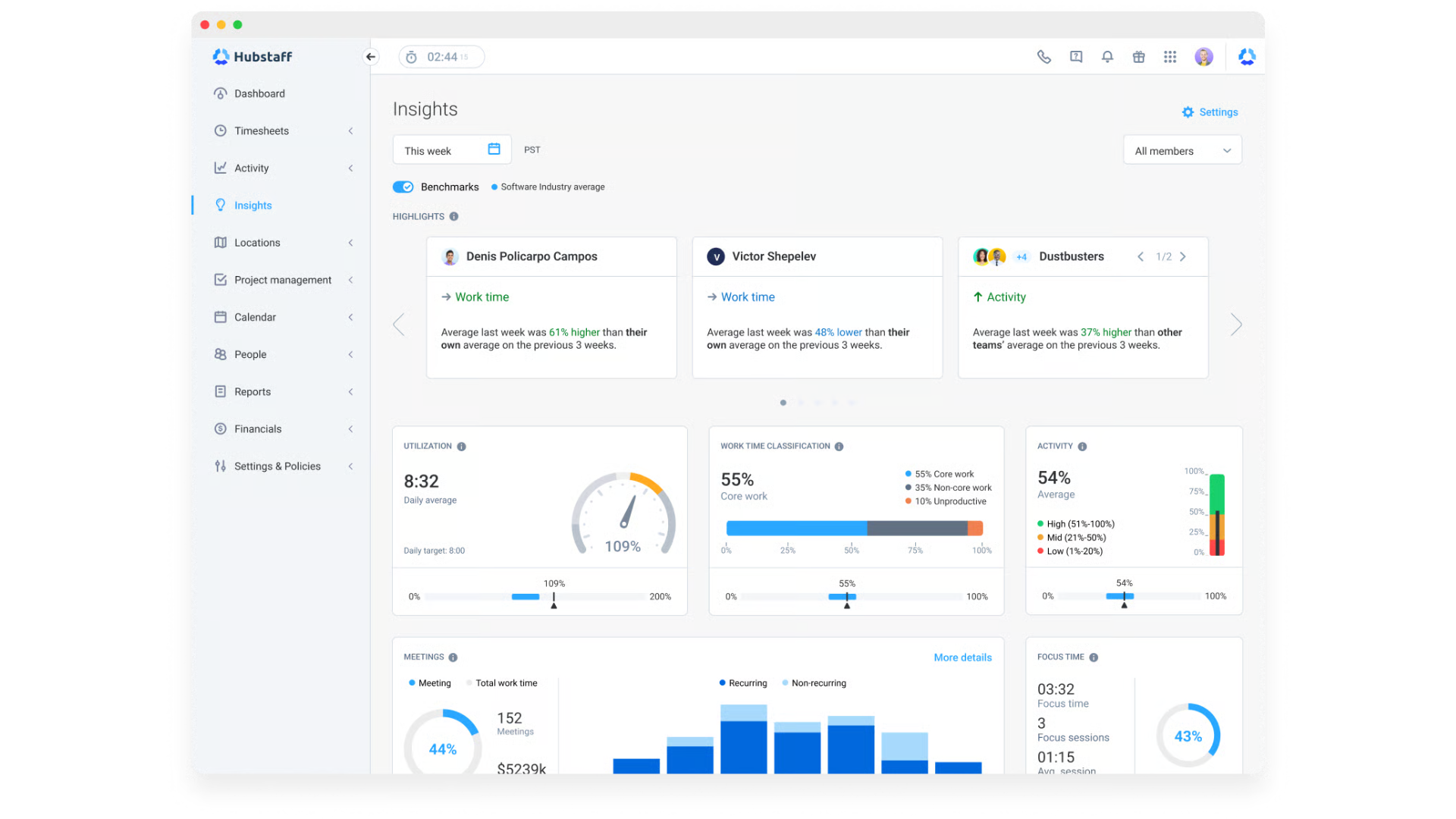
Insights into real-time utilization tracking, productivity, capacity planning, customizable reporting, productivity trend analysis, and workforce performance. These data help admins understand workloads, optimize schedules, forecast staffing needs, and improve operational efficiency for better planning, cost management, and team performance.
Integrations
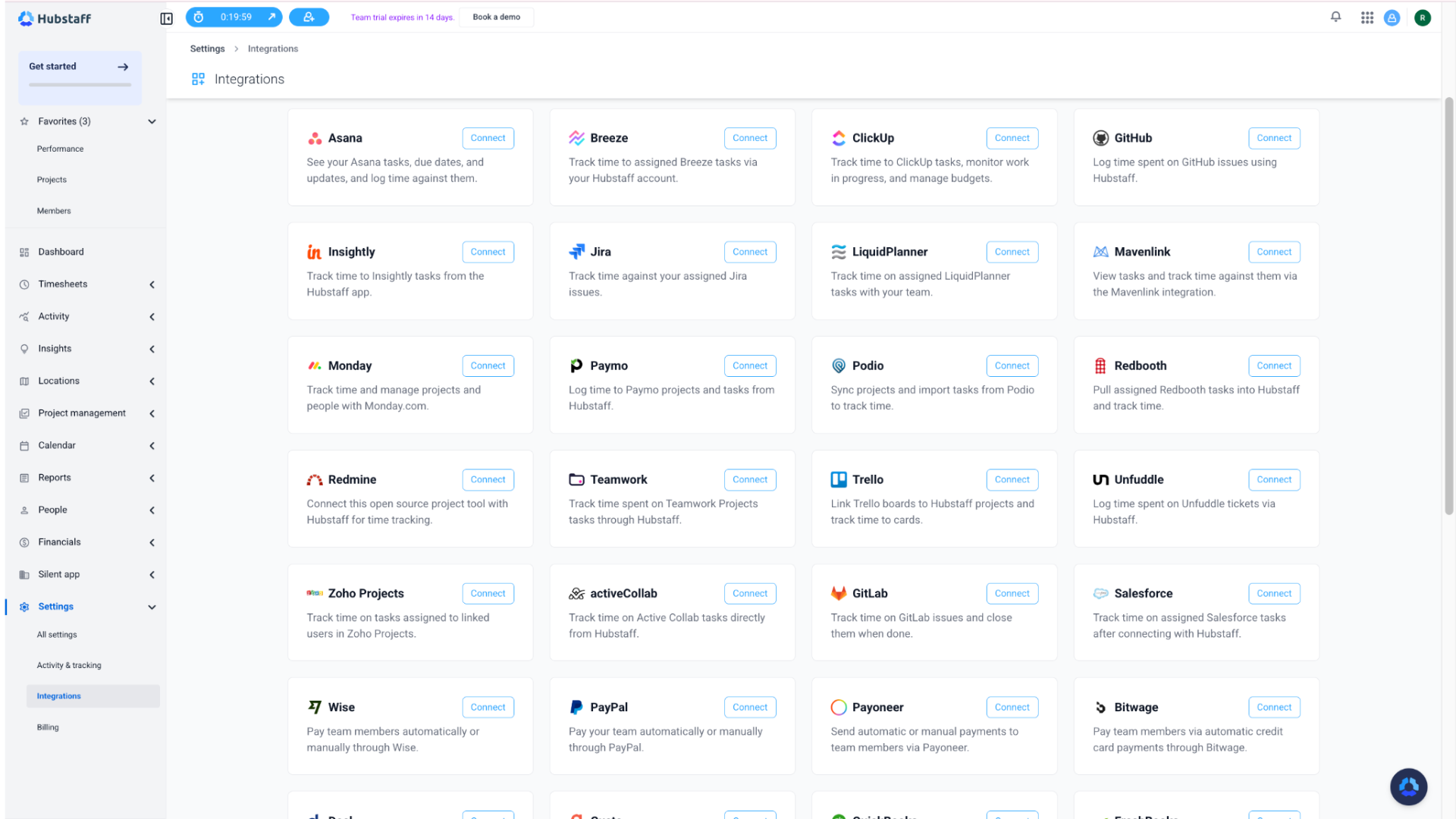
Connect your business with over 30 different app integrations for time tracking, project management, accounting, and payments. Hubstaff can work with apps like Jira, Slack, Wise, Asana, Google Calendar, and more.
Pros and Cons
Fareclock
Pros
- Modern UX design
- AI-powered facial recognition
- Strong fraud prevention
- Flexible scheduling options
- Detailed job costing
- Multiple clock-in methods
- Strong mobile admin control
- Automatic holiday handling
- 28+ reporting options
- GPS tracking and Geofencing
- Live location breadcrumbs
- Advanced shift management
- Payroll-ready timecards
- Overtime calculations
- Digital forms
- Raw punch logs
- Attendance audit trails
Cons
- Limited analytics
Hubstaff
Pros
- Time sheet visibility
- Timesheet approvals
- Activity monitoring
- GPS workforce tracking
- Project and job tracking
- Billable hour tracking
- Live worker location view
- Geofencing
- Project and job assignment for tracked hours
- Earned wage summaries
- Shift scheduling
- Time-off management
- Multiple integrations
Cons
- Weak offline performance
- Desktop-style interface for some features
- Heavy monitoring may feel intrusive
- Requires consistent internet for best performance
- Lacks document management
- Privacy concerns due to activity tracking
Customer Testimonials
See what their customers have to say about them.
Fareclock
“My overall experience with Fareclock has been good. It is easy to use, convenient, and helpful for tracking attendance and working hours. Easy to use and convenient for tracking attendance, working hours, and clock-in and clock-out daily.”
– Lecill P.
“Fareclock is super easy & affordable for companies to use, and features like GPS tracking and facial recognition help us maintain accountability without micromanaging. The mobile interface is good, making clocking in and out really quick for employees. You can set different codes like absent, rest day, on leave & resign which is really useful for complex schedules or compliance needs.”
– Zandrea H.
More of Fareclock on Capterra →
“Amazing, technical support is top notch. There has never been an issue or concern that has not been fixed or resolved. They will make your experience feel one of a kind.”
– Anonymous
“Nice and very good, with accurate time and location.”
– Dexter T.
More of Fareclock on G2 →
“My overall experience with Fareclock has been very positive. I am happy and fully satisfied with the service they provide. The platform is reliable, user-friendly, and has made our processes more efficient. Their support team is also responsive and helpful whenever assistance is needed. Kudos to the Fareclock team for delivering excellent service!”
– Charee A.
Fareclock on Apple App Store : 4.7 / 5 Star Ratings
Fareclock on Google Play Store : 4.7 / 5 Star Ratings
“I’ve been using Fareclock for 3 months and it’s a very unique way to clock in and out of work. You can track how many hours of work you have done. There is facial recognition, making it simple for you to use. Employers can use Fareclock as a way to track employees hours. This app tracks any overtime hours that may have been done.”
– Jason E.
Feedback Highlights:
Fareclock is described by its customers to be easy to use, reliable, and convenient for tracking attendance, working hours, and clock-in/clock-out activities. They also notably appreciate its features like GPS tracking, advanced facial recognition, accurate time/location tracking, and flexible scheduling options, along with responsive and helpful customer support.
Hubstaff
“Still great for time tracking, but accuracy in performance metrics is lacking. It could use an update for how it collects performance data.”
– Anonymous
“Overall, I do not like Hubstaff. Not only does it stop your time after 5 minutes of non activity but it takes a screen shot every 10 minutes. You have to really pay attention to the timer especially if you are on a call and are not moving your mouse or keying. If any changes need to be made to your timesheet you have to request it from the administrator and hope it is done for you. I feel that I have personally not been compensated for all time worked in any given pay period due to the time tracking of Hubstaff.”
– Billing Team Lead, Medical Practice
More of Hubstaff on Capterra
“The UI is simple to understand and use. The clear menu on the left side also helps with navigation. Usually the system is responsive however the date picker will slow down when running reports. The integration with our Databricks pipeline is very helpful.”
– Co-founder at a Consulting Firm
More of Hubstaff on G2
“The design, it looks nice and easy on the eyes, and it’s pretty simple.”
– Data Annotation Specialist
Hubstaff on Apple App Store : 4.5 / 5 Star Ratings
Hubstaff on Google Play Store : 3 / 5 Star Ratings
“Far more complicated than it needs to be for basic things like processing weekly payments. It is fairly easy to manipulate for staff that want to do so. Currently my settings are to turn on and off only when they are at a job site. My personal timer started today when I was at a site and never stopped, even after I had been gone for 6 hours.”
– Google Play Store Review, 2021
Feedback Highlights:
Customers describe Hubstaff as simple, visually appealing, and generally easy to navigate, with useful integrations and time-tracking capabilities. However, some users report concerns with time-tracking accuracy, automatic inactivity settings, screenshots, timesheet adjustments, and overall complexity, which can make the platform feel restrictive or unreliable for certain workflows.
Pricing
Free Trial: Yes (30 days)
Pricing starts at:
$1.65
per user per month
Check out their pricing →Free Trial: Yes (14 days)
Pricing starts at:
$4.99
per user per month
Check out their pricing →With pricing starting at $1.65 per user per month, Fareclock costs considerably less than Hubstaff’s $4.99 per user per month while offering a broader feature set. Fareclock then provides a stronger return on investment if you’re a business looking to scale their attendance and workforce management without significantly increasing software costs.
What Should I Choose?
While Fareclock and Hubstaff share core features such as timesheet management and reporting, they differ in the additional tools and capabilities they offer, setting each platform apart.
Choose Fareclock if your business needs to pair time tracking with broader workforce management capabilities. Fareclock goes beyond attendance tracking to provide AI-powered facial recognition with liveness detection, advanced scheduling controls, multiple clock-in methods, GPS tracking with configurable geofences, detailed job costing, digital forms, employee credentials, briefings, payroll-ready timecards, and 25+ reporting templates. These capabilities make Fareclock a stronger fit for businesses that need greater control over attendance, compliance, labor costs, and workforce operations across multiple locations and job sites.
Choose Hubstaff if tracking employee time alongside productivity, projects, and work activity is your priority. Its project and task tracking, activity monitoring, productivity insights, GPS tracking, and integrations make it well suited for remote and field teams that need visibility into how work time is being spent. However, if your business requires more comprehensive attendance management and a broader workforce management solution, Fareclock would be a better fit.
Our Verdict
If your business requires comprehensive workforce management, stronger attendance controls, employee location visibility, and detailed operational oversight, then Fareclock is the stronger overall solution — all at a lower starting price.
While Hubstaff excels in productivity monitoring, project tracking, and work-activity visibility for remote and field teams, Fareclock is the smarter choice for businesses seeking greater long-term value in attendance management, workforce visibility, payroll readiness, compliance, and overall operational scalability.
Ready to see Fareclock in action?
Start your 30-day free trial to achieve first-hand experience in its secure time tracking, advanced scheduling, real-time workforce visibility, and powerful reporting!