
Free Time Card Calculator
Turn clock-in and clock-out times into accurate, payroll-ready hours in seconds
How to Use Our Free Time Card Calculator
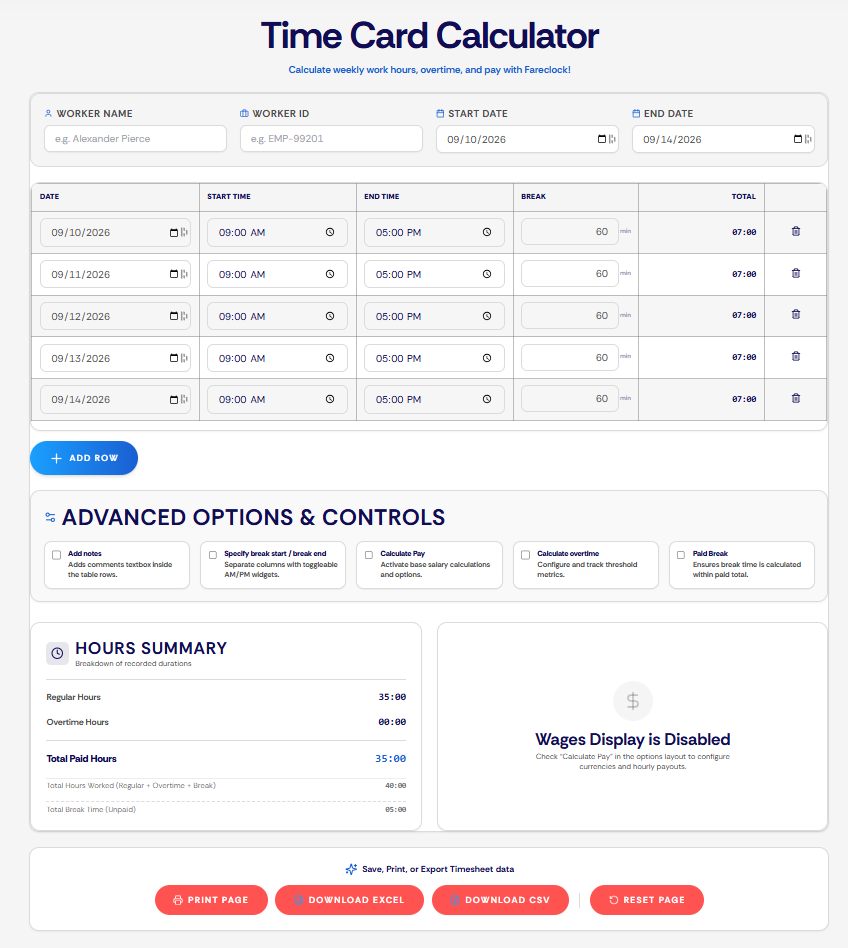
1 Enter Worker Information
- Enter the Worker Name (optional).
- Enter the Worker ID (optional).
- Select the Start Date and End Date.
2 Fill Out Each Workday
3 Add or Remove Days
4 Configure Pay Settings (Optional)
5 Review Your Results
6 Export Your Timesheet
What Can You Calculate with Our Free Time Card Calculator
- Daily and Weekly Hours Worked: Start and end times measures exact shift durations and aggregates these daily entries into a clear weekly total.
- Break Times and Paid Breaks: Deducts unpaid breaks automatically or includes paid rest periods in total work hours based on set preference.
- Overtime Hours and Custom Thresholds: Separates standard work hours from overtime by tracking overtime hours that go past custom limits.
- Gross Pay and Wage Projections: Combines base hourly rates and overtime multipliers for accurate total pay estimates.
- Shift Notes and Worker Details: Logs employee names, IDs, dates, and row-by-row notes to keep your payroll records organized.

Who Can Benefit from Our Free Time Card Calculator
- Small Business Owners who need to calculate daily and weekly work hours, subtract break times, and generate estimates of total paid hours or weekly shift totals.
- HR Managers & Payroll Teams who need to compute for regular hours, overtime, paid breaks, and estimated wages using customizable overtime limits, paid break toggles, and itemized hour breakdowns.
- Team Leaders & Supervisors who need to enter shift dates, start and end times, and break durations to calculate total hours worked across multiple days.
- Freelancers & Independent Contractors who need to log their worked hours, organize timesheet data, and export records for personal reference or client invoicing.

What are the Benefits of Using Our Free Time Card Calculator?
Doing the math by hand invites mistakes. Automating it:

- Improves accuracy by eliminating manual calculation errors
- Saves time by automatically totaling work hours, breaks, and overtime
- Reduces administrative workload for managers, HR, and payroll teams
- Simplifies timesheet verification with consistent, reliable records
- Minimizes disputes by keeping hour tracking transparent
- Supports payroll accuracy with precise work-hour calculations
- Increases productivity by streamlining time tracking and recordkeeping
- Helps maintain compliance with company policies and labor regulations
Frequently asked questions
1 What is the difference between a time card and a timesheet?
A time card logs specific shift clock-in and clock-out times for employees, while a timesheet summarizes total hours worked across tasks for payroll and client billing.
2 Does the calculator track overtime?
Yes, the Fareclock Free Time Card Calculator features customizable threshold settings to track daily or weekly overtime. It automatically separates regular work hours from overtime hours.
3 How do I calculate decimal hours for my timecard?
Enter your start time, end time, and break minutes directly into the calculator fields. The Fareclock Free Time Card Calculator will instantly convert your total daily shift duration into payroll-ready decimal hours.
4 How are break times and paid breaks handled?
You can enter break durations in minutes to deduct unpaid meal times from your total hours worked. Alternatively, toggle the "Paid Break" setting to include break time within your total paid hours.
5 Can I calculate gross pay and wages directly with this tool?
Yes, enable the "Calculate Pay" option to unlock hourly rate and overtime multiplier fields. The calculator multiplies your total hours by your custom rate to generate instant gross pay estimations.
6 Can I add custom shift notes or employee details?
Yes, you can input employee names, IDs, and period date ranges directly above the table. Enabling the "Add notes" setting also adds a custom comment box to every row for shift details.
7 Who can benefit from using this free Time Card Calculator?
Small business owners, HR teams, team leaders, supervisors, and freelancers all benefit from automating hour tracking. It eliminates manual math errors, automates payroll processing, and ensures accurate wage calculation for everyone.
Other Free Calculators
Overtime Calculator
Calculate for overtime hours and pay.
Payroll Hours Calculator
Convert shift times into payable hours.
Absence Percentage Calculator
Compute your team’s absence rate.
Ready for Payroll Without the Guesswork?
A calculator is a great start. Fareclock is the finish line. Our attendance and workforce management platform is built for businesses and organizations of any size, automating time tracking, break rules, and overtime so payroll runs clean every time.