

Construction workers may start early, move between job sites, or head straight to their tasks before remembering to clock in. Missed punches happen, even when a crew follows an established timekeeping process. The key is to correct them promptly, verify the hours worked, and keep a record of the change without delaying wages the worker has earned.
This matters because wage enforcement remains active. In fiscal year 2025, the U.S. Department of Labor’s Wage and Hour Division recovered more than $259 million in back wages for nearly 177,000 workers. This article explains why construction workers miss punches, how to correct time records, what to document, and how to prevent repeat errors.
Why Do Construction Workers Miss Clock-Ins and Clock-Outs?
Construction sites make it easy to forget a punch. Crews may start early, move between locations, or work in areas with poor connectivity. Common causes include:
- Early starts: Workers may begin unloading materials or preparing tools before remembering to clock in, especially when the foreman isn’t there yet.
- Multiple job sites: Workers who move between projects need to record time for each location. Every change creates another opportunity to miss a punch.
- Weak signal: Basements, remote sites, and new developments may have limited mobile coverage, making it difficult to record time through an online system.
- Unclear end-of-day routines: Field work doesn’t always finish at a predictable time. Without a consistent shutdown routine, workers may leave without clocking out.
- Gloves and dirty hands: Work gloves, wet hands, and dirt can make some devices difficult to use. Workers may also be too far from a shared clock to record a punch conveniently.
- Paper timesheets: Paper records rely on workers remembering to write down their hours, leaving more room for missing entries and incomplete information.
Most missed punches happen because of work conditions or gaps in the process, not deliberate misconduct. Understanding the cause helps employers address the problem without treating every missed entry as a disciplinary issue.
Why Missed Clock-Ins and Clock-Outs Are a Problem for Construction Companies
A single missed punch may seem minor. Across a crew and a pay period, however, missing time records can affect payroll, job costs, compliance, and how supervisors spend their time.
- Payroll errors and employee payment disputes: Missing punches slow down payroll and create extra administrative work. They can also lead to disputes when workers receive incorrect pay. A missed punch doesn’t remove the employer’s obligation to pay for hours actually worked.
- Inaccurate labor cost tracking: Labor often accounts for 40% to 60% of total construction project costs. When hours or cost codes are incorrect, job costing becomes less reliable. This makes it harder to track project spending against estimates and prepare accurate bids for future work.
- Compliance and recordkeeping risks: Under the Fair Labor Standards Act (FLSA), employers are responsible for keeping accurate records of hours worked by covered employees. Uncorrected missed punches and poorly documented changes can make it harder to verify work hours and resolve wage disputes.
- Reduced workforce productivity and accountability: Supervisors may spend Fridays chasing missing hours instead of managing the job. Informal fixes, such as a foreman clocking in for a worker, can also make it unclear who recorded or verified the time. Late corrections delay access to reliable labor cost information.
What Should You Do When a Construction Worker Misses a Clock-In or Clock-Out?
Follow the same six steps each time a worker misses a punch. A consistent process helps supervisors verify the hours, correct the record, and document the change before payroll. Employee time clock software like Fareclock can also make it easier to review recorded punches, check available location data, and keep timecards organized across job sites.
1. Ask the Employee to Report the Missing Punch
Ask workers to report missed punches as soon as they notice them, ideally before leaving the site or by the end of the workday. They should provide their actual start or finish time and explain what happened. Prompt reports are easier to verify than entries reconstructed days later.
With Fareclock, workers can submit missed punch requests directly through the mobile time clock app, providing the relevant time, job, and notes about the missing entry. This gives administrators a request to review instead of relying on verbal reports or messages.
2. Verify the Employee’s Actual Work Hours
Check the reported time with the foreman or site supervisor who can confirm when the worker arrived or left. Don’t automatically fill in the scheduled shift, since workers may start early, finish late, or move between jobs.
If the worker clocked in through Fareclock earlier that day, review the available time records and associated location information to help verify the entry. Use the supervisor’s confirmation and other available records to establish the actual hours worked.
3. Check Available Time and Attendance Records
Use other records to help verify the reported hours. Depending on the site and the information available, these may include:
- Nearby punches from the same crew
- GPS location data associated with recorded punches
- Daily site logs or foreman reports
- Gate or access records, where available
- Shift schedules and work assignments
Fareclock can record punch locations and support live GPS tracking with breadcrumb history on its Premium plan. These records can help supervisors understand where a worker was during the day, although location data alone may not prove the exact time work began or ended.
If a worker missed a punch because the site had no internet or mobile signal, check whether the punch was recorded offline and synced later. Fareclock supports offline punching and automatic syncing when connectivity returns.
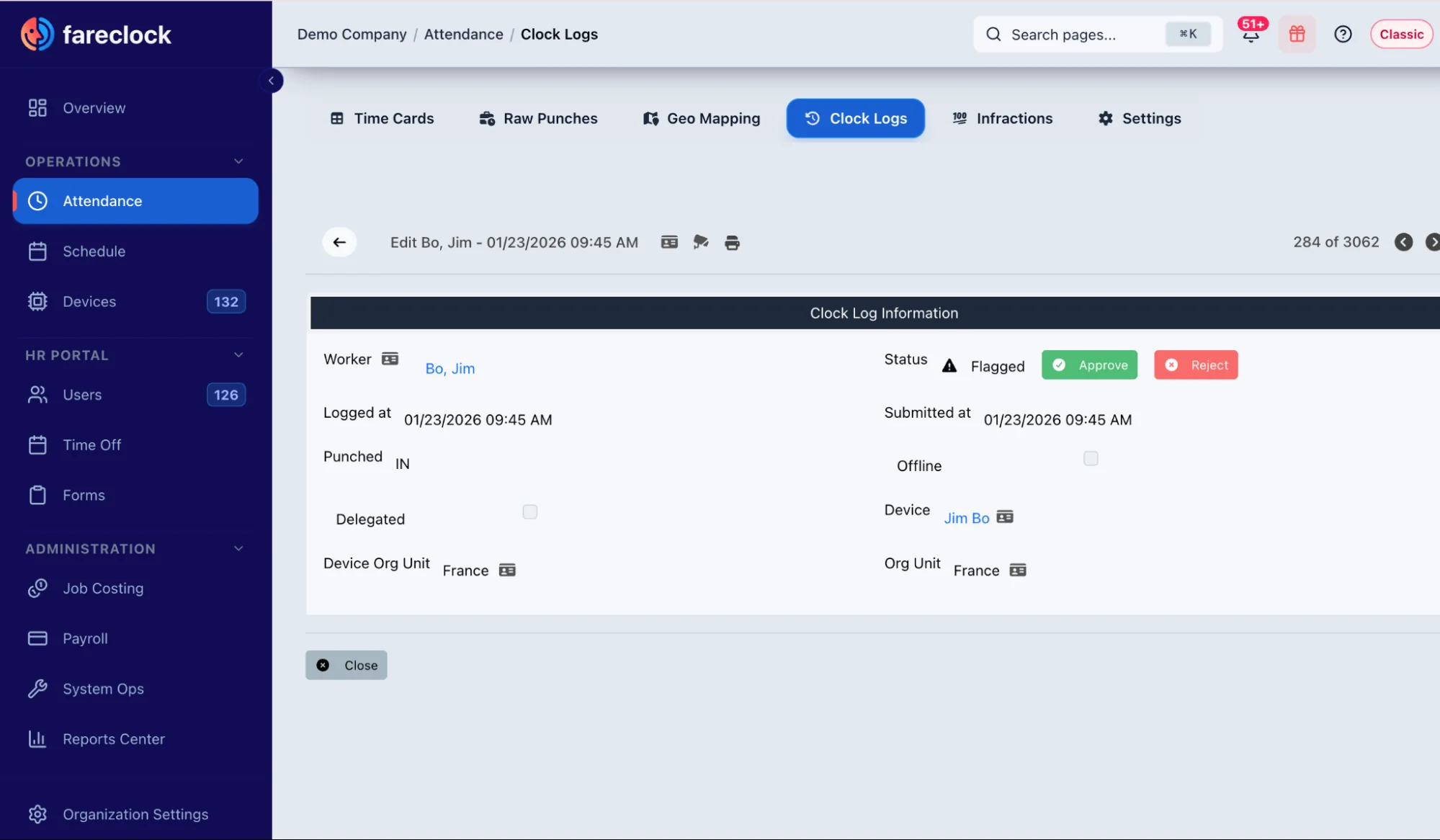
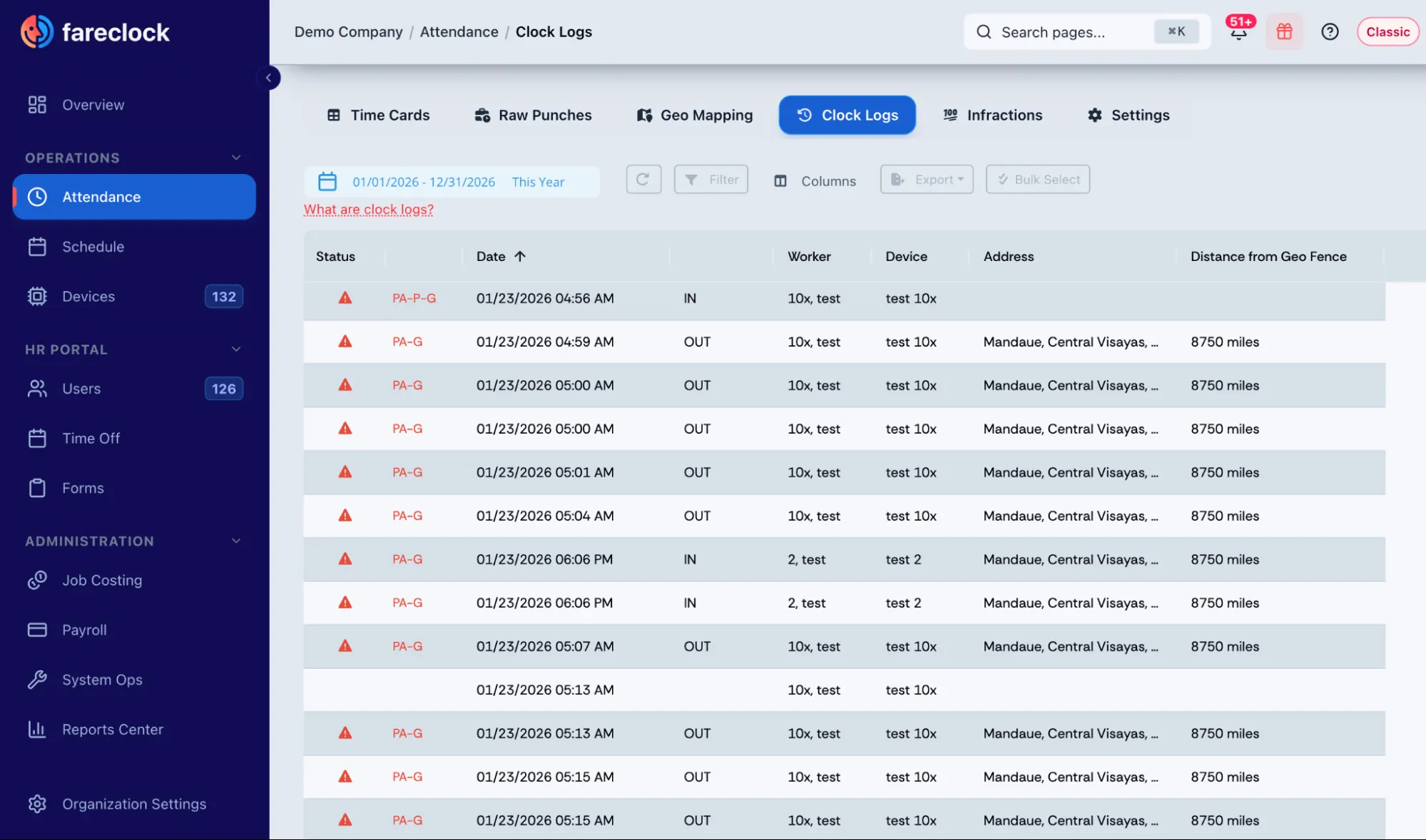
Administrators can also use Fareclock’s Clock Logs to investigate missing punches. Clock Logs record successful clock-in and clock-out attempts as well as flagged attempts, such as failed facial recognition or cases where a worker authenticated successfully but didn’t complete the clock-in or clock-out transaction. Reviewing these logs can help identify why a punch is missing.
4. Correct the Missing or Incorrect Time Entry
Once the hours are verified, update the time record with the correct entry. Record the reason for the correction and who made it. Fareclock’s timecard review tools help administrators inspect and correct recorded time before payroll, keeping corrections within the normal review process.
Any adjustment should reflect the time actually worked. Never change a record to reduce pay or avoid overtime obligations.
5. Get Supervisor Approval
Have an authorized supervisor or manager review and approve the correction. Keep the employee’s report separate from the approval so there’s a clear record of who raised the issue and who verified the change.
In Fareclock, administrators can review, approve, or reject missed punch requests through the Organization Console or Fareclock mobile app. Administrators receive notification alerts about pending requests, while workers receive alerts related to their submitted requests.
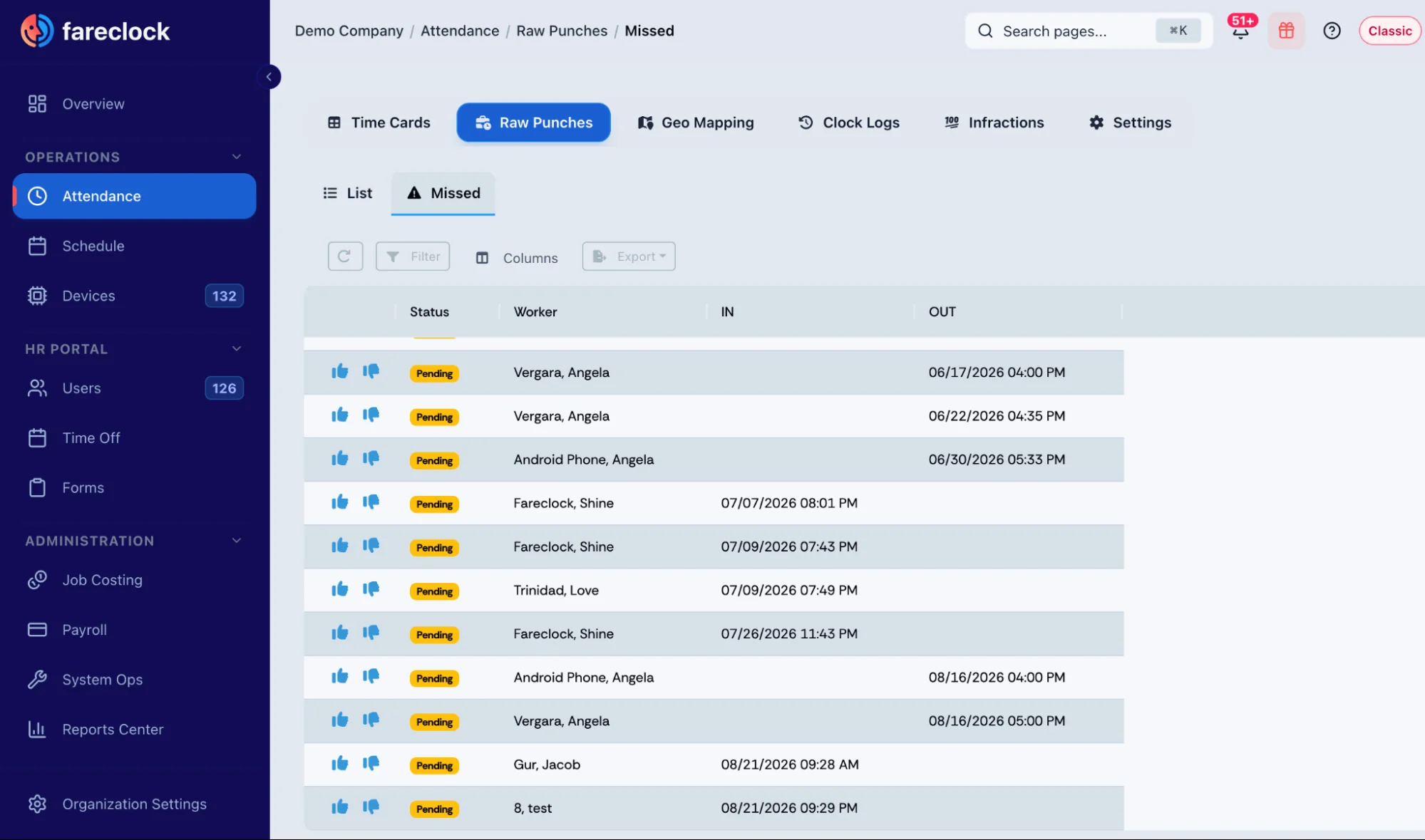
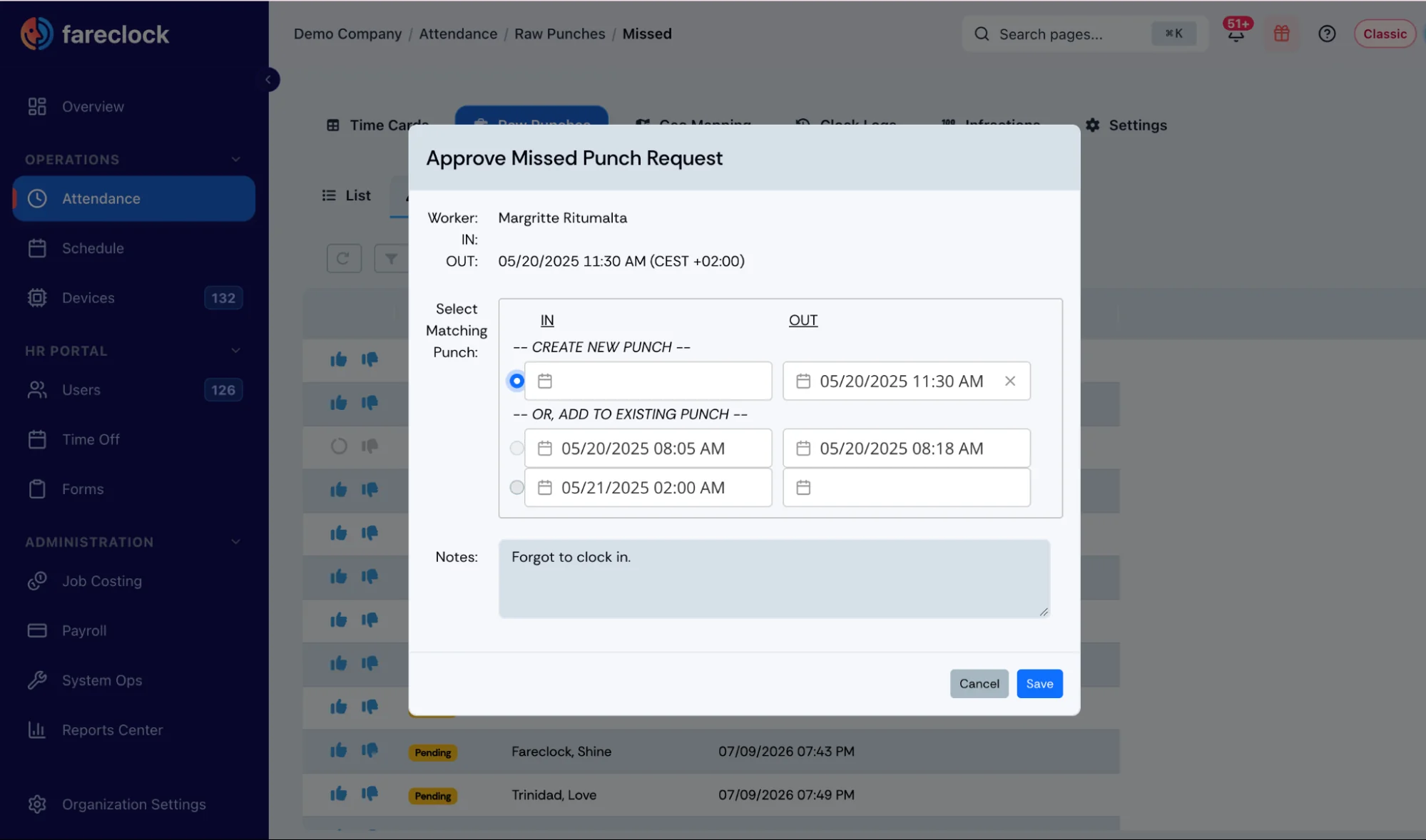
Missed Punches on the Fareclock Organization Console
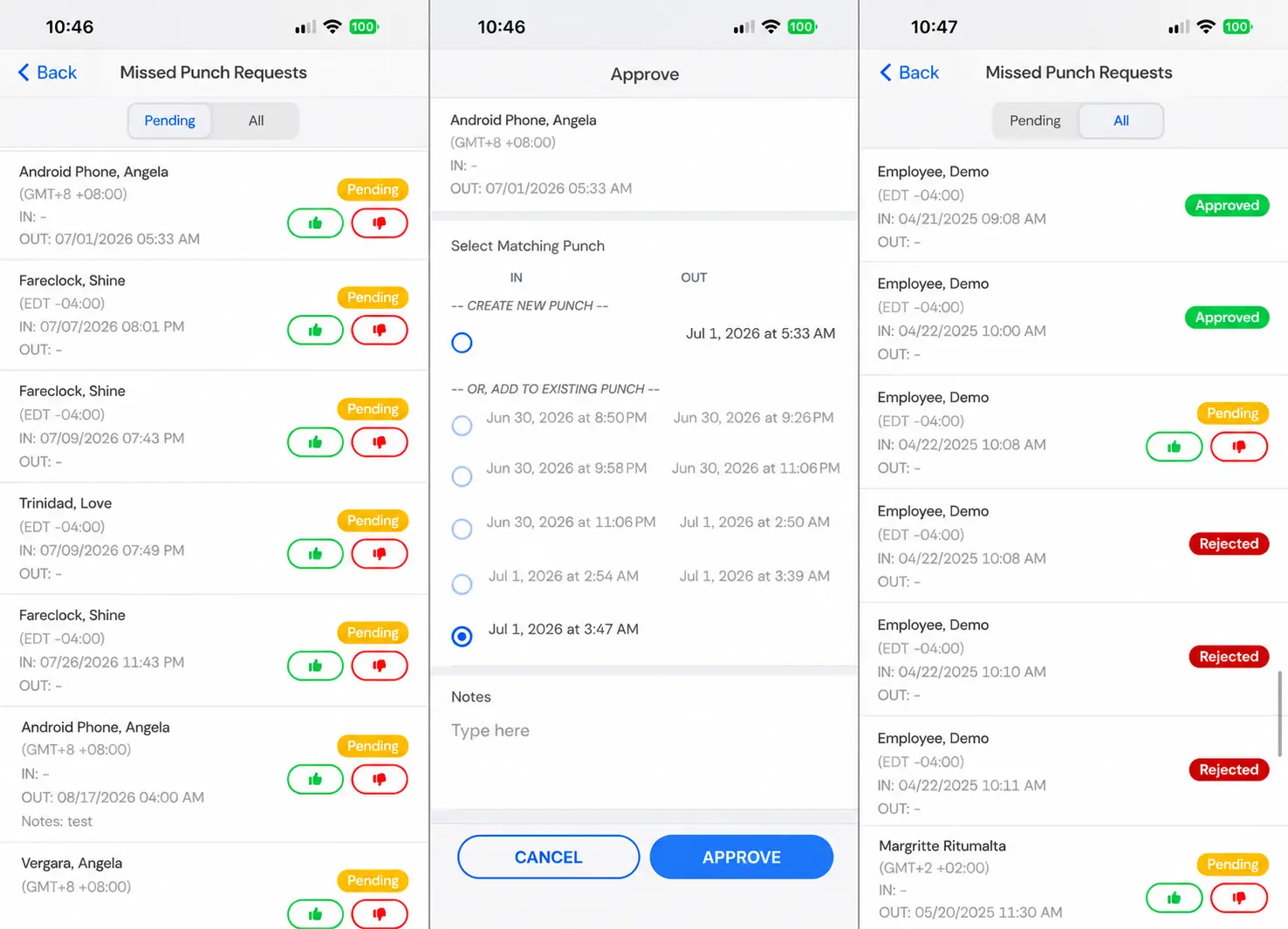
Missed Punches on the Fareclock Mobile App
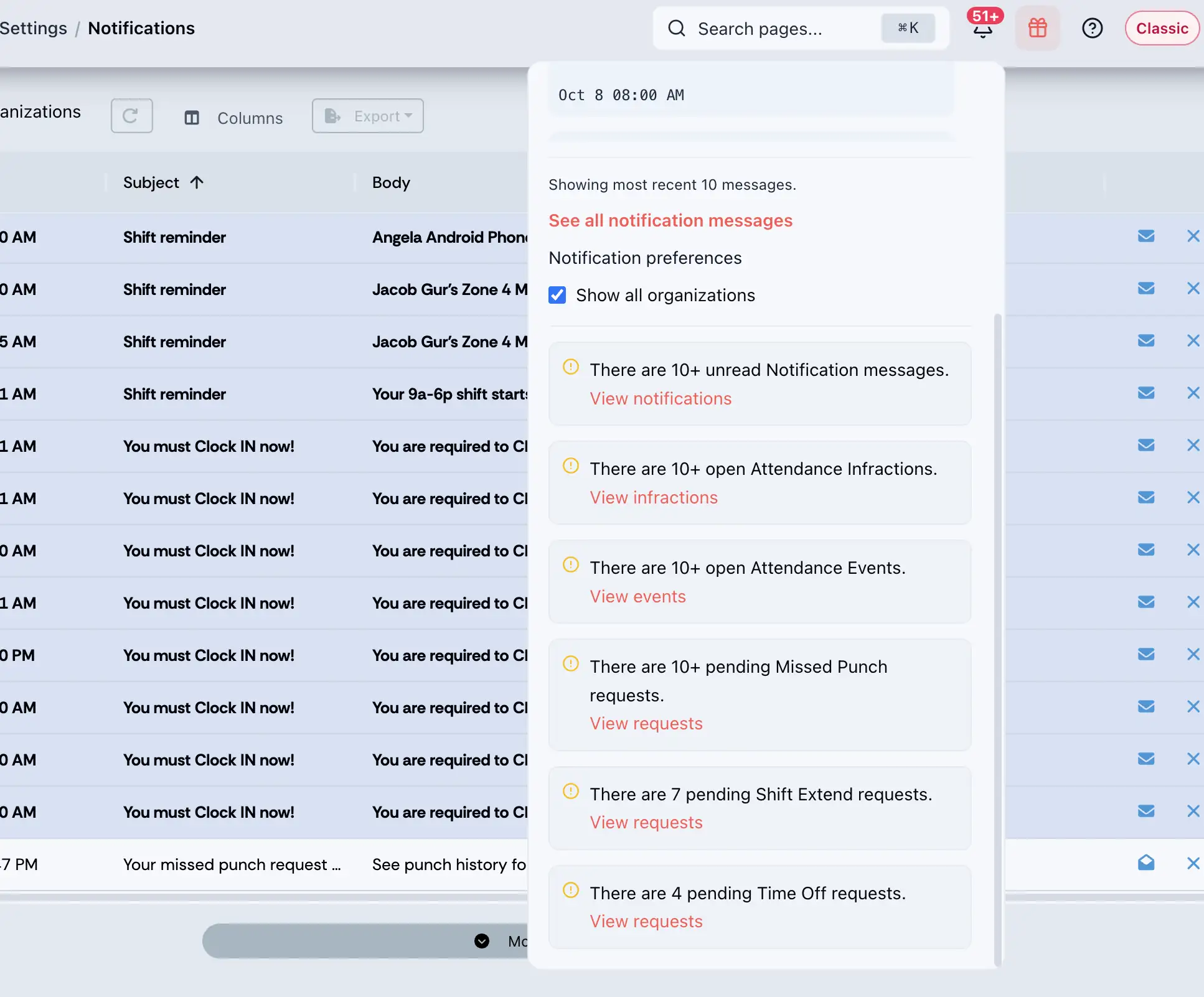
Notification alerts on pending missed punch requests
A consistent review process is particularly important when crews work across multiple sites. Supervisors should confirm both the hours and the job assignment before approving the timecard.
6. Update the Timesheet and Payroll Records
Make sure the corrected hours appear in the approved timecard and reach payroll before processing. Review unresolved missed punches and other unusual entries before the pay run so errors can be addressed promptly.
Fareclock helps bring clock-in records, job assignments, and timecard review into the same workflow. This gives supervisors a clearer way to check hours before preparing payroll reports and exports.
If a worker repeatedly misses punches, address the behavior through your normal attendance or disciplinary process. Keep that separate from wage payment: employees must still be paid for all hours they actually work, even when they fail to follow the clock-in procedure.
How Should Construction Companies Document Missed Punch Corrections?
Every missed punch should have a clear record showing what changed, why it changed, and who approved it. This helps resolve pay disputes and gives payroll a reliable record of the hours worked.