Time and attendance software can vary significantly in how it approaches employee tracking, verification, and workforce management. While Fareclock and Jibble both provide tools for recording employee hours and managing attendance, their broader feature sets serve different operational needs.
Fareclock focuses on attendance verification and workforce management, offering features such as Face Recognition, GPS verification, scheduling, job costing, and compliance tools. Jibble combines time and attendance with productivity and project monitoring, including screenshots, activity tracking, website and application monitoring, and multiple clock-in options.
This comparison examines the key differences between Fareclock and Jibble, including clock-in methods, employee verification, GPS and location tracking, scheduling, reporting, productivity monitoring, and overall usability. By looking at how these features work in practice, businesses can better understand which platform aligns with their workforce management requirements.
Note: Product comparisons and verdicts presented in this article are based only on our personal research and hands-on testing of their console and app. Our assessments reflect our own informed perspectives and opinions and are intended to provide an objective evaluation of each product’s features, usability, and overall performance.
At-a-Glance Feature Breakdown: Fareclock vs. Jibble
| Feature |  |
 |
|---|---|---|
| Multiple Clock-In Methods | ✅ | ✅ |
| GPS / Geo-Fencing | ✅ | ✅ |
| Offline Time Tracking | ✅ | ❌ |
| Face Recognition / Verification | ✅ | ✅ |
| Job Costing / Project Tracking | ✅ | Basic |
| Employee Scheduling | ✅ | ✅ |
| Productivity Monitoring & Screenshots | ❌ | ✅ |
How Do Fareclock and Jibble Compare Across Key Features?
GPS & Geofencing - Winner: Tie
Fareclock provides GPS verification and geofencing to help businesses verify employee locations and manage attendance based on work locations.
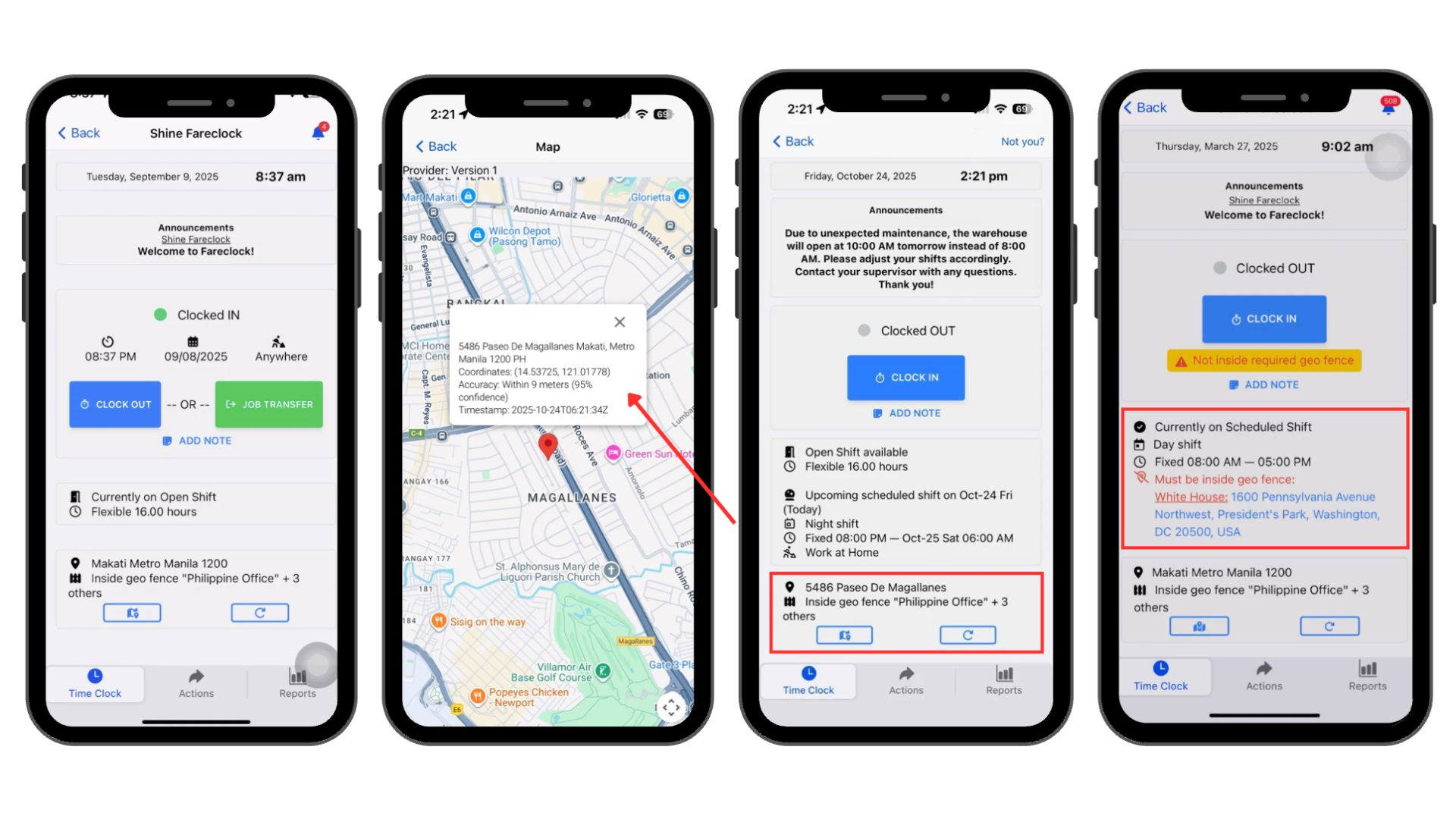
Jibble also offers GPS tracking and geofencing, allowing businesses to verify where employees are when they clock in and manage location-based attendance rules. Both platforms provide useful location-based attendance features.
Job Costing & Labor Tracking - Winner:

Fareclock lets businesses organize employee hours by jobs, phases, and cost codes, making it easier to connect time records with specific work and labor costs.
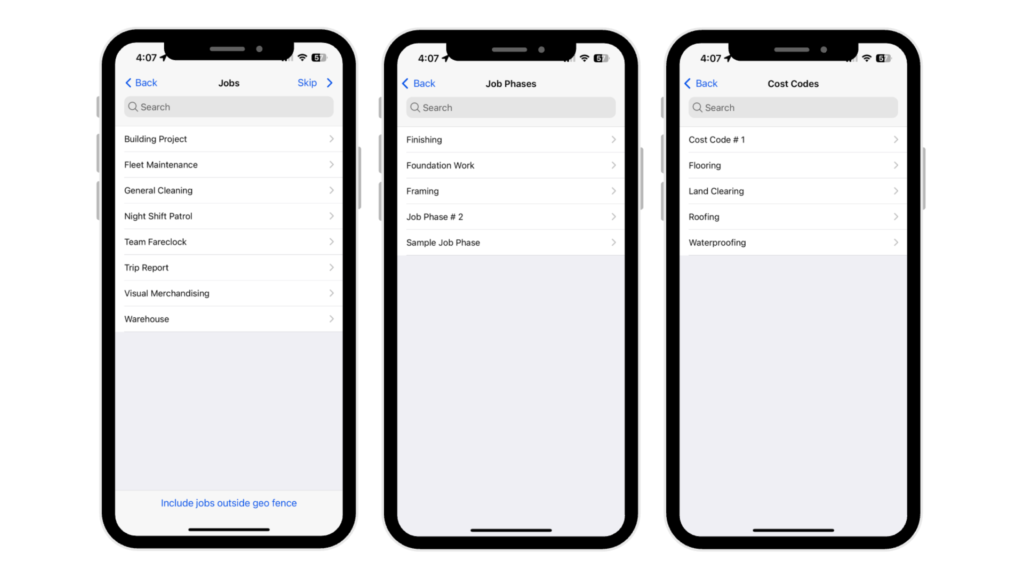
Jibble also supports project and activity tracking, allowing employees to record time against specific projects. However, Fareclock offers more structured job costing through its jobs, phases, and cost codes.
Productivity Monitoring - Winner:

Jibble includes productivity monitoring tools such as screenshots, keyboard, and mouse activity tracking, website and application monitoring, and idle detection. These features give managers additional visibility into computer-based work activity.
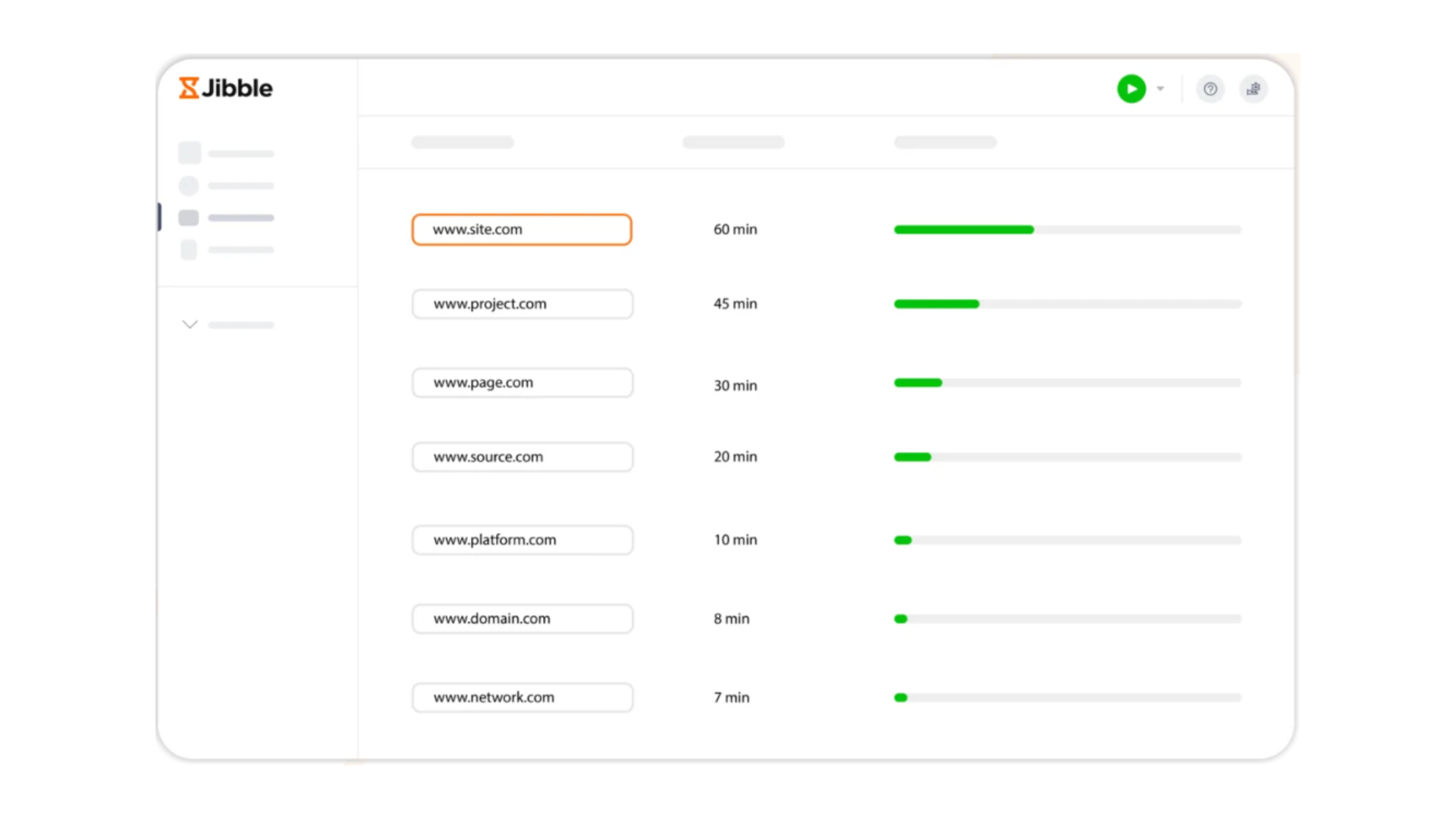
Fareclock focuses on attendance, employee verification, location tracking, and workforce management rather than monitoring employees’ computer activity.
Worker Administration - Winner:
Fareclock provides mobile administration tools that allow managers to handle important workforce tasks, including reviewing time records, managing schedules, approving requests, and handling employee-related settings.
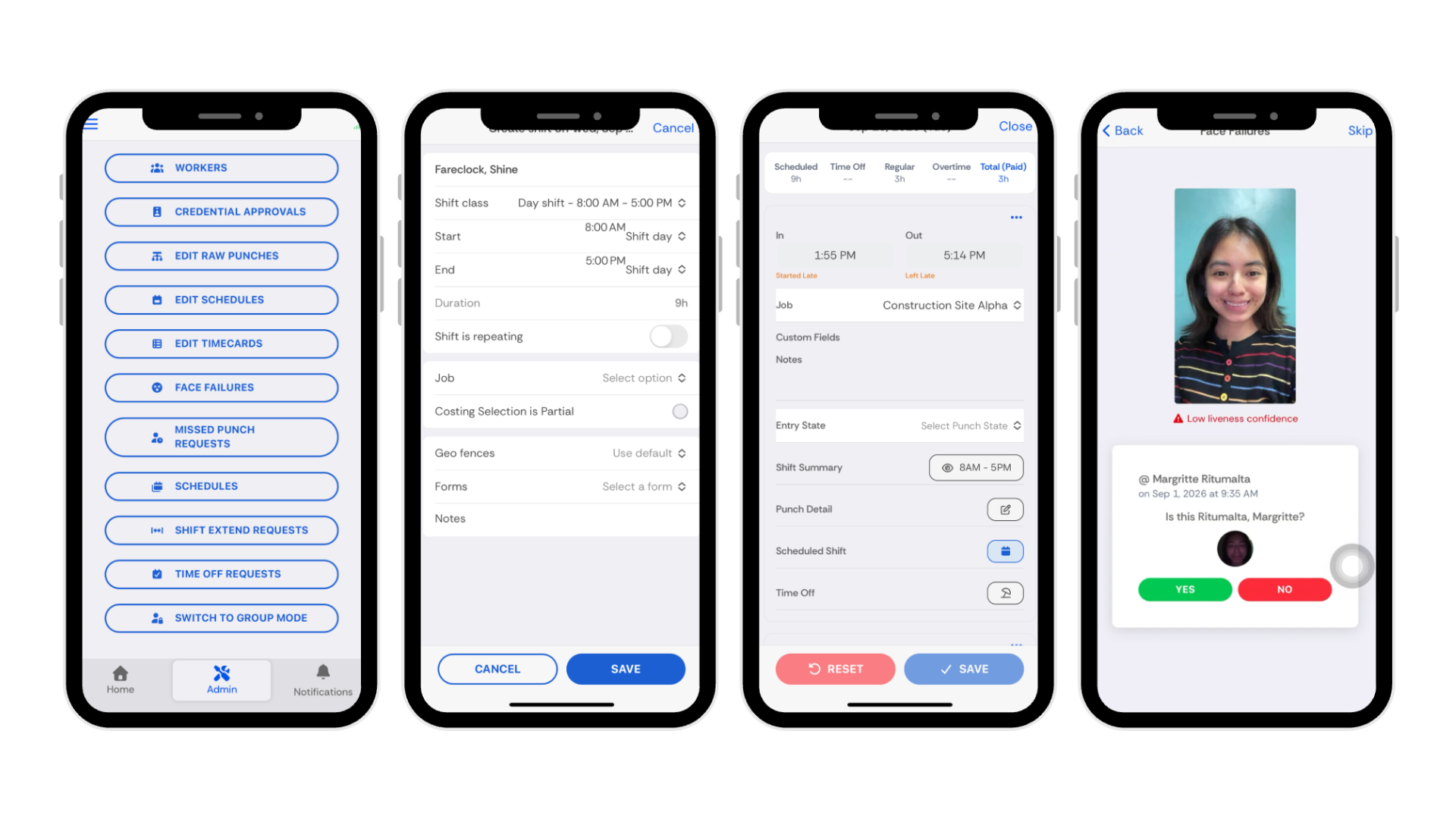
Jibble also supports mobile administration and team management, allowing managers to manage employees and attendance from their mobile devices. Fareclock places more emphasis on administrative control over attendance and workforce processes.
What Sets Fareclock and Jibble Apart?
The difference between Fareclock and Jibble largely comes down to their approach to time tracking and workforce management. Fareclock focuses on employee attendance, verification, location tracking, and workforce processes, while Jibble combines time and attendance with project tracking and productivity monitoring.
Fareclock
- Facial Recognition with liveness detection
- Multiple clock-in methods: Face, PIN, NFC, and QR Code
- GPS, geofencing, and breadcrumb tracking
- Offline time tracking with synchronization
- Job costing with jobs, phases, and cost codes
Jibble
- Multiple clock-in options across mobile, web, desktop, and kiosks
- GPS tracking and geofencing
- Face Recognition for attendance verification
- Project and activity time tracking
- Screenshots, activity tracking, and website/app monitoring
What Are the Pros and Cons of Each Platform?
Jibble
Pros
- Multiple clock-in methods
- Live Roll Call
- Project time tracking
- Robust scheduling
- Mobile administration
- Productivity monitoring
- Flexible attendance rules
- Strong workplace integrations
Cons
- Limited free trial
- Overwhelming dashboard
- Complex report filters
- Timer-dependent tracking
- Paid feature restrictions
- Buddy punching risk
- Better for office teams
- Limited feature access
Fareclock
Pros
- Face Recognition with liveness detection
- Multiple clock-in methods
- GPS and geofencing
- Breadcrumb location tracking
- Offline time tracking
- Structured job costing
- Shift management
- Time-off management
- Compliance monitoring
- Mobile administration
- Attendance reports
Cons
- No activity monitoring
What Are Users Saying About Fareclock and Jibble?
Jibble Customer Reviews
The reviewers of Jibble describe it as helpful, flexible, and feature-rich, particularly for tracking employee attendance, productivity monitoring, and workplace integrations. G2 reviewers like its mobile tracking and geolocation functionality, however some Capterra reviews note that the system has frequent bugs and issues.
Some users have reported concerns with the user interface, setup complexity, syncing, app performance, and learning curve. Current ratings include 4.8/5 on Capterra, 4.7/5 on G2, and 4.9/5 on the Apple App Store.
“I like the time-tracking feature, especially the mobile tracking and geolocation functionality. It makes it easy to track attendance and working locations.”
— G2 reviewer
“Bugs and issues, including slow syncing, app crashes, and unreliable performance with unstable internet.”
— Capterra reviewer
“The overall UI is a little bit clunky. The setup wasn’t great understanding the differences between activities, projects, and clients. Seemed somewhat unintuitive. And the clock in, clock out system feels a little bit archaic. And overly complicated.”
— G2 reviewer
[Read more Jibble reviews on Capterra →]
[Read more Jibble reviews on G2 →]
Fareclock Customer Reviews
Fareclock receives positive feedback describing the software as simple, reliable, and user-friendly, particularly for tracking employee attendance, work hours, schedules, and construction-site clock-ins. Capterra and G2 reviewers highlight its easy setup, straightforward interface, reporting, reliability, briefings, and responsive customer support.
Some reviewers have reported occasional GPS and location accuracy issues, but overall feedback emphasizes ease of use and dependable performance. Fareclock currently lists ratings of 4.7/5 on the Apple App Store and Google Play, while its G2 rating is 4.8/5.
“Fareclock’s reliability is unmatched with no or minimal technical issues. It was great to use an application that offered stable performance without interruptions. Fareclock has been nothing short of excellent!”
— Capterra reviewer
“The interface is simple, user-friendly, and convenient for daily time tracking. It helps employees clock in and out accurately without much training, which saves time and reduces errors.”
— G2 reviewer
“Some issues encountered like geo error, slight location accuracy/deviation.”
– App Store Reviewer
[Read more Fareclock reviews on Capterra →]
[Read more Fareclock reviews on G2 →]
What Are the Pricing and Trial Options for Fareclock and Jibble?
JIBBLE
Pricing starts at: Not fully disclosed
Free Trial: Limited
FARECLOCK
Free Trial: Yes (30 days)
Pricing starts at:
$1.65
per user per month
Which Businesses Can Benefit Most From Fareclock or Jibble?
Jibble
Jibble may be a good fit for office, remote, and hybrid teams that need more than basic attendance tracking. Its features for productivity monitoring, screenshots, project and activity tracking, and workplace integrations can be useful for businesses that want greater visibility into how employees spend their working time.
Choose Jibble if your priority is combining time and attendance with employee productivity and project monitoring. Its screenshots, activity tracking, website and application monitoring, project tracking, and workplace integrations can be particularly useful for office-based, remote, or hybrid teams.
Fareclock
Fareclock may be a better fit for businesses managing field, mobile, and multi-location workforces. Its Face Recognition with liveness detection, GPS and geofencing, offline time tracking, job costing, forms, credentials, and compliance tools make it suitable for businesses that need to manage attendance alongside on-site and workforce operations.
Choose Fareclock if you need employee verification, location-based attendance, offline tracking, and workforce management in one platform. It is designed to support employees working across job sites and locations while providing tools for job costing, scheduling, forms, credentials, compliance, and attendance management.
Free Trial
Explore Fareclock’s features with a 30-day free trial and see how it fits your business.
FAQ
What is the difference between Fareclock and Jibble?
Fareclock focuses on attendance verification, GPS tracking, workforce management, and job costing, while Jibble combines time tracking with productivity and project monitoring.
Is Fareclock or Jibble better for GPS tracking?
Both Fareclock and Jibble offer GPS tracking and geofencing. Fareclock also provides breadcrumb tracking and offline time tracking, making it well suited for field-based teams.
Is Fareclock better than Jibble for job costing?
Yes. Fareclock offers structured job costing with jobs, phases, and cost codes, while Jibble primarily provides project and activity time tracking.
Is Jibble better than Fareclock for employee productivity monitoring?
Yes. Jibble offers screenshots, activity tracking, idle detection, and website and application monitoring. Fareclock focuses more on attendance and workforce management.
Which is better for field employees, Fareclock or Jibble?
Fareclock is generally better suited to field and mobile workforces because it combines Face Recognition, GPS and geofencing, offline tracking, scheduling, job costing, and workforce management.