
Free Time Card Calculator
Turn clock-in and clock-out times into accurate, payroll-ready hours in seconds
How to Use Our Free Time Card Calculator
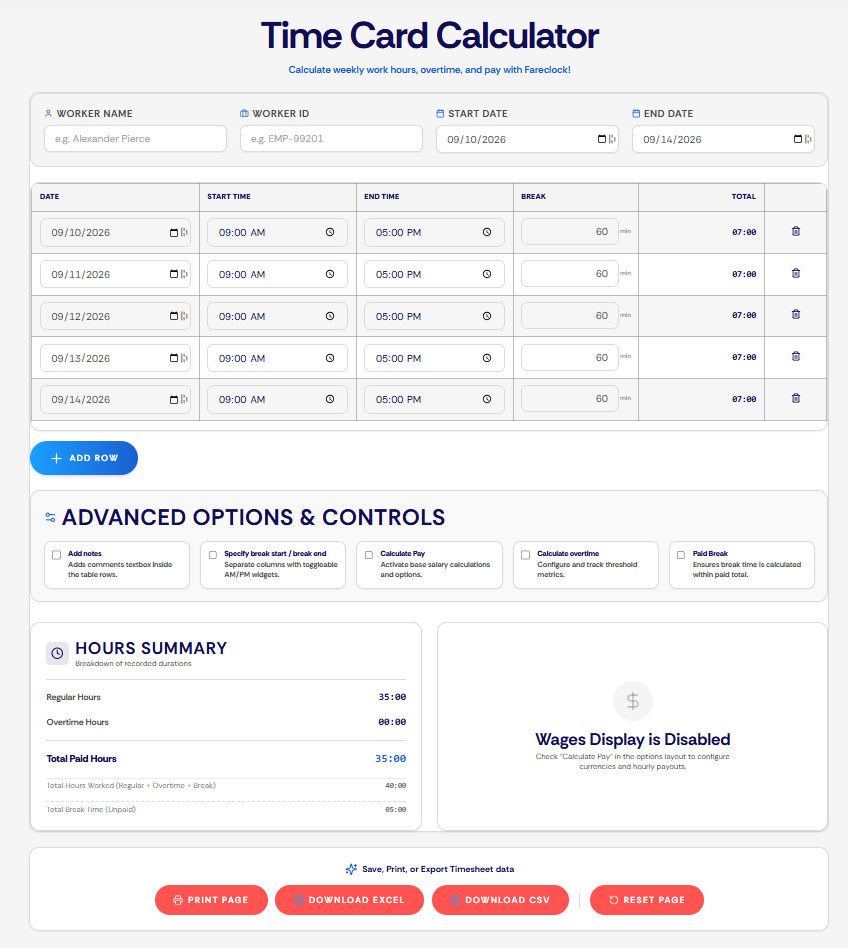
1 Enter Worker Information
- Enter the Worker Name (optional).
- Enter the Worker ID (optional).
- Select the Start Date and End Date.
2 Fill Out Each Workday
3 Add or Remove Days
4 Configure Pay Settings (Optional)
5 Review Your Results
6 Export Your Timesheet
What Can You Calculate with Our Free Time Card Calculator

- Daily and Weekly Hours Worked: Start and end times measures exact shift durations and aggregates these daily entries into a clear weekly total.
- Break Times and Paid Breaks: Deducts unpaid breaks automatically or includes paid rest periods in total work hours based on set preference.
- Overtime Hours and Custom Thresholds: Separates standard work hours from overtime by tracking overtime hours that go past custom limits.
- Gross Pay and Wage Projections: Combines base hourly rates and overtime multipliers for accurate total pay estimates.
- Shift Notes and Worker Details: Logs employee names, IDs, dates, and row-by-row notes to keep your payroll records organized.
Who Can Benefit from Our Free Time Card Calculator
- Small Business Owners who need to calculate daily and weekly work hours, subtract break times, and generate estimates of total paid hours or weekly shift totals.
- HR Managers & Payroll Teams who need to compute for regular hours, overtime, paid breaks, and estimated wages using customizable overtime limits, paid break toggles, and itemized hour breakdowns.
- Team Leaders & Supervisors who need to enter shift dates, start and end times, and break durations to calculate total hours worked across multiple days.
- Freelancers & Independent Contractors who need to log their worked hours, organize timesheet data, and export records for personal reference or client invoicing.
What are the Benefits of Using Our Free Time Card Calculator?
Doing the math by hand invites mistakes. Automating it:
- Improves accuracy by eliminating manual calculation errors
- Saves time by automatically totaling work hours, breaks, and overtime
- Reduces administrative workload for managers, HR, and payroll teams
- Simplifies timesheet verification with consistent, reliable records
- Minimizes disputes by keeping hour tracking transparent
- Supports payroll accuracy with precise work-hour calculations
- Increases productivity by streamlining time tracking and recordkeeping
- Helps maintain compliance with company policies and labor regulations
Ready for Payroll Without the Guesswork?
A calculator is a great start. Fareclock is the finish line. Our attendance and workforce management platform is built for businesses and organizations of any size, automating time tracking, break rules, and overtime so payroll runs clean every time.