
Security firms need more than basic attendance tracking because their operations often require more context: Which security personnel was on-site? What area of the building did the incident take place? What was observed at the reported site?
When operational events are not properly linked to attendance data, security managers are left with fragmented information that result in incomplete incident logs, delayed reports, lack of accountability, and poor visibility across multiple sites.
In these circumstances, security businesses and agencies are introduced to attendance and workforce solutions like Fareclock that would help them perform better through attendance tracking and incident reporting that works together in one connected workflow.
Watch on YouTube | Fareclock for Security Businesses
What are Fareclock Custom Fields?
Custom Fields let you capture and organize additional information for workers, punches, or shifts. They provide a flexible way to support your workforce records to match your organization’s reporting needs.
With Custom Fields, you can create different types of inputs that include Checkboxes, Multiple-choice lists, Text fields, Number fields, and Yes/No selections.
You can also configure advanced options for each field, such as:
- Required fields to make sure important information are filled in before a form can be submitted.
- Unique fields ensure every user has a one-of-a-kind value, like an employee ID or badge number.
- Sensitive fields protect confidential information by limiting access to authorized administrators only.
- Cross-indexing for reports helps organize data so users can easily filter, analyze, and create more accurate reports based on field values.
With this feature in place, organizations can standardize their data collection, improve reporting capabilities, and adapt the system to their operational requirements without additional development.
Read the Help Article | Custom Fields
What are the benefits of linking incident reporting with attendance?
Instead of relying on manual, scattered reports, security businesses and firms can automate and centralize incident documentation during incidents or shifts.
Take for example the given photo below:
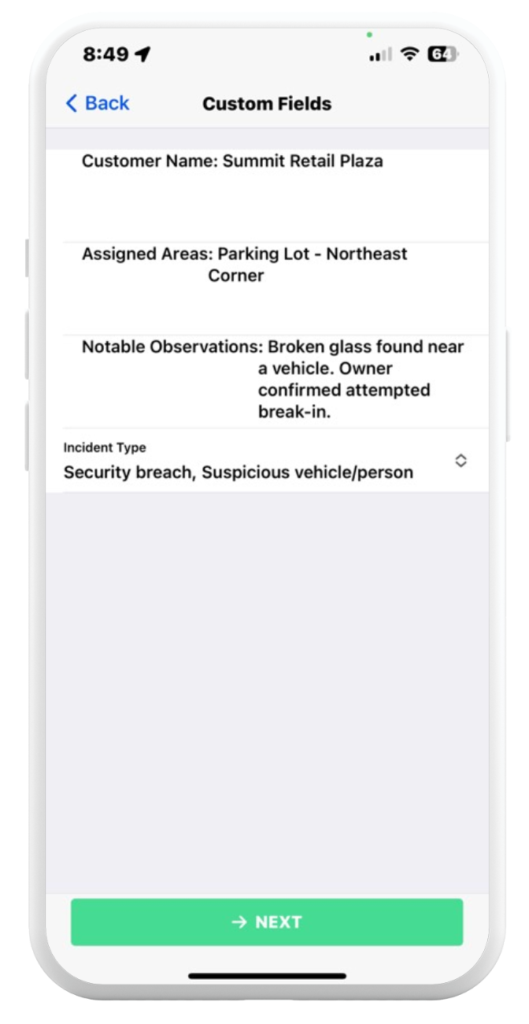
Feature: Fareclock Custom Fields as seen on the Fareclock Mobile Application
- Field: Customer Name
When deployed security guards link their report to a specific customer, property, or building like “Summit Retail Plaza,” this helps security firms or agencies accurately connect attendance, patrol activity, and incident reports to the correct location, reducing confusion between guards, supervisors, and clients. This gives clients a reliable and timestamped report that is tied directly to their property that improves transparency, strengthens accountability, and helps resolve conflicts quickly.
- Field: Assigned Areas
If a security personnel reports that s/he was at the “Parking Lot – Northeast Corner,” then the system confirms which specific zones are being actively patrolled. If an incident happens at a different location, then the management can effectively identify gaps in site coverage and monitoring.
- Field: Notable Observations
Attendance records that are supported with detailed notes like “Broken glass found near a vehicle” not only proves the guard is present on site, but that s/he is actively observing and inspecting the premises, transforming a simple attendance record into proof of professional and active duty performance.
- Field: Incident Type
Documenting incidents into categories like “Security breach” or “Suspicious vehicle/person” helps organizations better analyze incident and staffing patterns. Over time, security firms will notice which specific shifts or locations have higher incident rates, allowing for smarter staffing adjustments for the next.
Watch on YouTube | Fareclock: The Best Attendance App for Security Agencies
Fareclock for Security Businesses
Whether you manage a small security agency or a large multi-site security operation, Fareclock is equipped to provide you with the level of visibility that not only improves daily operations but also strengthens client trust, supports faster incident resolution, and helps managers make smarter staffing and deployment decisions.
With Fareclock’s Custom Fields feature, security companies create a more connected and standardized reporting workflow that improves communication and record-keeping across multiple client sites.
From documenting patrol observations to linking incidents directly to attendance logs, every piece of information becomes easier to track, verify, and analyze with Fareclock.
Contact Fareclock today or Start your Free Trial to see how Fareclock can help support and strengthen your security operations.